How to Build a Publishing Schedule That Holds
Learn how to build a publishing schedule with a realistic cadence, backward-planned deadlines, clear owners and reminders that keep work on track.
You set a publishing schedule for daily posts on Monday. By Thursday, two drafts are waiting on an editor who's already reviewing three other pieces, a subject expert hasn't replied, and tomorrow's slot has no approved copy. The writers get blamed, but writing rarely caused the miss. Review capacity did. A schedule holds when you plan cadence, draft deadlines, approvals and buffers as one system, not as a list of hopeful publish dates.
Table of Contents
- Pick a Cadence Your Team Can Actually Sustain
- Work Backward from Each Publish Date
- Set Up the Calendar and Assign Owners
- Build Review Slots, Buffers and Reminders
- Fix the Schedule When It Keeps Slipping
- Run the Schedule for Two Weeks Before You Trust It
Pick a Cadence Your Team Can Actually Sustain
Say a small team commits to a post every weekday. Week one looks fine because the team borrows time from evenings and skips a fact check. By week two, half the slots slip. The problem isn't ambition. It's that nobody counted how many pieces each editor, designer and approver can move through review in a normal week.
That's why cadence is a capacity decision, not a volume target. In a 2025 survey of 808 content marketers reported by MarketingProfs, only 39% reported publishing blog posts at least weekly, while about half published two to four times per month. The same study found 37% of marketers publishing multiple times per week reported "strong results," compared with a 21% benchmark across the full sample. Higher frequency can correlate with stronger outcomes, but it doesn't prove frequency alone causes them.
Start From a Realistic Default
| Team profile | Realistic cadence | Review slots per piece | Lead time from draft to publish |
|---|---|---|---|
| Solo writer | 1 piece per week | Self-edit and one fact check | 5 days |
| Small editorial team | 2-3 pieces per week | Editor review and fact check | 7-10 days |
| Mid-size team publishing daily | 5 pieces per week | Editor, SEO and legal or compliance pass | 10-14 days |
| Agency with client approvals | 2-4 pieces per month | Client approval round plus editor review | 14-21 days |
Use the closest row as your starting point, not as an aspiration. A solo writer who also handles images, metadata and newsletter copy doesn't have the same throughput as a team with a dedicated editor. As you adapt ideas to each channel, it helps to tailor your content calendar by platform, because a social post repurposed from an article isn't the same workload as a new article.
Set the Cadence in Three Moves
- Classify the output: Separate short updates, standard articles and research-heavy pieces by format and complexity. A briefing note and an original guide shouldn't consume the same calendar slot.
- Assign repeatable capacity: Decide how many pieces of each type the team can finish weekly or monthly without borrowing review time from the next cycle.
- Reserve the invisible work: Block explicit slots for review, legal, SEO, design and publishing. If those hours aren't on the calendar, they're not in the plan.
Run that cadence as a baseline for 8 to 12 weeks. Track your on-time publication rate, revision count, production hours and results. Increase frequency only when quality and approval capacity stay stable across that period.
Practical rule: Don't add a weekly slot until the current slots publish on time without emergency reviews.
Watch for a common accounting error. Social-post frequency and new-article frequency rely on different people, assets and deadlines, so reporting them as one output number hides where the queue forms.
Do this exercise now. Write down your baseline cadence and, for each owner, the number of pieces that person can carry per week through drafting, review or approval. The lowest of those numbers sets your real cadence.
Work Backward from Each Publish Date
The mistake that causes most missed dates is simple. A team picks a publish date, assigns one draft deadline a few days before it, and leaves everything between those dates unnamed. Then subject-matter review, fact checking, design and final approval all compete for the same final afternoon. This visual shows the dependency chain that a single draft deadline hides.
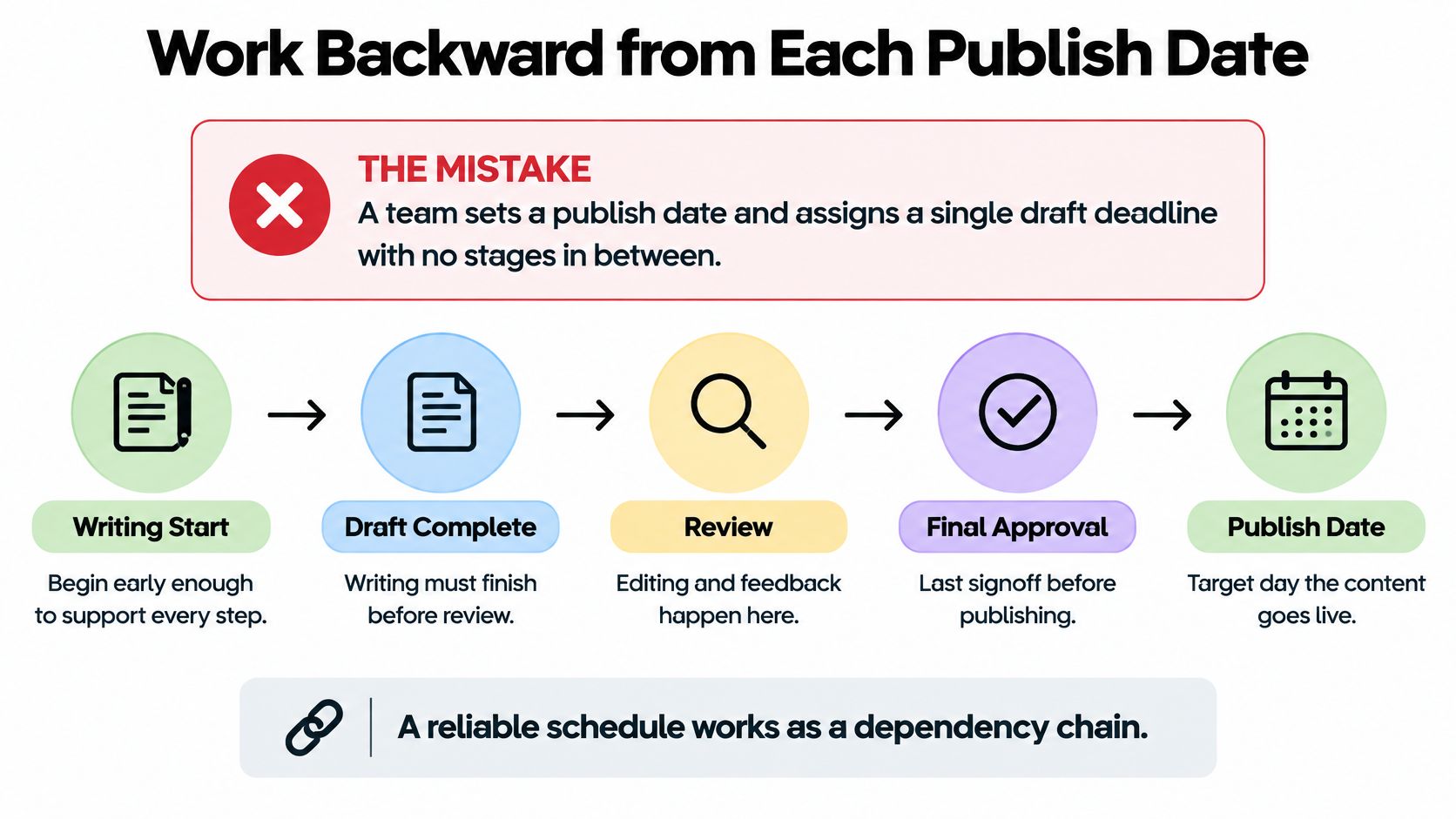
A reliable publishing schedule is a dependency-aware critical path. Research must finish before a writer can draft well. Fact checking can't close until claims are stable. Design can't finish if the editor is still restructuring the piece. When one upstream step slips, every later date moves, even if the publish date on the calendar stays politely unchanged.
Use Default Offsets, Then Adjust
| Stage | Owner | Due before publish |
|---|---|---|
| Idea approved and assigned | Editor | 21 days |
| Research and outline complete | Writer | 14 days |
| First draft due | Writer | 10 days |
| Subject-matter and fact check | Editor and subject expert | 7 days |
| Copy edit and SEO metadata | Editor | 4 days |
| Assets and design ready | Designer | 3 days |
| Final approval and content freeze | Managing editor | 2 days |
| Scheduled release | Publisher | Publish date |
These are planning defaults for a standard article, not a promise for an investigation, a legal-sensitive announcement or a piece that depends on outside data. Complex work needs earlier research and review dates. Short, repeatable formats can compress some stages, but don't compress them by deleting checkpoints.
Build the Timeline Backward
- Set the publish date first. Anchor the chain to the public deadline, a campaign launch or a fixed event.
- List every required step. Include research, outline, draft, subject-matter review, fact check, copy edit, legal or compliance review, assets, metadata and final approval.
- Assign one owner per step. A stage owned by "the team" has no accountable person when it stalls.
- Count back to each due date. Give each stage its own date instead of treating the draft deadline as the only internal deadline.
- Mark internal and external time. Label work your team controls separately from time spent waiting on experts, clients, authors or legal reviewers.
- Buffer every external wait. Add one to two days after an outside review so one slow inbox doesn't erase the editing window.
- Set the freeze date. Lock substantive changes before release so production and final checks happen on stable copy.
The distinction between internal-controlled time and external-wait time matters because you manage them differently. You can shorten internal time by narrowing scope or reassigning work. You can't make an outside expert reply faster by moving your desk deadline. You can only ask earlier, set a response window and protect the dates after that wait.
Journal production shows how large that wait can become. In research on dual print-web news and journal production published by Taylor and Francis, one medical journal reported a mean of 82 days from initial submission to online publication, with 39% of that elapsed time attributable to authors preparing and submitting revisions after external and statistical review. Your blog shouldn't need 82 days. The lesson is narrower: revision by someone outside your daily control can consume more of the schedule than the original draft.
This short walkthrough is useful if you want to see backward planning applied to a single piece before you reset an entire calendar.
A healthy calendar entry shows more than a title and a publish date. It shows an owner for the current stage, an earlier draft deadline, the next review date and a visible buffer. If any of those fields are blank, the date is still a wish.
Set Up the Calendar and Assign Owners
Scattered planning breaks in a predictable way. One piece lives in a spreadsheet row, its outline sits in a document, and the latest deadline change is buried in a chat thread. Three people check three places and reach three conclusions about what is due. The fix is one calendar that everyone treats as the source of truth.
Run Three Moves in One Place
TheContentMap workflow has three steps: capture ideas in a pipeline, plan them on an editorial calendar by assigning owners and setting publish dates, then publish and review what worked. Keep those moves connected. An idea should not need to be recreated as a new task when it becomes an assignment, and a published piece should not disappear from the record once it is live.
If the old plan lives in a spreadsheet, preserve only the fields that still carry meaning. A spreadsheet-shaped editorial calendar template for Excel users shows the minimum columns worth keeping: title, owner, status, draft deadline, review date, publish date and campaign. Clean those fields before anything moves into shared workflow software.
Set up the pipeline with a small set of stages your team can apply consistently:
- Idea: A proposed topic with a brief, audience and reason to publish.
- Draft: A writer owns the piece and a draft deadline is set.
- Review: An editor, expert or approver owns the next decision.
- Scheduled: Copy, assets and metadata are ready for the publish date.
- Published: The piece is live and ready for performance review.
Add topics and tags for topic, channel and campaign while the library is still manageable. Clean labels let a managing editor filter by campaign or channel later without renaming hundreds of entries. They also prevent duplicate assignments when two editors pitch the same subject under different headlines.
Make Ownership Unavoidable
Assign one writer, one editor and one publisher to every piece. The managing editor owns the calendar itself, including date changes and gaps. Team collaboration works better when users can assign writers and leave comments for editors, writers and stakeholders on the piece, because the context stays attached to the work instead of drifting into separate inboxes.
An unowned date is the earliest warning of a future miss.
Say a team of 12 publishes 40 pieces a month. Every week, the managing editor filters the calendar for slots with no owner or no date and fixes those gaps before the Monday planning meeting. That ten-minute check catches orphaned ideas while there is still time to assign, move or cancel them. If nobody can take a slot within one planning cycle, treat the slot as over capacity and move it before review time gets squeezed.
Keep the Tool Boundaries Boring
Whatever system holds the plan, keep status, owner, draft deadline, review date and publish date on the same record. Nobody should maintain a second calendar for “real” dates. When a piece reaches Scheduled, that single record should already show the final date, the named approver and the assets status; if any field is blank, the schedule is not ready.
Publish reminders send nudges that keep deadlines visible. Point each nudge at the piece and the next decision, not at a vague warning that something is due. Keep the draft, review comments and final file attached to the same entry. Agree that only the managing editor moves a publish date, and require a comment with the reason when it happens.
Before go-live, push one sample piece through every status. Confirm the owner is correct at each stage, the reminder fires and the calendar shows the right date. Recheck the setup monthly, because one stale status field brings back the scattered-document problem.
Build Review Slots, Buffers and Reminders
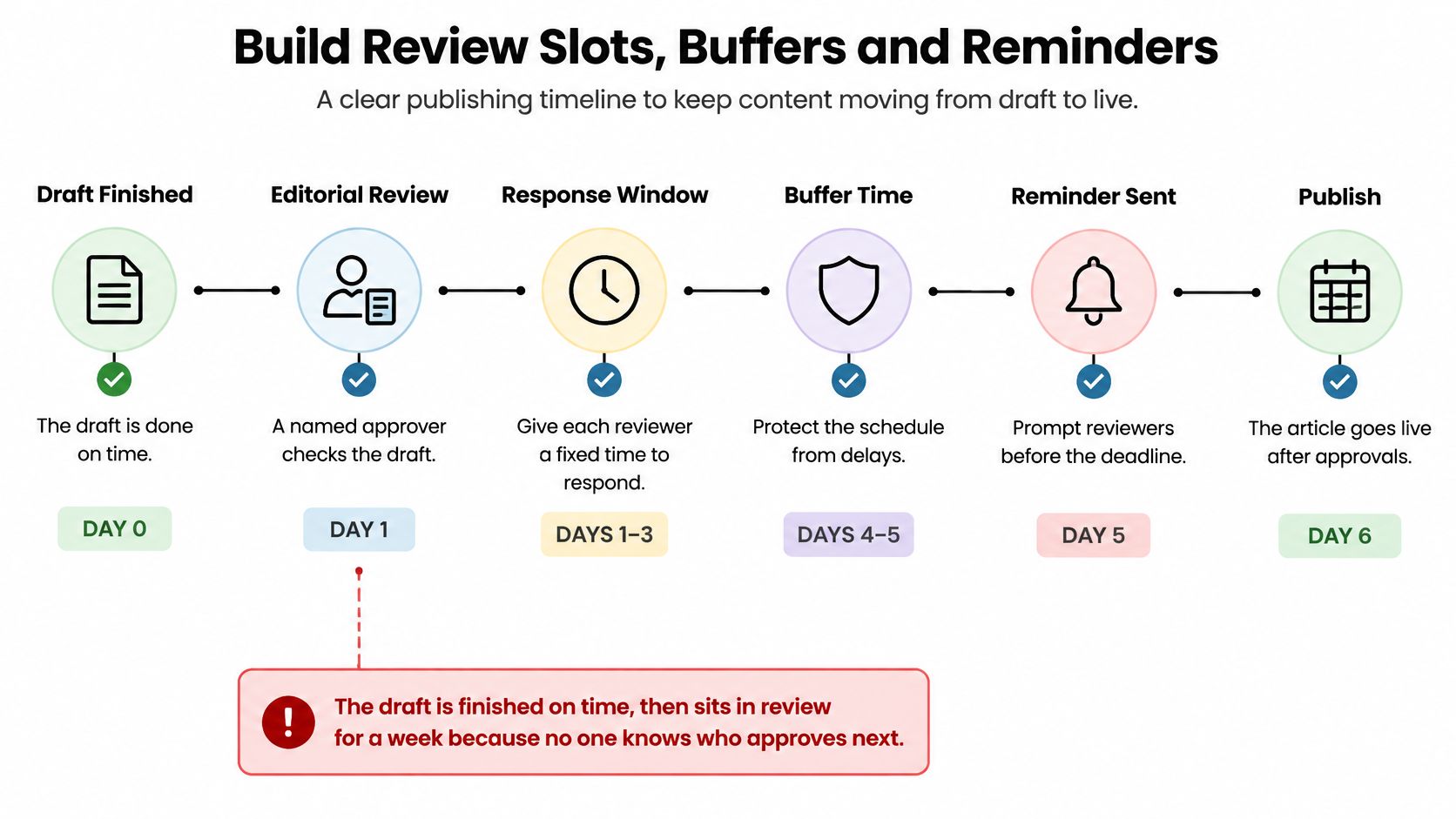
The usual failure point isn't drafting. A writer delivers on time, then the piece sits for a week because nobody knows who approves it next. The calendar says Review, but it doesn't say which review, whose decision is required or when silence becomes a delay. This timeline shows how named review, response windows, buffers and reminders keep that handoff moving.
Give Every Stage an Entry Condition
Follow the order in the milestone offsets: draft, subject-matter review, copy edit and SEO, assets, final approval, freeze, then publish. Each stage needs a named approver, a response window and a clear entry condition. Subject-matter review shouldn't begin until claims and sources are in the draft. Final approval shouldn't begin while basic copy edits are still open.
Define what "done" means in operational terms. A comment that says "looks good" isn't approval if legal still needs to check a claim. For each stage, record who can approve, who can only comment and what evidence closes the stage. Our guide to building a clear content approval workflow can help you separate those decision rights before they become calendar delays.
I recommend a 48-hour response rule for internal reviewers on standard pieces. It's long enough for a careful read and short enough to reveal a bottleneck before the publish week. For external reviewers, request a specific return date and place a one to two day buffer after it. Don't hide that buffer inside the editor's own working time, or the editor becomes the person expected to absorb everyone else's delay.
Protect the Freeze
Set a content freeze two days before publish. After the freeze, allow corrections to facts, broken links, typos and production errors. Don't allow new sections, new claims or a change of angle. Those changes reopen fact checking, editing and approval, so they belong in a moved slot or a follow-up piece.
Global teams need extra care with response windows. A 48-hour window that starts late Friday in one region may contain almost no working time for a reviewer elsewhere. Count time zones, regional holidays and local approval practices before you set the clock. Write deadlines with a date, time and time zone, not "end of day."
Make Reminders Escalate
Use three reminder points:
- Three days before the due date: Nudge the owner while there's still time to finish or flag a problem.
- On the due date: Alert the editor that the stage is due and needs a decision or handoff.
- After the deadline: Flag the managing editor so the delay becomes a scheduling decision, not a private backlog.
Set the escalation rule in advance. If an owner misses by two days, move the piece to the next open slot and update the calendar immediately. That feels strict, but it keeps the team working from the current publishing schedule. A hopeful calendar creates false confidence, then forces rushed approvals when reality arrives.
Fix the Schedule When It Keeps Slipping
Drafts arriving the day before publish usually don't mean writers are careless. They usually mean the public date was set with no earlier draft deadline, so the writer's deadline became whatever panic produced. Before you demand more effort, diagnose which part of the system keeps producing the same symptom.
| Symptom | Likely cause | Fix |
|---|---|---|
| Drafts arrive the day before publish | Public date set with no earlier draft deadline | Set the draft deadline 10 days before publish |
| The same pieces slip every week | One owner carries too many open pieces | Cut cadence or cap open pieces per owner |
| Approvals stall at review | Several stakeholders approve at the same stage | Name one approver per stage with a 48-hour response rule |
| Late edits change published content | No content freeze date | Freeze content two days before publish |
| Posts go out but the plan never changes | No feedback step after publishing | Review results monthly and feed them into the next cycle |
Match the Fix to the Bottleneck
If the same pieces slip every week, look at the owner's queue before you look at their effort. A writer carrying six open assignments can't give any of them a reliable next step. Cap open pieces per person, finish or formally park the excess, and reduce cadence until the queue clears. Cutting one slot for a month is better than pretending to publish five pieces and rescuing three.
If approvals stall, count how many people believe they can block release at the same stage. Parallel approval sounds inclusive, but it produces contradictory edits and no final decision. Name one approver per stage, let other stakeholders comment within that window, and record the decision on the piece. A detailed project management checklist for editorial work helps you turn those responsibilities into repeatable checks rather than relying on whoever happens to be online.
If late edits keep reaching live content, your team doesn't have a freeze problem. It has a decision problem. Stakeholders are using publication as another review round. Set the freeze two days before publish, define which corrections can pass after it, and require the managing editor to approve exceptions. Track how often exceptions happen. Frequent exceptions mean review is starting too late or the brief was unclear.
Close the Feedback Loop
A schedule can run on time and still fail if nobody learns from what was published. Review results monthly and feed them into the next planning cycle. Retire formats that consume long review chains without producing useful outcomes, and give proven formats earlier, better-protected slots. Publishing more of what readers ignore is just a punctual way to waste capacity.
Some fixes take effect within one publishing cycle. Adding a draft deadline, naming one approver and setting a freeze date should change the next piece immediately. Other fixes need four to six weeks of data, especially cadence cuts, queue caps and changes to review windows. You need enough cycles to see whether on-time publication improves without revision rounds or production hours rising.
Change one variable at a time: If you cut cadence, shorten reviews and replace the editor in the same week, you won't know which change fixed the schedule.
These fixes assume you've measured a baseline cadence. Without one, you can't tell whether the schedule design or the volume is the problem. Start with the symptom that repeats most often, apply one fix, and keep the rest of the system stable long enough to judge it.
Run the Schedule for Two Weeks Before You Trust It
Treat a new publishing schedule as a trial, not a launch. Two weeks is long enough to expose missing owners, unrealistic review windows and draft deadlines that were never compatible with the publish dates. It's short enough that the team won't spend a quarter defending a system that isn't working.
Run the Trial
- Load the next two weeks. Pick the cadence your team profile can sustain, then enter each piece with an owner, draft deadline and publish date.
- Apply every milestone. Add subject-matter review, edit, assets, final approval, freeze and reminders before the trial starts, not after the first delay.
- Check the calendar every Monday. Look for unowned slots, missed draft deadlines and reviews that have passed their response window.
- Record exceptions transparently. Note moved pieces, freeze breaks and stages that required rescue work. Do not edit the original dates and call the result on time.
Run the trial in the shared calendar your team already uses. The point is to test the process, not to learn new software and a new schedule in the same week. A simple calendar that everyone updates will teach you more than a complex setup that only one operations manager understands.
Decide What the Evidence Supports
After two weeks, measure your on-time publication rate, revision rounds and late changes. Compare them with the baseline behaviour that pushed you to rebuild the schedule. Also look at where pieces waited longest. A stage can meet its deadline on paper while consuming emergency effort that won't be sustainable next month.
If the plan holds, raise the cadence by one piece a week and watch the same measures. If it doesn't, reduce cadence or fix the largest bottleneck first. Don't add output to a system that's already using buffers as normal working time.
End the trial by answering one question: which stage cost the most time, and who owns it now? If nobody can answer, the calendar still isn't showing the workflow. A schedule earns a higher cadence only after it holds for two weeks.
Put your two-week trial on one shared calendar where owners, review stages, freeze dates and publish reminders are visible together. TheContentMap's Starter plan is free and includes an editorial calendar, up to 3 projects, 1 editor seat and community support, so you can test the process before adding volume. Start your first measured cadence with TheContentMap today.
Related Articles
Seat Management for Editorial Teams in 2026
Your editorial calendar is full, a legal approval is holding up publication, and finance wants to kn...
SoftwareMarketing Campaign Workflow Teams Can Run in 2026
A campaign rarely fails because nobody had an idea. It fails because the idea sat in review, the lan...
SoftwareContent Marketing Workflow for Editorial Teams
83% of marketing leaders wanted to streamline workflows and reduce the number of technology solution...
Comments (0)
No comments yet. Be the first to share your thoughts.