7 Editorial Calendar Example Layouts for Teams
See an editorial calendar example for each team type, from monthly themes to news desks, and how to adapt the layout to your channels.
Your spreadsheet is full of publication dates, but the team still can't agree on what belongs in the newsletter, what needs a blog post, or who approves the social clips. A writer thinks Friday means draft delivery. The campaign manager thinks it means publication. Meanwhile, the editor is chasing an approval that nobody put on the calendar.
An editorial calendar example is useful only when its layout matches your publishing cadence, ownership rules, and the point at which work must be locked. A monthly theme view can organize a campaign without showing whether tomorrow's newsletter is ready. A daily news queue can clarify immediate assignments while hiding a seasonal guide's production dependencies.
The layouts below organize themes, topic clusters, seasonal moments, newsroom priorities, refreshes, social distribution, and recurring series. Each suits a different team and channel mix. The useful adaptation isn't copying someone else's posting frequency. It's changing the columns, planning horizon, and approval ownership so your team can distinguish an interesting idea from a commitment it can deliver.
Table of Contents
- 1. Monthly Theme-Based Editorial Calendar
- 2. Pillar-Cluster (Hub-and-Spoke) Editorial Calendar
- 3. Seasonal and Holiday Editorial Calendar
- 4. Daily News Desk Budget Calendar
- 5. Evergreen Content Refresh Calendar
- 6. Multi-Channel Social Media Publishing Calendar
- 7. Newsletter and Podcast Cadence Calendar
- Which Editorial Calendar Layout Fits Your Team
- Pick One Layout, Then Add the Columns You Actually Use
1. Monthly Theme-Based Editorial Calendar
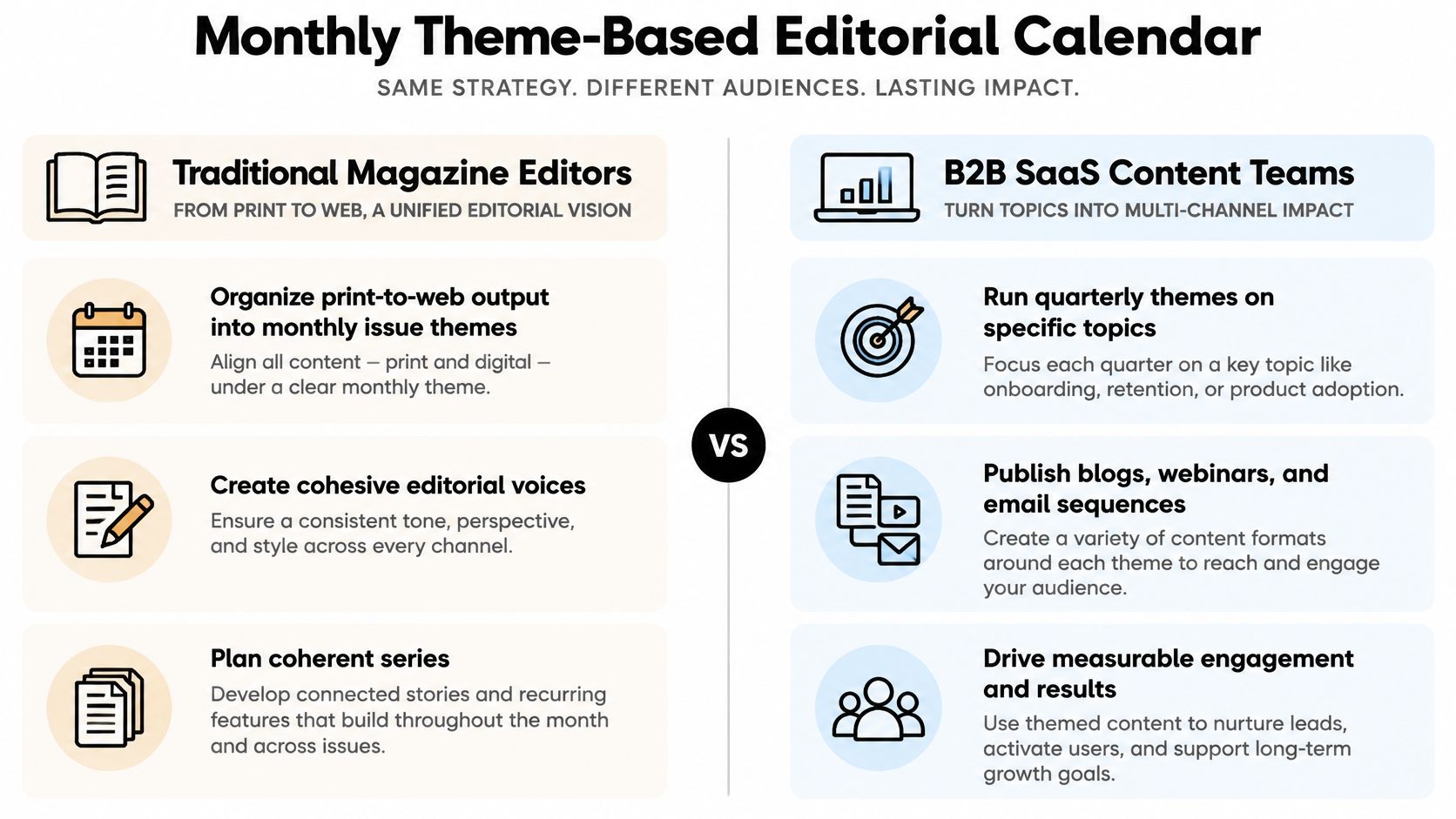
A theme-based calendar gives an in-house marketing team or magazine a shared editorial direction. Instead of filling empty dates with unrelated titles, the editor assigns a theme, defines the audience problem, and commissions suitable formats across channels.
Say a B2B software company chooses customer onboarding as its theme. The blog explains implementation mistakes, a webinar demonstrates setup, and an email sequence helps new customers reach their first useful outcome. A magazine could use the same structure to coordinate a themed issue with supporting web features.
Copy the Narrative, Not the Volume
Use these fields to connect the theme to production:
- Theme and audience question: State what readers should understand or accomplish.
- Asset and channel: Identify the deliverable, not just its working title.
- Owner and approval deadline: Separate the writer's responsibility from the reviewer's.
- Commitment level: Mark assignments as committed or flexible.
The trade-off is coherence versus responsiveness. A tightly themed month makes commissioning easier, but forcing every timely story into the theme weakens relevance. Keep flexible assignments movable, with the managing editor responsible for deciding what gets displaced.
The River editorial calendar pack recommends leaving room for unplanned work and reviewing bandwidth. Make that practical by recording replacement priority rather than treating every scheduled item as equally protected.
For a smaller creator team, combine related deliverables under a campaign owner and use these workflow and SEO tips for creators alongside the calendar. Reduce the channel mix before increasing the workload.
2. Pillar-Cluster (Hub-and-Spoke) Editorial Calendar
Start with a reader's broad problem, then map the narrower questions needed to solve it. A pillar-cluster calendar organizes that relationship explicitly, making it useful for SEO-led publishers and marketing teams with substantial resource libraries.
For a personal finance publisher, budgeting could be the pillar. Supporting assignments might cover irregular income, household expenses, and budgeting worksheets. Each entry needs a distinct purpose, not merely a different variation of the same keyword.
The trade-off is depth versus breadth. Concentrating on a topic helps editors build connected coverage, but it can crowd out unrelated audience needs. Keep an independent idea backlog so a cluster plan doesn't become a rule against covering anything else.
Make Dependencies Visible
Add pillar tag, audience intent, destination page, internal-link action, owner, and publication dependency to the standard title and date fields. Publish or update the pillar before dependent articles, unless an existing resource already provides a useful destination.
For example, the worksheet assignment might remain blocked until the editor approves the budgeting guide's terminology. The commissioning editor owns topic boundaries; individual writers own their assigned questions. The guide to organizing topic clusters for SEO explains the underlying structure.
Plan the connection before commissioning the article. A shared topic tag alone doesn't tell a writer where the reader should go next.
Adapt the cadence to production effort. A technical publisher may need a longer commissioning window and specialist review, while a consumer publisher can release simpler supporting pieces sooner. Add a performance-review field to decide whether the next assignment should fill a gap, improve the pillar, or address a different topic.
3. Seasonal and Holiday Editorial Calendar
A seasonal calendar starts with an external moment, then works backward through distribution, approval, production, and commissioning. Retail, travel, and lifestyle teams need this distinction because the event date is rarely the right publication date.
Say a retailer is planning a back-to-school buying guide. Product availability, photography, affiliate checks, email preparation, and social assets all need separate deadlines. Publishing the article when shoppers have already made their decisions won't fix a late production start.
Work Backward From Audience Need
Build the layout around event date, audience decision window, publication date, asset deadline, approval deadline, dependency, and refresh owner. These fields separate an immovable external event from deadlines the team can control.
- Retail adaptation: Include stock confirmation and a replacement product.
- Travel adaptation: Record destination relevance, booking context, and image permissions.
- Agency adaptation: Name the client approver and the latest acceptable response date.
The trade-off is preparation versus certainty. Advance planning gives designers and writers time, but offers, availability, and campaign priorities can change before publication. Mark uncertain details explicitly instead of letting assumptions pass as approved facts.
Use a rolling process: outline distant opportunities, commission approaching work, and lock only the details that need to be fixed. Assign an editor to approve substitutions when a dependency fails.
After the season, record what should be refreshed, retired, or reused. Preserve the underlying guide where it remains useful, but verify seasonal recommendations before bringing it back into circulation.
4. Daily News Desk Budget Calendar
At a news desk, the budget is the working list of proposed stories and their expected treatment. Editors need to know what leads, what's developing, what can wait, and who can make the publication decision.
A digital business desk might hold a planned company profile while assigning a reporter to a breaking regulatory announcement. The calendar must distinguish held, blocked, and actively reporting so nobody mistakes an intentional editorial decision for a missed deadline.
The trade-off is speed versus planning stability. A live queue supports rapid decisions, but without a separate feature backlog, urgent assignments can consume all available reporting capacity.
Give Every Story a Next Decision
Use priority, reporter, assigning editor, next action, expected filing time, verification status, publication slot, and update owner. Keep sensitive reporting details in the appropriate restricted workspace rather than exposing them in a broadly shared calendar.
Desk rule: Every active story needs a named editor who can publish it, hold it, or change its scope.
Set explicit transitions from idea to draft, review, approved, scheduled, and published. A Brixon Group Kanban editorial workflow case reported that average blog-article lead time fell from 23 to 12 days after visualizing work and tracking lead time over six months. That's a workflow case, not a newsroom benchmark, but the operational lesson applies: record when work changes stage.
For an agency, adapt this layout into a rapid-response queue with a client approval cutoff. For a publisher, revisit priorities during the day and protect forward-looking reporting during a separate planning meeting.
5. Evergreen Content Refresh Calendar
Your next useful assignment may already have a URL. A refresh calendar organizes maintenance of existing guides, explainers, and resources instead of treating every publication slot as a demand for something new.
An SEO-focused publisher might review an established software guide when product details change. A B2B team might revisit a long-lived industry explainer because its examples no longer match the questions salespeople hear.
The trade-off is protecting existing value versus expanding coverage. Refreshing everything on a fixed rotation wastes editorial attention; commissioning only new work leaves important resources unattended. Prioritize pages by business value, evidence of deterioration, and the seriousness of outdated information.

Schedule a Change, Not Just a Review
Use existing URL, last reviewed, refresh trigger, proposed change, editor, reviewer, publication decision, and follow-up date. Start with a focused inventory using the content audit guide, then turn findings into scoped assignments.
- Accuracy issue: Verify and replace outdated statements or broken resources.
- Intent mismatch: Restructure the article around the reader's actual task.
- Coverage overlap: Decide whether to consolidate rather than refresh competing pages.
The Orbit Media blogging survey found that the share of marketers publishing two to six times per week fell from 28% in 2014 to 12% in 2022. That doesn't establish an ideal cadence, but it supports questioning volume as the default planning goal.
Reserve recurring maintenance capacity, with an editor responsible for accepting the revision. Change the publication date only when the update warrants it, and explain substantive changes where readers would benefit.
6. Multi-Channel Social Media Publishing Calendar
A social calendar should show how an idea changes by platform, not merely where identical copy will appear. A feature article might become a LinkedIn document, an Instagram carousel, and a short video, each with its own hook, asset requirements, and approval.
The trade-off is coordination versus administrative weight. A shared timeline makes campaign distribution visible, but an oversized row containing every caption and revision becomes difficult to maintain. Use a parent campaign record with separate entries for platform-specific deliverables.
Separate the Idea From Its Executions
Track parent asset, platform, format, caption status, asset location, owner, approver, publication time, time zone, and objective. Make the social editor accountable for platform suitability, even when another editor owns the source article.
The 2022 digital content marketing trend study found that almost three out of four B2B companies wanted to publish more frequently. Don't translate that ambition directly into additional platform commitments; check design, editing, and approval capacity first.
For video-led campaigns, plan the edit requirements before assigning release dates. Guidance on turning hero videos into platform-ready cuts is useful when specifying different versions rather than requesting a vague social edit.
This video offers an additional reference for the publishing workflow.
Adapt cadence by channel performance and production cost. If a format attracts attention but few relevant visits, test the hook or destination before adding more slots. Keep approvals attached to the specific execution so permission to publish the blog doesn't automatically imply permission to publish every derivative.
7. Newsletter and Podcast Cadence Calendar
Subscribers experience a recurring series as a promise. A newsletter or podcast calendar therefore needs to organize the issue or episode as a complete package, including the dependencies that could prevent release.
For an interview podcast, those dependencies include guest confirmation, recording, editing, transcript review, and promotional assets. For a business newsletter, they include section assignments, fact-checking, sponsor approval where applicable, and the final send decision.

The trade-off is consistency versus production flexibility. Fixed release slots simplify planning, but a series becomes fragile when every installment depends on a guest or approval arriving at the last moment. Maintain reserve material that remains useful without a time-sensitive introduction.
Assign an Owner to the Whole Installment
Use series, issue or episode, release slot, production owner, guest or sponsor dependency, final approval, backup asset, and performance-review date. Contributors can own individual components, but the series editor should own readiness.
A booked guest isn't a ready episode. Track the remaining work before treating the release slot as secure.
Choose the rhythm around the slowest recurring dependency, using this guide to setting a publishing cadence you can sustain. Batch reusable production tasks without forcing topical material into an unsuitable advance schedule.
Add a hypothesis and next action to the review fields, extending the planning structure in the Asana editorial calendar template. For newsletters, examine clicks and downstream actions alongside opens; for podcasts, examine completion and listener response. Record whether the next installment should change length, format, subject, or promotion.
Which Editorial Calendar Layout Fits Your Team
| Layout | Best for | Planning horizon | Main risk | What to schedule first |
|---|---|---|---|---|
| Monthly or quarterly theme-based calendar | Teams seeking cohesive content across channels | Monthly or quarterly | Themes may feel forced or limit timely content | Define the theme, audience questions, and publish slots |
| Pillar-and-cluster hub-and-spoke calendar | Building topical authority and internal links | Multi-month waves | Pillars take significant effort; results may take months | Publish or update pillar pages |
| Seasonal and holiday calendar | Retail, travel, and lifestyle content tied to annual events | Annual, planned weeks or months ahead | Peak-period workload and short-lived content | Map key dates and work backward from event deadlines |
| Daily news desk budget calendar | Newsrooms publishing timely, high-volume coverage | Daily or hourly | Constant reprioritization and editor burnout | Set daily priorities, story owners, and status slots |
| Evergreen content refresh calendar | Maintaining and improving existing content | Recurring reviews based on content age or performance | Incomplete inventory or missed updates | Rank existing content by traffic and conversions |
| Multi-channel social media publishing calendar | Coordinating platform-specific posts and approvals | Weekly or ongoing | Changing platform requirements or strategy-free posting | Map core assets to platform formats and approval slots |
| Newsletter and podcast cadence calendar | Recurring subscription-based series | Fixed cadence, planned several weeks ahead | Delays can disrupt the schedule; formats may grow repetitive | Set publish dates and reserve issues or episodes |
Pick One Layout, Then Add the Columns You Actually Use
Choose the layout that matches your longest meaningful lead time. If guest booking determines when production can begin, start with the series calendar. If photography and product confirmation dominate the schedule, start with the seasonal view. Don't choose a daily grid merely because the team publishes social posts every day.
Then borrow only the columns that support actual decisions: theme, pillar tag, event date, status, refresh date, channel, or series slot. A field earns its place when someone uses it to assign work, resolve a dependency, approve publication, or change the next plan. Remove fields that everyone fills in but nobody reads.
Keep the Operating Rules Shared
A spreadsheet can help establish the initial structure. The advisor editorial planning spreadsheet is another reference for spreadsheet-based planning, but the important decision is where your team maintains the authoritative record.
A shared calendar with drag-and-drop dates, visible owners, and an idea pipeline from draft through published keeps assignments from living in disconnected sheets. Our editorial planning platform, TheContentMap, supports that workflow, with comments for collaboration and content insights for reviewing which topics and formats perform.
Separate production questions from editorial outcomes. Finishing assignments faster doesn't tell you whether the content helped readers or generated relevant responses. At review time, record both where work stalled and what the published asset achieved.
Before importing the entire backlog, test your chosen layout:
- Name the primary channel: Identify the audience commitment the calendar must protect.
- Set the planning horizon: Work backward from the slowest approval or production dependency.
- Reserve reactive or refresh capacity: Decide who can use it and which commitments can move.
Run a real assignment through that structure before expanding it. If the editor can identify its owner, next action, deadline, and publication decision without searching another document, you've built a calendar the team can use.
TheContentMap brings idea capture, editorial scheduling, ownership, and performance insights into a shared planning workflow. Visit TheContentMap to put your chosen layout into practice, assign upcoming work, and keep publication deadlines visible.
Related Articles
Deadlines for Writers: How to Set Realistic Dates
Roughly 25% to 60% of forthcoming titles miss their original submission date, according to estimates...
SoftwareHow to Book a Demo: What to Prepare and Expect
Deals where buyers had demo access closed 46% of the time, compared with 38% for deals without it, i...
SoftwareHow to Comment on Drafts Writers Can Act On
The review lands at 4:40pm with eleven comments on a 1,800-word guide that publishes tomorrow. Three...
Comments (0)
No comments yet. Be the first to share your thoughts.