Editorial Calendar Template Excel: Setup and Workflow Guide
Set up an editorial calendar template Excel file with clear fields, formulas, and workflow rules. Includes customization tips and migration to dedicated tools.
A publish date slips, and the editor opens the shared workbook to find two competing copies. One has the updated review date; the other has the writer's latest status. A stakeholder asks what's blocked, and nobody can answer without messaging several people. That's the moment an editorial calendar needs to become more than a list of titles and dates.
An editorial calendar template in Excel can provide a practical starting point, but only if the team builds it to manage work, not just display it. The difference comes down to consistent fields, controlled updates, visible dependencies, and a regular review of exceptions.
Table of Contents
- When an Excel Editorial Calendar Is the Right Starting Point
- Core Fields Your Template Should Include
- Turning the Grid Into a Working Scheduling System
- Modeling Dependencies, Ownership, and Realistic Buffers
- Connecting the Calendar to Business Results
- Knowing When to Retire the Template
When an Excel Editorial Calendar Is the Right Starting Point
Excel makes sense when a team needs a shared structure without adopting a dedicated publishing system. Its rows and columns are easy to reshape, and the people already coordinating the blog and newsletter almost certainly know Excel basics. For a small editorial team juggling a blog, a newsletter, and a few social channels, that familiarity means the first reliable plan can go up in an afternoon instead of after a software rollout.
There's a reason the format has lasted. Excel first shipped for Macintosh on September 30, 1985, with a graphical interface, visible formatting, integrated charts, multiple worksheet windows, and an interactive calculation engine, a combination that made structured planning accessible beyond specialized software, and a 2024 survey of Japanese business-technology readers found that 98.6% used Microsoft Excel, a sign of how embedded the tool is in that market (Excel's history and development). Those capabilities map naturally to an editorial calendar: dates in rows, channels and owners in columns, and formulas or formatting to make schedule changes easier to see.
The limits show up as more people edit the workbook. A copied file becomes an unofficial source of truth. Free-text updates make status filters unreliable, and a reviewer misses an item because the spreadsheet can display a deadline but can't prompt the right person at the right time. I've watched a three-person team lose a week reconciling two versions of the same calendar after a single save conflict. These aren't reasons to avoid Excel. They're risks to design around from day one.
A centralized calendar matters because missed deadlines and weak visibility often go together. Editorial-calendar research reported that 36% of firms missed deadlines because they lacked a centralized calendar; it also found a gap between marketing top performers and average companies in use of a centralized production calendar (editorial calendar planning analysis). For teams building a sustainable planning habit, staying relevant with content planning offers a useful perspective on keeping planned topics connected to the audience.
Treat Excel as a legitimate first operating system, not a promise that one workbook can support every future workflow. It works best when the team agrees on one shared file, a clear owner for updates, and a lightweight process for resolving conflicts.
Core Fields Your Template Should Include
Start with one row per content asset. A blog article, newsletter issue, video, and social post may relate to the same campaign, but each has its own owner, deadlines, approval path, and destination. Keeping assets on separate rows makes it possible to filter by channel, owner, or status without turning each publication date into a separate column.
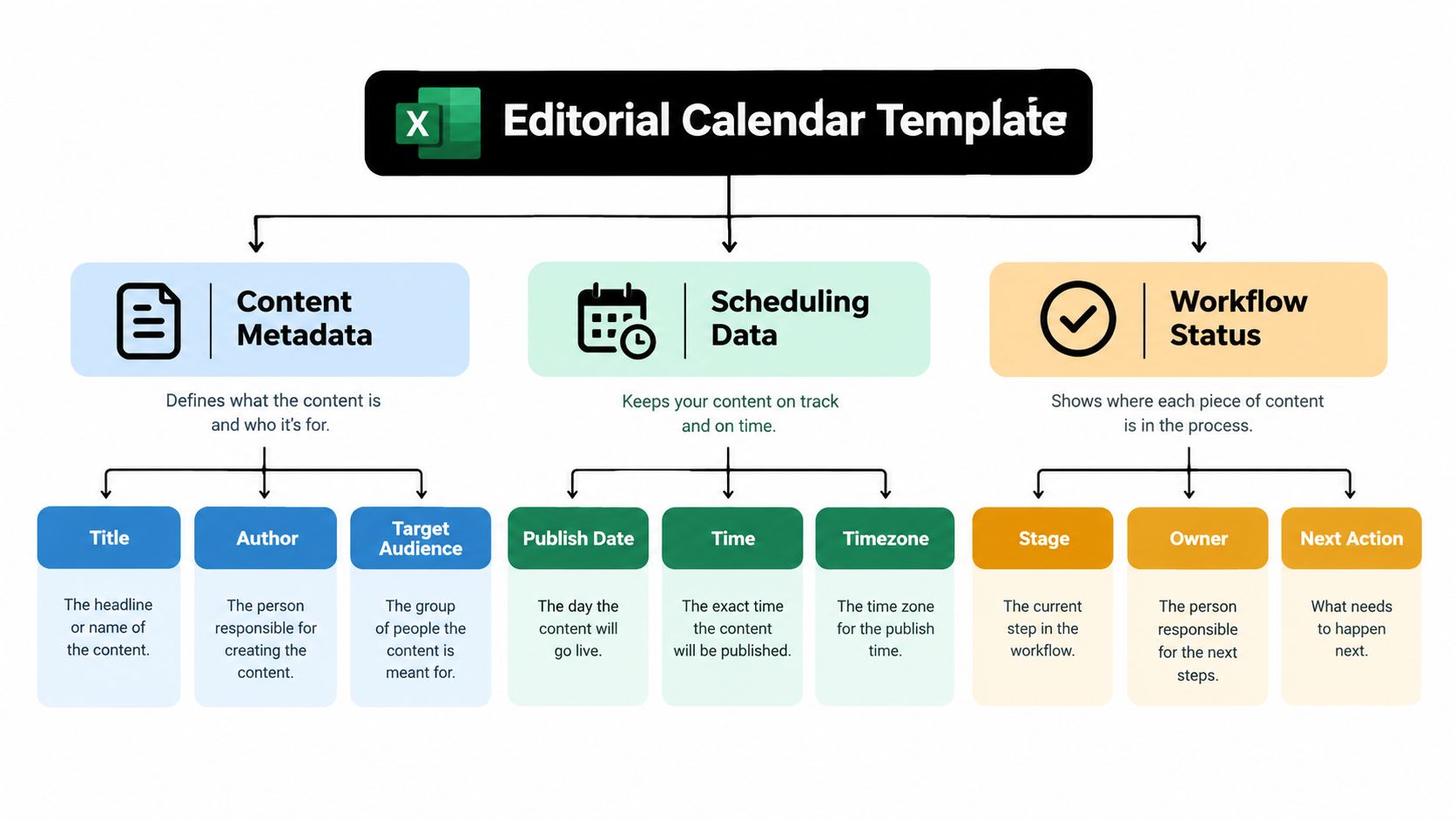
Build the columns in the order the editor needs to make decisions:
- Asset ID and working title: Give each row a stable identifier, then add the title people recognize. The ID helps preserve references when a title changes during editing.
- Channel and content type: Record where the asset will appear and what it is, such as a blog post, newsletter, or video. These fields reveal competing demands across formats and distribution.
- Owner and status: Name the person accountable for moving the asset forward, then track its current stage. Use a defined workflow such as idea, draft, review, scheduled, and published instead of notes like “waiting on someone.”
- Priority and working dates: Add draft, review, approval, and publish dates. Priority helps editors make trade-offs when several assignments compete for attention; separate milestones show where a schedule is at risk before publication day.
- Dependency, campaign, URL, and notes: Identify the related work that must happen first, connect the asset to a campaign, and record its draft or published link. Use notes for context that doesn't belong in a controlled field, not as a substitute for ownership or status.
A free-text status column may feel faster at first, but “Done,” “Complete,” and “Finished” become separate categories to a filter. A controlled status list gives the team a consistent view of what's waiting for a writer, reviewer, approver, or scheduler. It also gives an editor a direct answer to a practical question: what action will move this item forward?
This structure is the workbook's backbone. If a column doesn't support a decision, a handoff, or a later review, remove it or make its purpose explicit. Extra fields that nobody maintains don't add control; they make the calendar harder to trust.
Turning the Grid Into a Working Scheduling System
A well-designed table still needs rules. Without them, one editor enters “In Review,” another types “Review,” and a third writes a note in the status cell. Data Validation prevents much of that drift by restricting entries to approved values. Microsoft describes the feature as a way to control what users can enter into cells and improve data integrity (Excel spreadsheet features and guidance).
Create a separate Notes tab with the allowed values for status, priority, channel, and assignee. Use those lists as Data Validation sources, then convert the calendar range into an Excel Table. A Table carries formulas and formatting into new rows more reliably than a manually formatted range, which reduces the risk that a newly added asset gets missed by a rule.
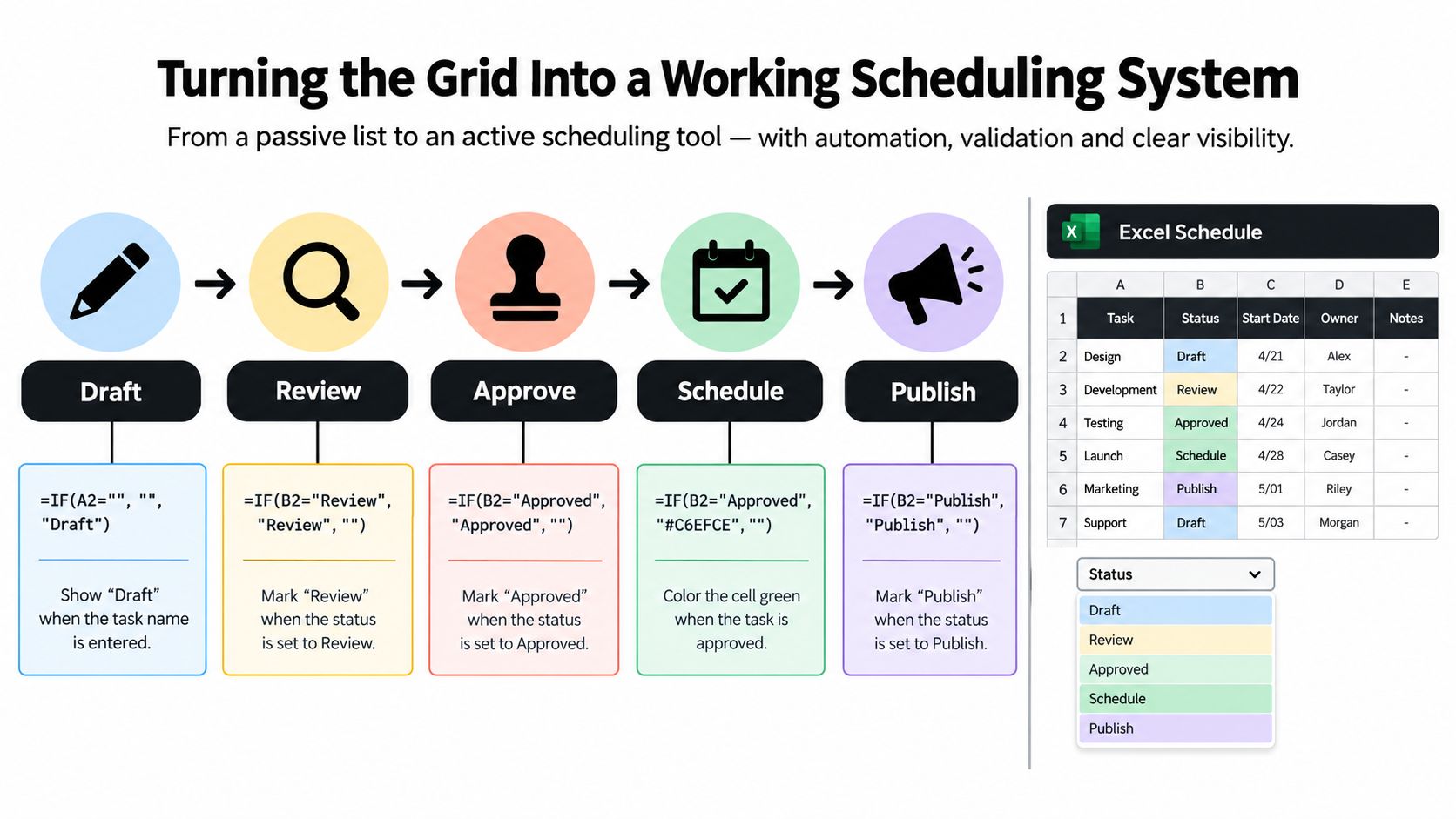
Add formula columns that help the editor spot schedule trouble:
- Lead time: Calculate the time between the planned start of work and the publish date, so the team can see whether there's room for review and production.
- Days to deadline: Compare the publish date with today's date, while accounting for items that are already published or cancelled.
- Overdue state and schedule variance: Flag work that has passed a milestone and compare planned dates with actual dates when the asset is complete.
Use conditional formatting to highlight overdue work, blocked dependencies, and missing owners. Protect formula columns so a manual paste does not replace a calculation, and test the workbook with blank dates, cancelled items, and rescheduled publications. Those edge cases are where a tidy-looking template often breaks.
For distributed teams, record dates consistently in ISO format, YYYY-MM-DD, and define one working-time convention. Store the time zone in its own field instead of writing a local time into a date cell where another team may read it differently. Teams comparing spreadsheet planning with a workflow in a publishing platform can also review how to schedule content with VeloCMS.
The aim isn't to make Excel behave like a full editorial platform. It's to make the workbook surface risk on its own, so the team sees a blocked or overdue row before a meeting, not after a missed publish date.
Modeling Dependencies, Ownership, and Realistic Buffers
A calendar can show that an article is due on Friday and still fail to explain why it won't be ready. The missing information is often a dependency: a legal review, subject-matter input, visual asset, or localization pass that must happen before publication. Schedule problems aren't always writing problems; they can be information and resource constraints hidden behind a single date.
Work backward from the intended publish date. First define the publishing objective and cadence. Then break each asset into its real stages: brief, drafting, editing, legal or brand review, approval, production, and publication. Assign one accountable owner to each stage, estimate durations from the team's own past work or a considered range, then set milestone dates in reverse order.
A publish date is a commitment. The dates and owners behind it are the plan.
Add a Dependency ID field to connect related tasks, and a Blocked Reason field to explain what's holding the item up. “Waiting for review” is more useful than “in progress” when the editor is deciding what to escalate. A linked production asset or localization input can also show why a draft is technically complete but not ready to schedule.
This kind of modeling matters because schedule slips can be substantial. PMI's PERIL risk database found the average impact of recorded risks was roughly seven weeks, nearly a 20% slip on a typical nine-month project; information delays were especially damaging, and schedule risks accounted for almost one-third of records (PMI analysis of project experience and risk). The lesson for editorial operations isn't to add arbitrary padding. It's to make uncertainty visible and leave enough room for the work the team knows must happen.
Review exception rows weekly. Look for assets with no owner, a missing dependency, a review date after publication, or a negative schedule buffer. Compare baseline dates with actual dates, record changes in a change log, and keep one authoritative workbook rather than circulating copies.
Hidden approval queues and optimistic publish dates are especially damaging because they make a schedule look healthier than it is. For projects that depend on outside production, clarify the handoff and approval path early. A commercial video production company can be one example of an external partner whose deliverables need explicit milestones in the calendar. For a deeper look at how to structure those handoffs, use this guide to the content approval workflow.
Connecting the Calendar to Business Results
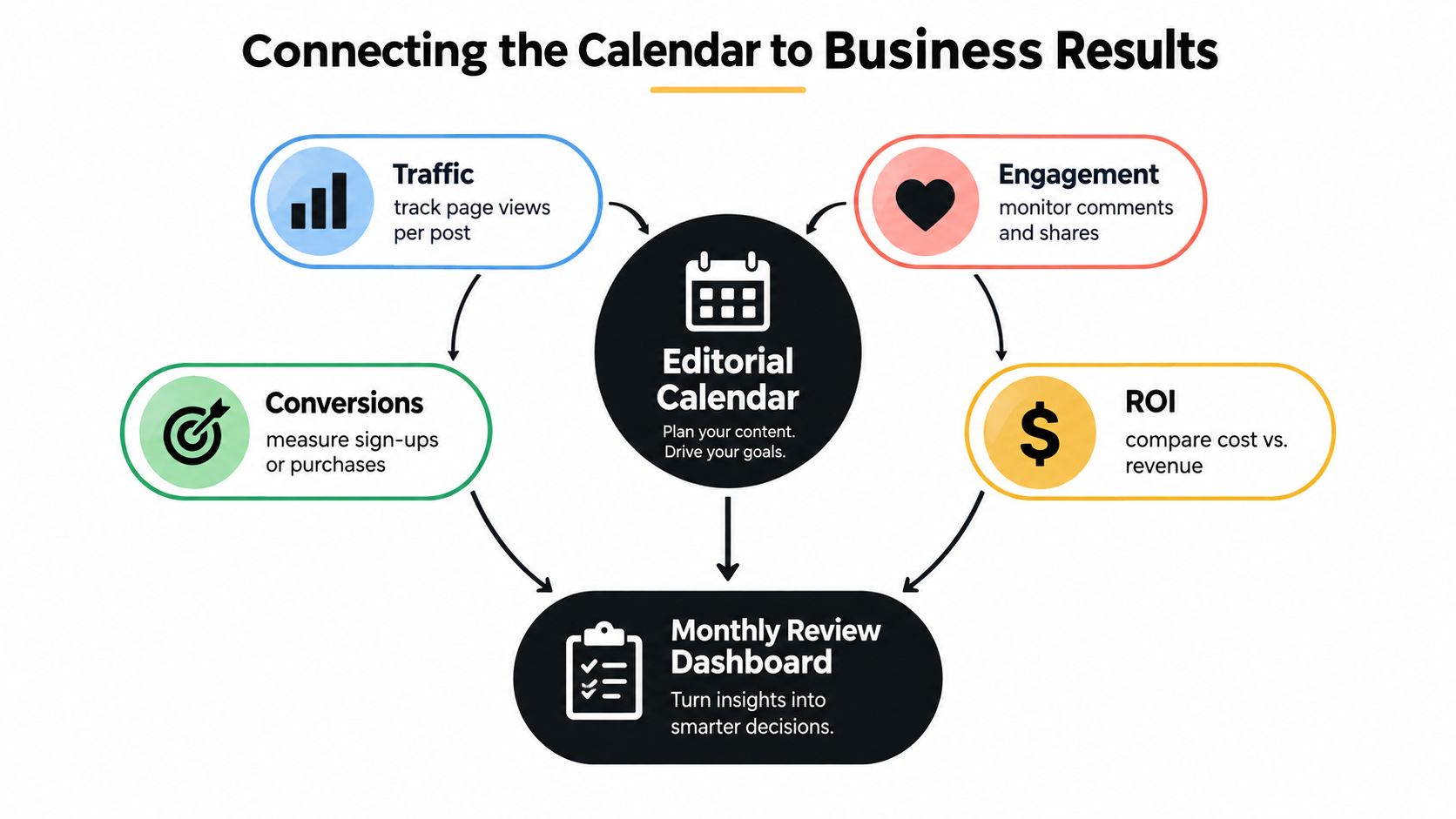
A publishing calendar can tell leadership what went live without showing whether the work supported a business goal. Add fields that preserve the intent behind each asset, so the team can assess outcomes without confusing activity with impact.
Start with the target audience, business objective, and funnel stage. These fields make it easier to distinguish a piece intended to attract new readers from one meant to support evaluation or retention. Record a repurposing plan too, so an editor can see how the original asset will be adapted for other channels rather than counting every variation as unrelated work.
Then add a primary outcome metric, baseline, measurement window, review date, and attribution caveat. A measurement window tells the team when to assess results. The caveat records what the number can and can't establish. Page views can indicate reach, but they don't prove that a particular article caused a sale. Excel won't collect any of these numbers on its own either, so assign metric entry to a named owner rather than leaving it to whoever remembers.
Measurement is a known weakness in content operations. Roughly one-third of B2B marketers report difficulty measuring content effectiveness, while 75% of high-performing organizations track business impact, compared with 63% overall (B2B content marketing research). Teams that outgrow manual tracking in a spreadsheet can use this overview of content tracking tools to consolidate reach, engagement, and outcome data in one place.
A monthly review can then separate reach, engagement, and business outcomes. Compare the selected metric with the stated objective, note any attribution limits, and decide whether the next plan should change its topic, format, channel, or distribution. If a metric is only a proxy, label it as one.
That honesty is what makes the workbook more useful than a dashboard filled with precise-looking numbers that don't answer a decision. The calendar ends up supporting production and learning at once: it still shows what's publishing next, and it preserves enough context to run a defensible review after publication.
Knowing When to Retire the Template
Excel has done its job when it gives a team a clear, maintainable source of truth. It's time to consider a dedicated platform when the same file keeps producing version conflicts, reminders go unnoticed, dependencies cross projects, stakeholders ask questions the workbook can't answer, or the team needs performance insights the formulas can't provide.
Those signals aren't a failure of spreadsheet discipline. They show that the process now depends on reminders, collaboration, workflow views, or linked outcomes that a workbook handles poorly. A dedicated editorial platform can keep ideas, assignments, comments, schedules, and published-content insights connected. For a closer look at the decision criteria, see this guide to editorial calendar software.
When comparing options, check whether the product supports the work that is breaking: multiple projects, a visual idea pipeline, comments and assignments, publish reminders, or reporting tied to published outcomes. Move when the cost of maintaining the spreadsheet exceeds the value of its flexibility, and bring your existing field definitions and workflow stages with you.
If your calendar is already running into version conflicts, missing ownership, or invisible approval delays, visit TheContentMap to see how its editorial calendar, idea pipeline, team assignments, reminders, and content insights support a connected workflow. Compare those capabilities with your current workbook, then decide whether to keep refining Excel or move the process into a dedicated editorial workspace.
Related Articles
10 Best Approval Workflow Software Picks
Your polished draft is ready, but publication isn't. The editor's feedback lives in a docume...
SoftwareContent Operations Platform: What It Is and How to Choose
The managing editor starts the morning by checking a spreadsheet for today's deadlines, a chat t...
Software10 Content Tracking Tools for Editorial Teams in 2026
Content rarely stalls while someone is writing. It stalls between an idea in a shared document and a...
Comments (0)
No comments yet. Be the first to share your thoughts.