Marketing Campaign Workflow Teams Can Run in 2026
Use this marketing campaign workflow to assign owners, pass launch gates, and measure business outcomes across channels.
A campaign rarely fails because nobody had an idea. It fails because the idea sat in review, the landing page wasn't ready when the ads were, or nobody could say which result would justify more spend. A marketing campaign workflow fixes that only if it works as an operating system, with one business outcome locked before production and a named human gate on AI-assisted work before anything publishes.
Table of Contents
- Why Campaign Cycles Stall and What Must Be Controlled
- Campaign Workflow Blueprint From Brief to Close
- Set Up Roles, Board, and Tools Before Day 1
- Lock the Business Outcome Before Launch
- Fixes When Priorities and Approvals Stall
- Change the Next Brief Before You Restaff
Why Campaign Cycles Stall and What Must Be Controlled
In a 2026 GrowthLoop study reported in Jeff Pedowitz's case for standardized campaign workflows, 41% of marketers said campaign cycles took 30 days or longer to execute, even as AI adoption expanded. That same reporting cited Digital Applied research showing a median approval cycle of 1.8 days for teams using structured approval workflows, compared with 4.7 days for teams without them. The gap is 2.9 days on approvals alone, roughly 62% shorter with structure.
That's the baseline to design against. A 30-day cycle isn't just slow. It's long enough to miss a seasonal window, a competitor move, or a shift in audience behavior that made the original brief worth writing.
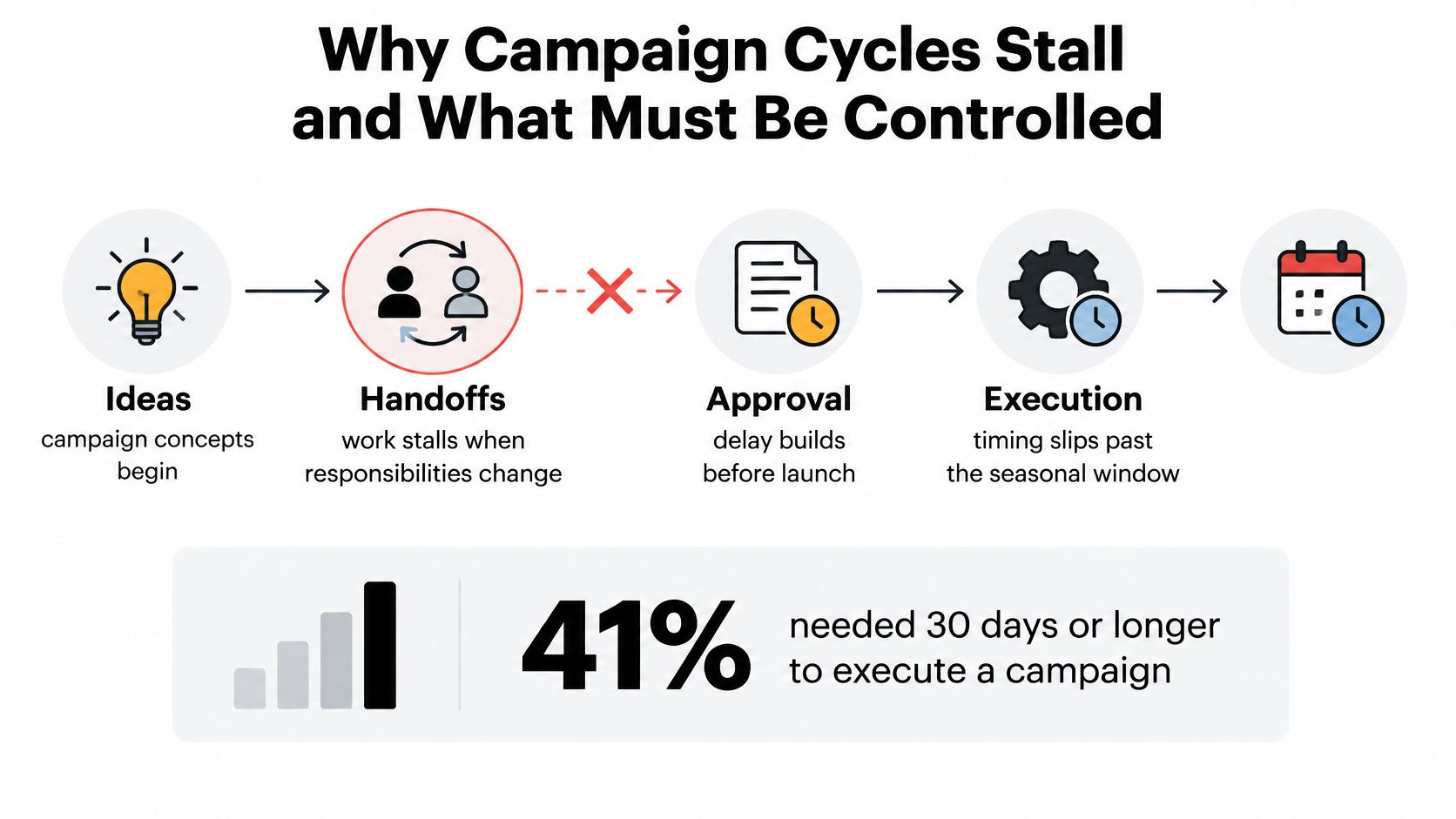
Handoffs Are Where Time Disappears
A marketing campaign workflow is the shared sequence that turns an idea into a launched, measured campaign. It runs through intake, briefing, production, review, approval, launch preparation, and post-launch learning. Work doesn't usually stall inside a task. It stalls between tasks, when a writer thinks legal has it, legal thinks brand has it, and the channel lead finds out at the launch check.
Every handoff needs four controls, and I wouldn't launch without all four written on the campaign card.
- One owner: A named person, not a team, who moves the deliverable to the next stage.
- A deadline: A date tied to the launch date, not a vague priority label.
- Visible status: One place where anyone can see whether the item is drafted, in review, blocked, or approved.
- An escalation rule: What happens, and who acts, when the deadline slips by a day.
Without those controls, channels run in parallel with no shared picture of what blocks launch. Email waits on a page that paid social already points to. Budget approval happens after creative is finished. Measurement gets invented after results arrive.
Treat 30 days as the cycle to beat, not the schedule to accept.
Shorter approval cycles matter because they change how many market opportunities a team can pursue in a fixed quarter. Saving 2.9 days per approval doesn't sound dramatic until you multiply it across creative, legal, and spend sign-off on every campaign. The gain compounds into extra launches, faster tests, and feedback that arrives while it can still change the next brief.
Campaign Workflow Blueprint From Brief to Close
Say you're running one multi-channel offer across email, paid social, and a landing page on a 30-day clock. The table below sets the owner, timing, and exit gate for each stage. Nothing moves forward until its gate clears.
| Stage | Accountable owner | Timing | Exit gate |
|---|---|---|---|
| Lock objective and conversion event | Campaign lead | Days 1-2 | Brief approved with one primary outcome |
| Document audience, offer, budget, channels | Channel leads | Days 2-5 | Owner and deadline written for every deliverable |
| Build assets and tracking | Marketing ops with creative | Days 5-12 | Campaign ID and standard UTM taxonomy in place before assets |
| Creative, legal, and spend review | Brand, legal, and budget owner | Days 12-16 | Creative and legal signed; spend approved where required |
| Launch and anomaly watch | Channel lead | Day 18 launch; checks at 24 and 48 hours | Tracking QA passed and delivery checked |
| Weekly optimization and close | Campaign lead | Weekly from launch; close Day 30 | Results compared with pre-set baseline |
The Nine Steps in Order
1. Lock the outcome. The campaign lead writes the decision this campaign informs, one primary outcome such as qualified pipeline, revenue, retention, or contribution margin, and one conversion event. Brief approval is the only exit. One frequently cited project statistic in Ravetree's guide to project management for marketing teams attributes 37% of project failures to unclear objectives. The same source reports a 92% success rate in meeting objectives for organizations using project-management practices, but that evidence is secondary, so I'd treat it as directional. The firmer lesson is simpler. Lock the outcome before production starts.
2. Complete the brief by Day 5. Channel leads document audience, offer, budget, channels, one owner per deliverable, dependencies, and dates. If a deliverable has no owner, it doesn't exist yet, no matter how good the idea sounds in a meeting.
3. Issue the campaign ID and UTM rules before drafting. Marketing ops publishes the campaign identifier and the standard parameter names every channel must use. UserMaven's breakdown of marketing attribution metrics lays out this sequence for a reason. Missing identifiers and inconsistent UTM parameters are among the most common workflow failures, and they're nearly impossible to repair after launch.
4. Produce assets only against the brief. The landing page finishes before ads point at it. Email copy uses the approved offer and dates, not a placeholder someone meant to update. For teams automating the repetitive parts of this stage, a workflow playbook for SaaS founders from Big Moves Marketing is a useful companion on where automation helps and where it creates rework.
5. Run three separate review gates. Creative, legal or brand, and budget approval are distinct decisions with distinct owners. Don't collapse them into one group thread. This is also where the AI rule belongs. When generative AI drafts copy, builds segments, or produces image variants, a named person owns claims, permissions, privacy, disclosure, and the publish decision, and the campaign card records which tool touched each asset.
If review capacity can't match the extra drafts AI produces, don't add another AI asset to the queue.
6. Preflight everything. Check links, tags, audience exclusions, offer dates, and consent settings. Click every tracked link and confirm the conversion event fires once. Launching before event and tag validation is one of the most damaging and most avoidable pitfalls in campaign operations.
7. Launch, then check at 24 and 48 hours. The channel lead confirms delivery, spend pacing, and tracking on both checks. Most launch errors surface in the first two days, while they're still cheap to fix.
8. Optimize weekly against the primary outcome. Not the cheapest click, not the highest engagement. Cheap conversions that produce weak pipeline are a loss dressed up as a win.
9. Close with a comparison, not a recap. Planned versus actual timing, spend, reach, and qualified outcomes. Then convert what you found into explicit changes to the next brief, or the review was just a meeting.
Set Up Roles, Board, and Tools Before Day 1
Roles come first, tools second. If you set up software before you've decided who owns what, you've just bought a faster way to be confused.
Four Roles That Cover Every Gate
The campaign lead owns the outcome and runs the weekly cross-channel call. Channel leads own their deliverables and their launch. Marketing ops owns tracking and the UTM rules. The budget owner signs spend where finance requires it, and that requirement is common. In a 2024 NP Digital survey of 1,043 marketers, 62% required approval before spending campaign budget, while 38% could spend without prior approval. Write your rule down either way. Don't let it surface as a surprise at the review gate.
Weekly checkpoints should absorb cross-channel decisions, while in-channel tweaks stay with the channel owner. That split matters for workload. In DoubleVerify's 2025 survey of 1,970 marketing and advertising decision-makers, 26% of campaign managers' time, more than 10 hours per week, was spent on manual campaign optimizations. Batching those changes into a weekly rhythm protects the rest of the week for production and review.
The Minimum Tool Set
Each tool earns its place by changing a decision at a gate. If a sheet or dashboard never changes a decision, cut it. Teams evaluating options can compare setups in this overview of marketing workflow management software, and creative-heavy teams may find it useful to simplify creative workflows with AdCrafty as a reference for automating production steps without losing the review gate.
| Tool or sheet | Job | Gate it serves |
|---|---|---|
| Campaign board | One owner and one status field per deliverable | Every stage |
| Shared UTM sheet | Campaign ID and parameter names for every channel | Build assets and tracking |
| Approval queue | One approver, one backup, two-day limit | Creative, legal, and spend review |
| Reconciliation view | Joins campaign, site, CRM, billing, and identity data | Launch to close |
| Review log | Records AI tool use and approver for each asset | Review and publish |
Keep the board as the single source of status. The moment status also lives in chat threads, email, and someone's notebook, you have four versions of the truth and none of them are reliable. Reminders and assignments should replace memory, because memory is exactly what fails when three campaigns overlap.
One practical test before Day 1. Pick any deliverable at random and ask who owns it, when it's due, and what gate it must pass next. If the board can't answer in ten seconds, the setup isn't finished.
Lock the Business Outcome Before Launch
A clean stage list still fails if the team can't say whether the work changed the business. That's not a rare edge case. It's the norm.
The checklist below shows the sequence, from defining the outcome to confirming you can measure it.
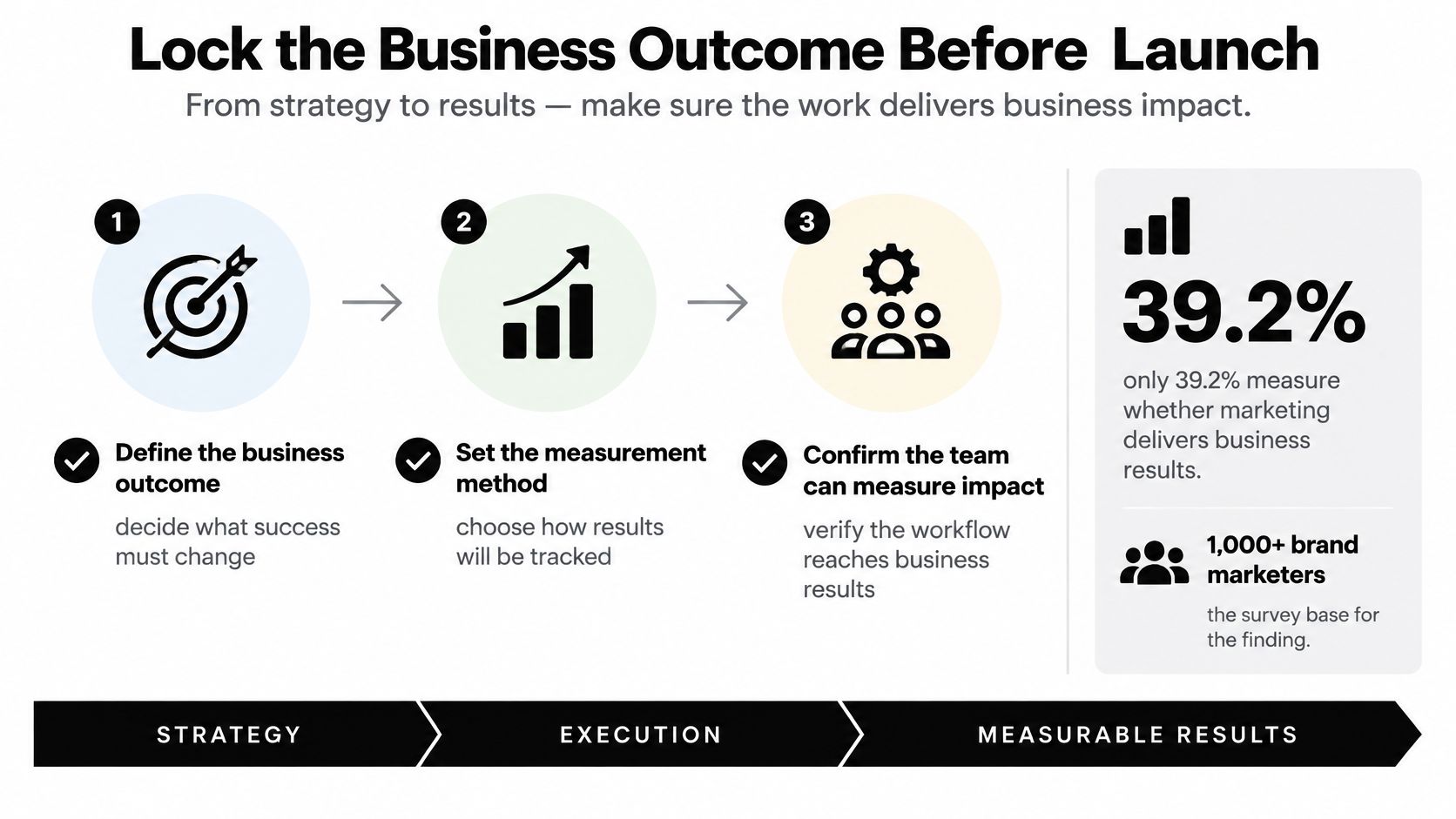
In a 2025 survey of more than 1,000 brand marketers reported by Marketing Week, only 39.2% measure whether marketing work delivers business outcomes, while conversion rate, ROI, and click-through rate remain the most commonly tracked metrics. The same research found that only 35.3% use controlled experiments and 32% use econometrics such as marketing-mix modeling. Execution gets tracked carefully. Causal learning mostly doesn't.
The Six-Line Measurement Card
Before launch, put six lines on the campaign card. I'd block the launch gate until all six exist.
- The decision: What will you do differently based on this result? Scale, stop, or change the offer.
- The primary metric: One outcome, such as qualified pipeline or contribution margin.
- One guardrail metric: The number that must not get worse while the primary improves, such as unsubscribe rate or refund rate.
- The baseline: A 6 to 12 month history where it exists, with ranges labeled below average, acceptable, and strong before anyone sees results.
- The test or comparison design: A holdout, a geo split, a before and after window, or an honest statement that this is observational only.
- The data owner: One person who reconciles the numbers and signs the close-out.
Reconcile campaign, website, CRM, billing, and customer-identity data instead of trusting platform-reported conversions alone. Platforms grade their own homework. Diagnostic numbers such as reach, click-through rate, cost per acquisition, and conversion rate stay secondary. They explain movement in the primary metric. They don't replace it. For awareness-led campaigns, the same discipline applies, and this guide to brand awareness measurement covers how to define those outcomes before spend starts.
The video below walks through how to connect campaign activity to business results in practice.
Treat Attribution as Directional
An attribution model assigns credit. It doesn't prove the campaign caused the conversion. Unless a controlled incrementality test supports the claim, report attribution as a directional signal and say so plainly in the close-out. Stakeholders can handle honesty. What they can't use is false precision.
This contract blocks the usual measurement failures before they happen. Ambiguous KPI definitions, duplicated conversions, and engagement reports with no revenue context all become visible at the brief gate, while they're still cheap to fix.
Practical rule: If the result is inconclusive, don't scale spend. Write the failed test into the next brief and design a cleaner one.
More dashboard metrics don't equal more learning. Fewer, decision-linked measures with explicit rules for inconclusive results will teach you more in one quarter than a wall of charts teaches in a year.
Fixes When Priorities and Approvals Stall
Campaign work often stalls because teams cannot agree on priorities, lose track of status, or leave approvals without a clear owner. The numbers point to coordination as a practical problem, not a lack of ideas.
An Adobe workplace-productivity study cited in MarTech Cube's 2026 reporting on unified workflows found that 39% of marketers identified unclear priorities as a leading productivity blocker, 37% cited coworker interruptions or distractions, and 36% cited context switching between too many tasks or projects. Marketers in the study estimated losing approximately 91 business days annually to low-impact work, equivalent to more than 18 weeks. The reporting also found 32% of marketers considered confusing or complex workflows a project-management pain point, while 22% had difficulty tracking project progress.
As campaigns span more channels, formats, markets, and approval participants, coordination can become the constraint. More process alone does not resolve it. Match each visible symptom to one operational change, then make that change part of the working brief.
Match the Symptom to One Fix
| Symptom | What it usually means | Change to make |
|---|---|---|
| Nobody agrees what matters | Unclear priority, cited by 39% | Pause production and rank one objective on the brief |
| Review sits for days | No approver or backup | Name one approver and a backup, with a two-day limit |
| Updates live in chat | Status is invisible; 22% had difficulty tracking progress | Move the campaign to one board with a status field |
| Legal edits on launch morning | Review gate was skipped | Include legal in the brief and review before launch |
| Tags or UTMs missing at go-live | Tracking QA was skipped | Block launch until the campaign ID and UTMs pass |
| Clicks rise, pipeline does not | The campaign may be optimizing for cheap conversions | Use the primary outcome in the weekly review |
Start with the first row. When stakeholders have not agreed on the outcome, every downstream task can pull production in a different direction. Pause the work, put one ranked objective in place, and resume against that shared decision. It may delay production briefly, but it avoids spending weeks on work aimed at competing goals.
Approval queues need a named human gate, including when AI-assisted work is involved. Assign one approver and a backup, set a two-day limit, and define who handles escalation. The approver should review the work before publication, not after it has entered the launch queue. A content approval workflow can give those decisions and handoffs a consistent place instead of leaving them scattered across email.
For the metric trap, compare campaign activity with the primary business outcome. If clicks and cheap conversions rise while the pipeline stays flat, the activity is not delivering the result the campaign is meant to produce. Bring the primary outcome to the weekly review and use it to decide whether the current work should continue.
A fix counts when the next campaign brief reflects it: a ranked objective, a named approver, or a clear status field. If the same stall returns, the process change did not address the cause.
Change the Next Brief Before You Restaff
Don't open a new brief until this campaign's postmortem changes the template. Staffing a fresh team onto a broken brief just gives the same problems new owners.
Run the Postmortem as a Comparison
Compare planned versus actual timing, spend, reach, qualified outcomes, and any incremental read you have. Keep it short and specific. Which gate slipped, and by how many days. Which metric definition caused an argument. Which approval waited on a person who was never named as the approver.
Then change one thing only. A gate, an owner rule, or a metric definition. One change per cycle sounds slow, but it's the only pace at which you can tell whether the change worked. Five simultaneous changes teach you nothing, because you can't attribute the improvement, and attribution discipline applies to your process too.
Record a failed or inconclusive test in the next brief rather than scaling spend on it. Failed tests are assets. They stop the next campaign lead from paying to learn the same lesson twice.
Start With One Live Campaign
The useful start is one live campaign this week on one shared calendar, not a full process redesign. Our workflow runs in three steps. Capture ideas in a pipeline, plan them on an editorial calendar by assigning owners and setting publish dates, then publish and review what worked. Team collaboration lets you assign writers and leave comments for editors, writers, and stakeholders in one place, and publish reminders send nudges that keep deadlines visible.
Put the six lines of the measurement card on the first campaign card before anyone requests creative. Run the gates. Still aim to pull the cycle under 30 days, and let the postmortem, not enthusiasm, decide what changes next.
Pick the single change now and write it into the template before the next campaign opens. That one edit is the difference between a workflow that learns and a workflow that just repeats.
Put your next campaign on one shared board where owners, publish dates, approval stages, and reminders stay visible from brief to close, so handoffs stop eating your launch window. TheContentMap gives your team an editorial calendar and idea pipeline built for exactly that, with assignments and performance insights connected to every piece you publish. Start with one live campaign this week and let the first postmortem prove the value.
Related Articles
Content Marketing Workflow for Editorial Teams
83% of marketing leaders wanted to streamline workflows and reduce the number of technology solution...
SoftwareTagging Ideas for Editorial Teams: A Practical Guide
You're in a planning meeting, looking for ideas about pricing. One editor used pricing, another...
SoftwareContent Calendar Planning: A Step-by-Step Guide for 2026
Your calendar looks full, but next week's article is still waiting for product approval. A write...
Comments (0)
No comments yet. Be the first to share your thoughts.