How to Build an Editorial Calendar That Ships
Learn how to build an editorial calendar that actually ships with templates, workflows, and roles designed for modern content teams.
You're staring at a spreadsheet that looked tidy in week one and is already drifting by week six. The ideas are there, the deadlines are there, and somehow the whole thing still feels like it's held together with comments, reminders, and luck. That's usually the moment a team needs to stop treating the editorial calendar like a date grid and start treating it like a production system.
An editorial calendar only works when it carries strategy, ownership, workflow state, and a feedback loop. That's how newspapers and magazines planned long before digital, balancing reader demand, advertiser needs, and production deadlines, and that same logic still applies when one team is publishing across blogs, newsletters, social, and product updates as editorial planning evolved from print publishing into modern digital workflows. The calendar should show what's moving, who owns it, what's blocked, and what happens after it ships.
Table of Contents
- Why Most Editorial Calendars Fail Before They Start
- Foundations, Themes, and the Fields Every Entry Needs
- Planning Horizons and the 90/30/14 Layered Calendar
- Workflow Status States and Ownership at Every Stage
- Roles, Review Cadences, and the Weekly Editorial Check-In
- Closing the Loop with Performance Insights and Content Audits
- A Pre-Launch Checklist and Common Pitfalls to Avoid
Why Most Editorial Calendars Fail Before They Start
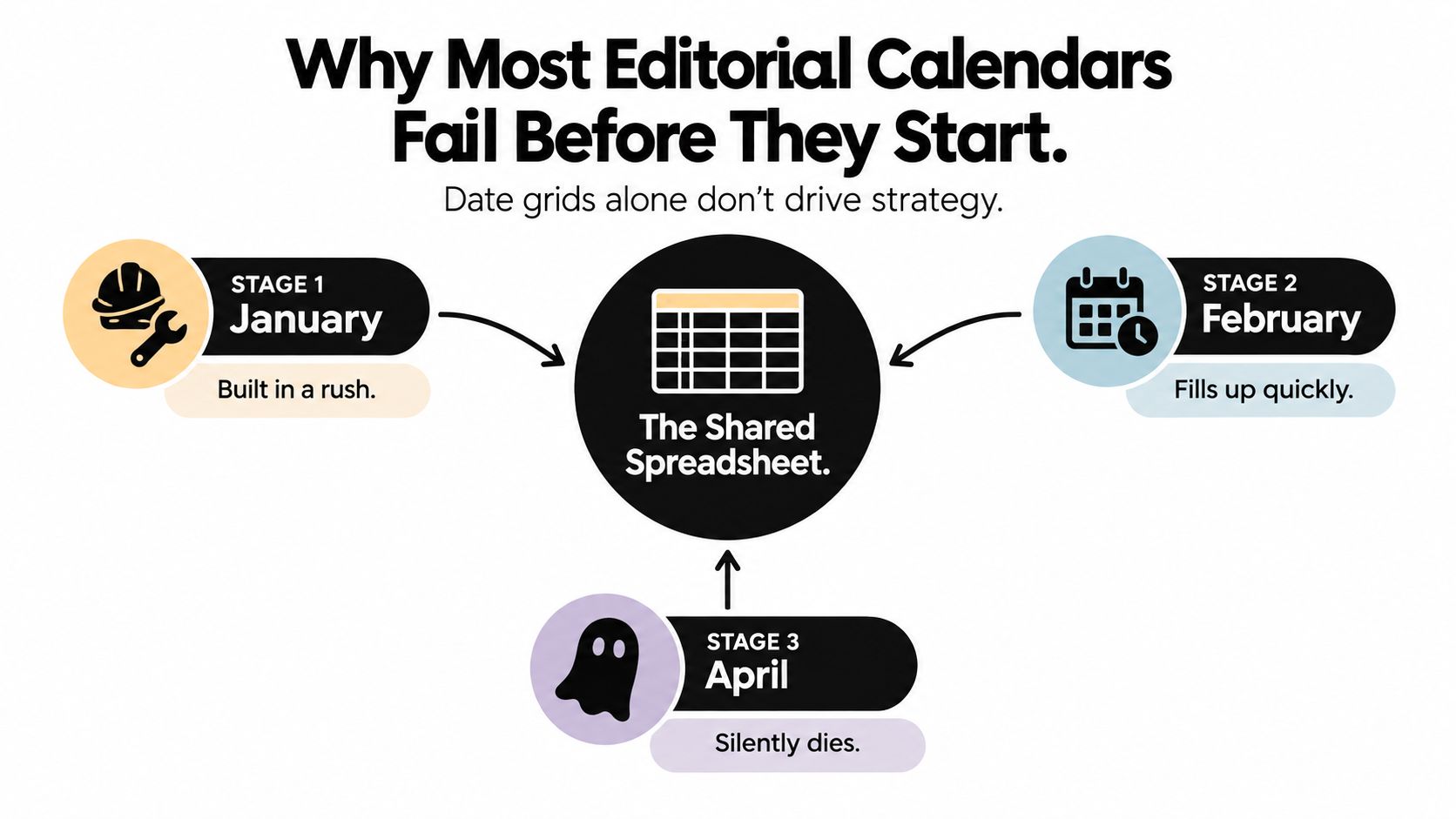
The failure pattern is familiar. Someone builds a shared spreadsheet in January, the team fills it fast in February, and by April the thing is technically still alive but no one trusts it. That's not because the team lacks discipline. It's because a grid of dates can't survive real editorial work on its own.
A date-only calendar collapses the first time a breaking story lands, a reviewer goes quiet, or a writer assumes someone else will handle the handoff. Without visible status states, a piece can sit in limbo between idea and publish while everyone thinks someone else is driving it. A centralized calendar matters because missing it creates real operational drag, and one industry source cites research showing that almost 36% of organizations miss content deadlines when they don't use one, while another cites a Content Marketing Institute figure that only 40% of marketers had a documented content plan in 2022 according to the industry source cited here.
What breaks first
The first failure is usually ownership. If a calendar doesn't name the person responsible for moving an item from draft to review to publish, it becomes decorative. The second failure is structure. Teams often plan topics without defining the status states that tell everyone where work sits.
Practical rule: if the calendar can't answer “who owns this, what stage is it in, and what happens next,” it isn't an operating system yet.
The better model is a production system. That means every item should move through states, not just dates, and those states need review checkpoints, clear assignees, and a cadence for checking whether the plan still matches reality. If you want a basic starting point for that mindset, it helps to build a practical content calendar, then harden it into a workflow instead of a list.
The hidden fix is buffer. A calendar without slack gets crushed by the first urgent request, and then every delay ripples outward. A calendar with protected space survives a bad week because it already expects one.
Foundations, Themes, and the Fields Every Entry Needs
Start with themes, not dates. The strongest calendars begin by choosing a small set of content pillars tied to audience needs and business goals, then mapping each pillar to the channels where it belongs. A blog post, newsletter entry, podcast clip, and social repurpose shouldn't all be treated as separate strategy decisions if they're serving the same theme.
That strategic layer keeps the calendar from becoming random output. It also prevents teams from overproducing in one channel while leaving another stale. A useful internal brief helps here, because a title alone forces everyone to guess intent. If your team needs a reliable way to frame that brief before work begins, the content brief template that gets better first drafts is a useful reference point for what context should exist before the first draft starts.
Required fields versus optional ones
The calendar entry itself should be boring in the best way. Every row should carry enough context that another person could pick it up without Slack archaeology. Resist the urge to add fields that sound smart but never get maintained.
| Field | Purpose | Required or Optional |
|---|---|---|
| Working title | Gives the item a stable label during planning and production | Required |
| Target keyword or angle | Anchors the item to search intent or editorial focus | Required |
| Intended audience | Clarifies who the piece is for | Required |
| Channel | Shows where the item will publish | Required |
| Content type | Distinguishes article, newsletter, video, social, or other formats | Required |
| Format | Flags whether the piece is guide, list, interview, update, or similar | Required |
| Owner | Names the accountable person | Required |
| Status | Shows where the item sits in the workflow | Required |
| Due date | Marks the internal handoff deadline | Required |
| Publish date | Locks the public release date | Required |
| Brief link | Connects the calendar entry to the working brief | Required |
| Campaign tag | Useful when a piece belongs to a larger initiative | Optional |
| Translation status | Helpful for multilingual teams | Optional |
| Repurpose plan | Helps track derivative assets without duplicating effort | Optional |
A few fields are negotiable, but the brief link isn't. Without it, every handoff becomes a rewrite. Optional fields should support decision-making, not create a second database nobody updates.
Keep the sheet narrow enough that editors will actually maintain it and broad enough that writers don't need five messages to understand the assignment.
Planning Horizons and the 90/30/14 Layered Calendar
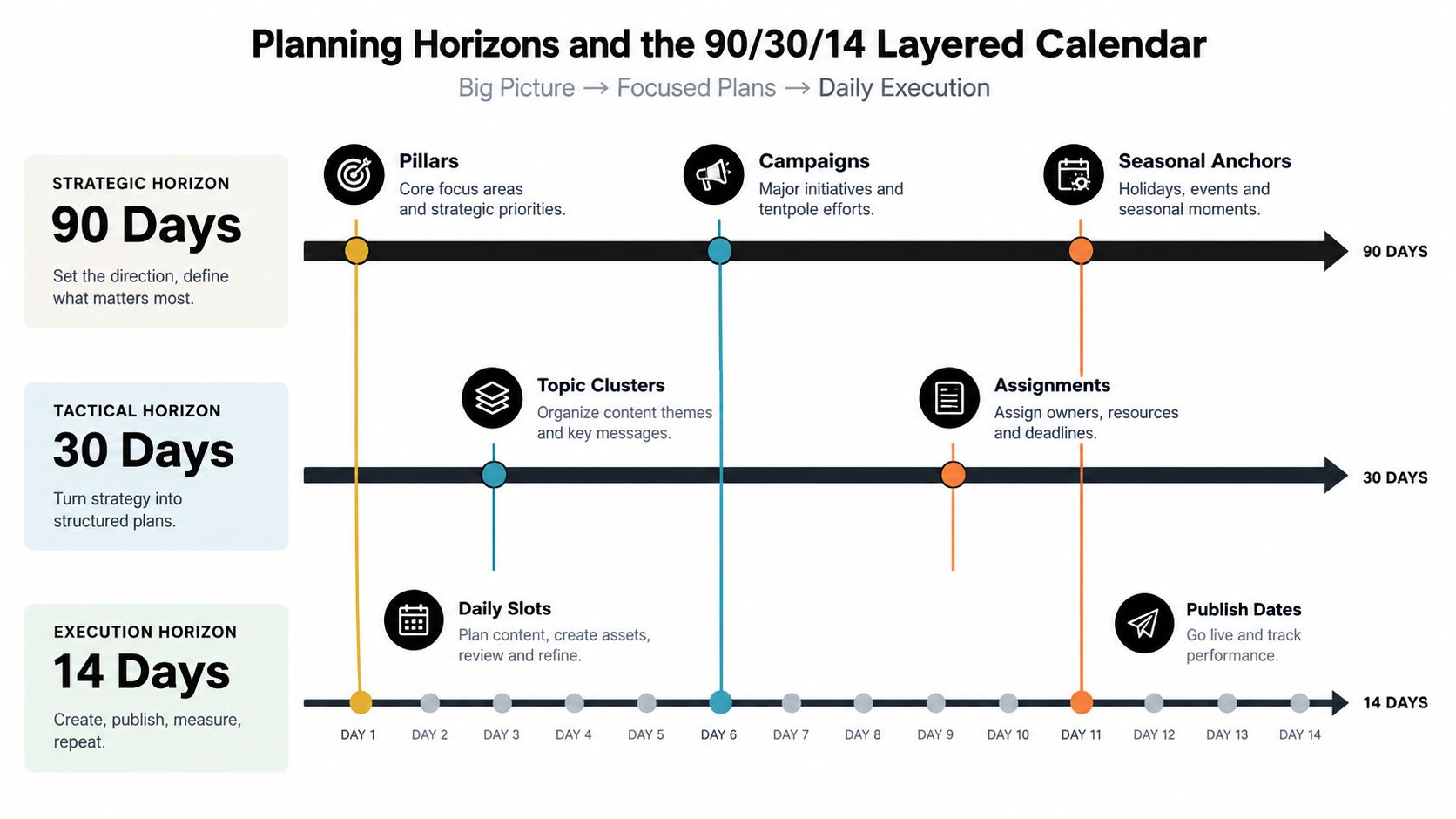
A single planning view is too blunt for real editorial work. The cleanest way to keep strategy, topic selection, and execution from colliding is to layer the calendar into three horizons. That gives leadership room to steer without constantly rewriting the work in motion.
The first layer is the 90-day strategic view. That's where pillars, campaigns, and seasonal anchors live. Nothing in this layer should feel frozen, because the point is to hold direction, not micromanage every title.
The second layer is the 30-day topic view. Specific pieces get committed, owners get named, and channel distribution gets locked enough for the team to work. It's also where gaps in pillar coverage become obvious, which is the value of zooming in. The third layer is the 7 to 14-day execution lock, where drafts, reviews, and publish dates get treated as real deadlines instead of wishes.
How to keep the layers from fighting each other
The practical mistake is pushing too much detail too early. A 90-day view should absorb strategic changes without breaking the production queue. The 14-day lock should absorb execution realities without reopening the whole plan.
One useful way to think about slack is to leave open space in the working calendar for reactive work, trend response, or items that need to slide when someone gets sick or a story breaks. Several current planning guides now recommend layered planning and leaving 10 to 20% of slots open for that kind of work as noted in 2026 editorial planning guidance. The principle is sound even when the exact reserve shifts by team.
A calendar gets fragile when every slot is claimed before the month starts.
That's why overfilling is a trap. A leaner calendar with visible slack usually ships more reliably than a packed one that collapses the first time reality intrudes.
Workflow Status States and Ownership at Every Stage
A status field only matters if it changes behavior. The most useful setup I've seen uses five states, Ideation, Drafting, In Review, Scheduled, and Published, with one accountable owner attached to each transition. Anything less becomes a colorful list of hopes.
Match each status to an owner
Ideation belongs to the strategist or editorial lead, because that stage is where the topic is still being shaped and evaluated. Drafting belongs to the writer, who owns the working draft and the internal deadline. In Review belongs to the editor, who checks clarity, angle, structure, and whether the piece still matches the brief.
Scheduled belongs to the publisher or CMS owner, who confirms the page is loaded, timed, and ready to go. Published is the final state, but it shouldn't mean the work is forgotten. It should trigger whatever distribution or measurement process the team uses next.
Make transitions explicit
Each move should have a trigger. Drafting changes to review when the draft clears a checklist, not when the writer says it feels close. Review moves to scheduled when edits are resolved, metadata is present, and any required assets are attached. If a legal check or image upload is needed, gate the transition on it.
That kind of gatekeeping sounds fussy until you've watched work stall between draft and publish because one missing field no one owned blocked the whole asset. A well-run workflow surfaces those blockers early, and a tool with reminders helps keep them visible. If your team is comparing workflow systems, this overview of editorial workflow management software is a practical benchmark for what the workflow layer should support.
Useful standard: no item moves forward until the person who owns the next stage can see exactly what's complete and what still needs attention.
Stuck items should show up in a weekly stall report, not disappear. Silent abandonment is how calendars rot.
Roles, Review Cadences, and the Weekly Editorial Check-In
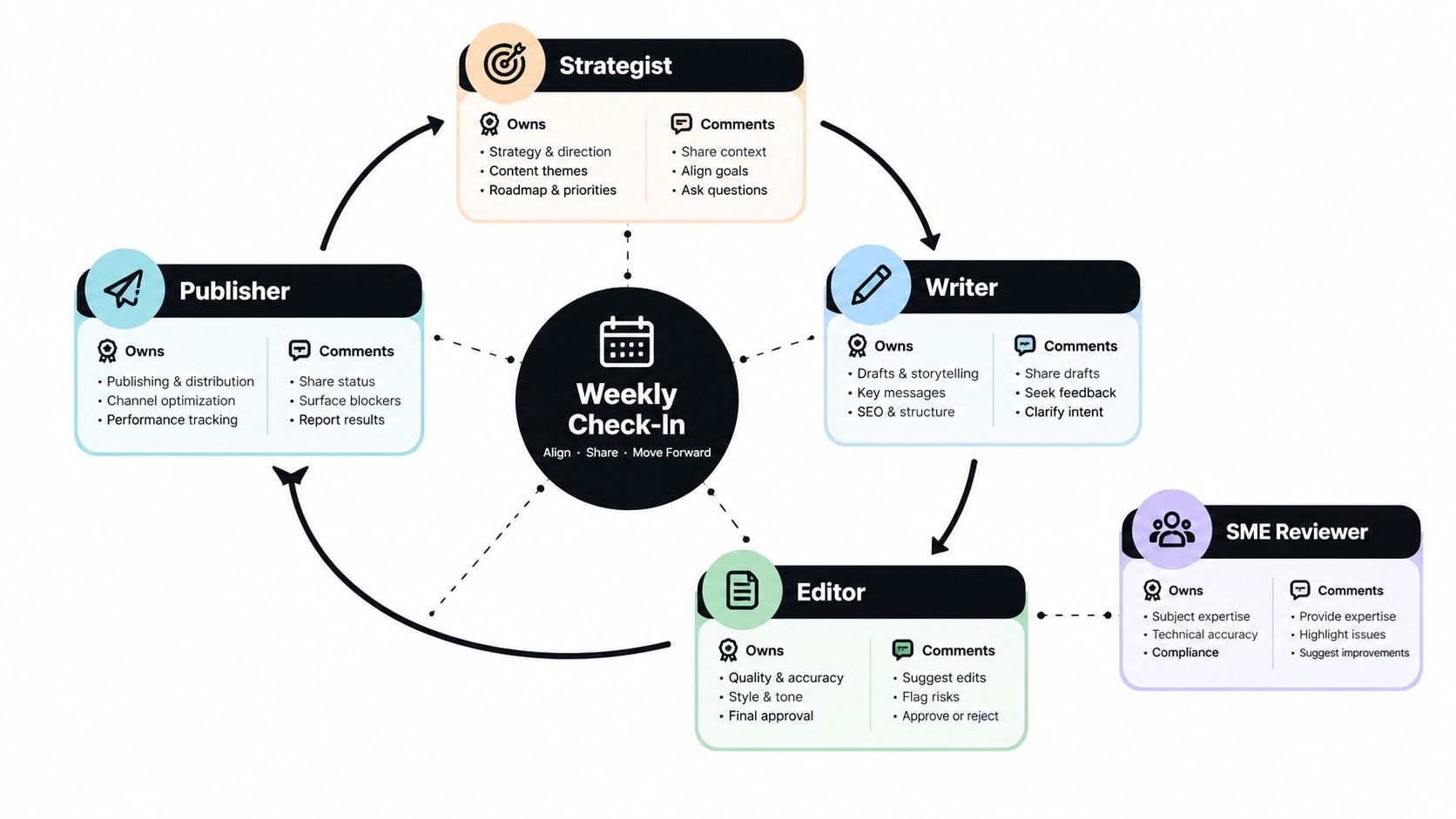
A functional editorial calendar needs a minimum viable roster, not a crowd. At minimum, you need a strategist, writers, an editor, and a publisher. If subject-matter review matters to your process, add an SME reviewer, but keep that role narrow so it comments on expertise instead of taking over production.
Who owns what versus who comments
The strategist owns theme direction and priority calls. Writers own drafting. Editors own quality control and readiness for publication. Publishers own the schedule and final activation. SME reviewers should comment on accuracy, framing, or technical nuance, but they shouldn't become a hidden second editor unless you want the schedule to slow down.
Async review and sync review need different rules. Async review happens in the tool, with comments, timestamps, and a visible decision trail. Sync review happens in the weekly meeting, where people resolve blockers, confirm dates, and make trade-offs. If you merge those two modes, the meeting turns into a status dump and the tool turns into a graveyard of unresolved notes.
A 30-minute weekly check-in that stays useful
A short meeting works best when it's disciplined.
- Stale entries first: review anything that's been sitting too long in one status.
- Blockers second: identify missing approvals, assets, or open questions.
- Next week's confirmed slots third: verify what's going live.
- Slack allocation last: protect open space for reactive work, news, or swaps.
The meeting should end with updated statuses and named owners, not a fresh pile of ideas. New ideas belong in the 90-day theme backlog, not in the lock window where they'll only crowd out work already in motion.
When leadership wants to insert breaking work, don't pretend the calendar can absorb it invisibly. Something has to move. The right response is to trade a slot, not just add another one. That keeps the plan honest and protects the team from pretending capacity is elastic.
Closing the Loop with Performance Insights and Content Audits
A calendar that ships content but never learns from it eventually turns into a slot-filling machine. The work still gets published, but the plan stops improving. That's where performance feedback has to re-enter the calendar, or the team ends up repeating the same decisions with more confidence than evidence.
Pull signals after the piece ships
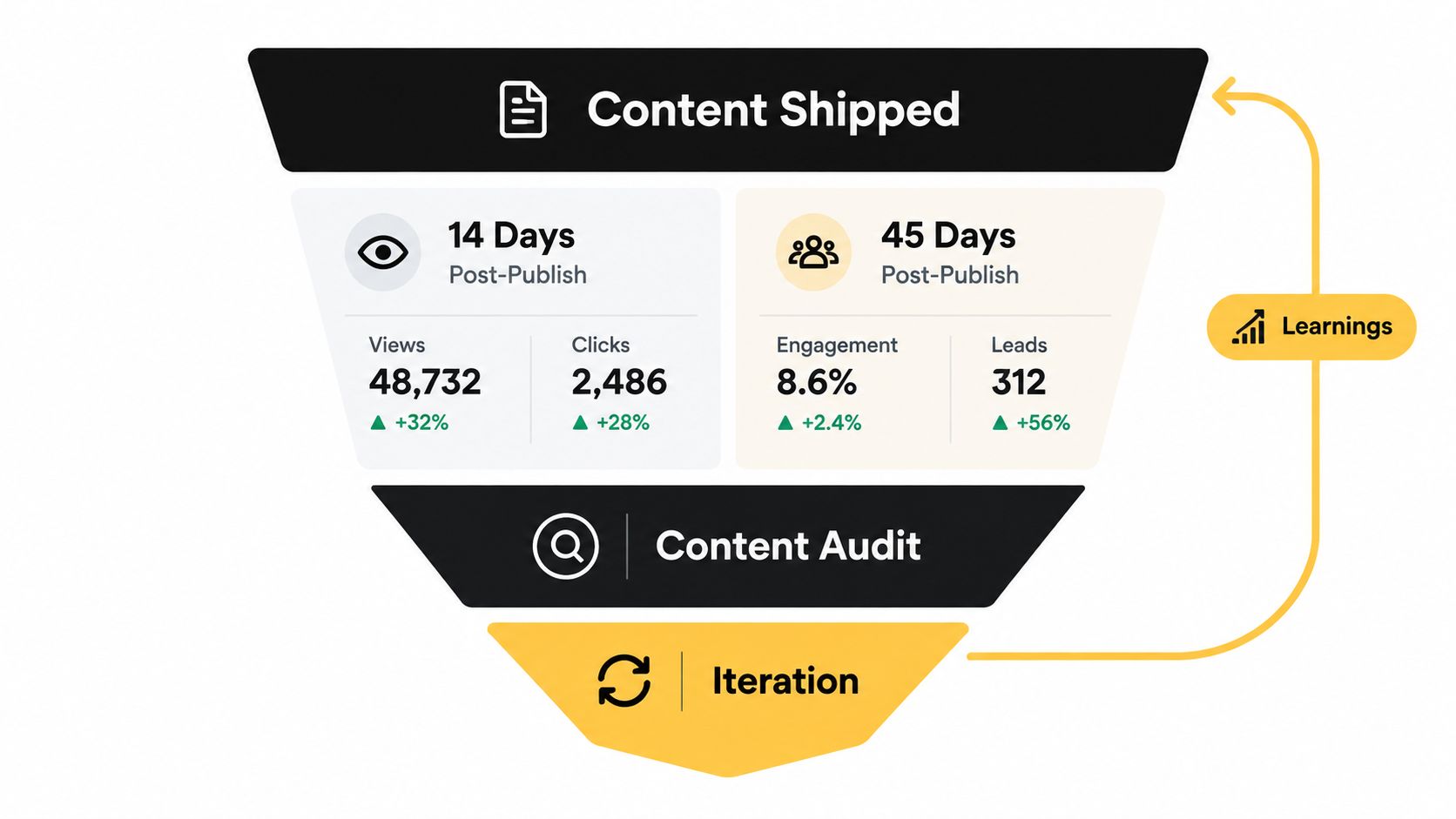
The cleanest rhythm is to check lightweight signals 14 days and 45 days after publication. Use those checks to look at traffic, time on page, conversions or signups, and one qualitative signal such as sales feedback or reader comments. Those checkpoints shouldn't become a giant reporting ritual. They just need to tell you whether the piece deserves another push, a refresh, or retirement.
A monthly retrospective should turn those signals into action. Weak themes can be retired, oversaturated formats can be rotated, and strong formats can get more room in the next planning horizon. If you need a practical way to run that review, the guide to running a content audit in a single afternoon is a good example of how audit work can stay focused instead of turning into a long, unfunded project.
Let the audit rewrite the calendar
A quarterly content audit is where the bigger cleanup happens. Outdated pieces, declining pages, and articles that cannibalize each other should be flagged for refresh, consolidation, or retirement. Audit outcomes should then re-enter the calendar as new ideation entries with a clear owner, so the plan reflects the library's real needs rather than just what the team wishes it had.
For teams that want a complementary external reference on keeping content inventories healthy, the blog health content audit guide is a useful companion. The point isn't more reporting. The point is turning old performance into the next editorial decision.
A Pre-Launch Checklist and Common Pitfalls to Avoid
Before any item gets a slot, it should pass a simple gate. If the entry doesn't have a theme link, an owner, a status, a publish date, and a distribution channel, it's not ready to live on the calendar. That sounds basic, but most broken calendars fail because the team started filling dates before they finished defining the structure.
The common mistakes are usually the same. Teams skip buffer, let one person own every stage, or treat the calendar as read-only after planning week. Another trap is measuring success by volume alone, which leads to more output and not necessarily better output. A calendar full of weak pieces still looks busy right up until it starts wasting everyone's time.
That's why adding more slots usually isn't the fix. When output slips, the better move is to audit what's already there, retire underperforming topics, and protect production time for the work that truly deserves it. If your team wants a tool-oriented comparison point for this kind of discipline, the Taja AI editorial calendar guide is a useful reminder that the key question isn't how to cram more into the week, it's how to keep the workflow usable.
Paste-ready pre-launch checklist
- Theme linked: Every item maps to a pillar, campaign, or audience need.
- Owner named: One person is accountable for the current stage.
- Status current: The workflow state reflects reality, not hope.
- Publish date confirmed: The calendar shows an actual release date.
- Channel set: The distribution path is explicit.
- Brief attached: The entry points to context, not just a title.
- Buffer protected: Reactive space is still visible.
- Next review scheduled: The calendar will be checked before the plan goes stale.
TheContentMap gives editorial teams one place to plan, move, and review content without losing ownership or momentum in spreadsheets. If you're rebuilding your calendar as a production system, not a date grid, visit TheContentMap and see how a structured workflow can keep ideas, deadlines, and published work connected.
Related Articles
Content Marketing Plan: Step-by-Step for Editorial Teams
You opened the spreadsheet again. The dates are filled, the titles look plausible, and the month sti...
SoftwareContingency Planning Example: 7 Content Backup Plans
It's 9 a.m. Your feature writer is sick, the product launch has slipped, and the newsletter stil...
SoftwareHow to Build a Publishing Schedule That Holds
You set a publishing schedule for daily posts on Monday. By Thursday, two drafts are waiting on an e...
Comments (0)
No comments yet. Be the first to share your thoughts.