Content Calendar App: What It Does and How to Choose One
A content calendar app plans ideas, owners and publish dates in one place. Learn the features that matter, how to choose one and how to set it up.
Most content teams are small even when the function is official. In the Content Marketing Institute's 2025 global B2B benchmark of 1,186 marketers, 76% said their organization has a dedicated content marketing team or individual, yet 54% of those dedicated teams consist of only two to five people. The same study found that 58% of B2B marketers considered their content strategy only moderately effective. A content calendar app exists for that gap. It is a control layer for who owns a piece, where it sits, and what you learned after it went live, not a prettier list of dates.
Table of Contents
- What a Content Calendar App Is and Why Spreadsheets Break
- Core Features and Benefits of a Content Calendar App
- One Week for a Three-Person Team
- Criteria for Judging a Content Calendar App
- Sync and Edit Conflicts to Check Before You Buy
- What Plans and Seats Cost for Real Teams
- Keeping AI-Assisted Content Accountable
- Choose Your Calendar Before the Next Planning Cycle
What a Content Calendar App Is and Why Spreadsheets Break
A content calendar app is a shared, dated view of every planned piece, built for editors rather than general project work. Each item carries an owner, a status, reminders, and a path back to results. A two-to-five-person desk still has to coordinate ideas, assignments, reviews, publish dates, and channel activity at once, without a newsroom-sized staff to absorb the slack. The job is making that limited workflow visible and repeatable, not producing more content.
A shared spreadsheet fails in predictable places. Dates drift across tabs. A name typed into a cell is not an assignment anyone is watching. Reminders depend on memory. Idea status lives in someone's head, or in colour codes that nobody updates after the first busy week. Teams that have already felt this often look at replacing scheduling spreadsheets before they pick an editorial tool. If you want to see the baseline first, start from an editorial calendar template in Excel and notice which columns go stale.
| Task | Shared spreadsheet | Content calendar app |
|---|---|---|
| Seeing the week's schedule | Separate tabs or manual sorting | One calendar view with dated items |
| Assigning ownership | Name typed into a cell | Owner set on each item |
| Catching a missed deadline | Someone has to open the file and look | Reminders sent before the date |
| Tracking idea status | Colour codes or notes that drift | Pipeline stages from idea to published |
| Reviewing what performed | Manual export and comparison | Content insights linked to published items |
Practical rule: If the week's plan only makes sense to the person who last sorted the sheet, the sheet is not a calendar.
Core Features and Benefits of a Content Calendar App
Editors meet these features in the order the work moves.
One dated view. The editorial calendar shows the whole plan at a glance, and you can drag pieces between dates. That removes the sort-the-tabs ritual when a launch slips by two days.
A real pipeline. Capture ideas and move them through draft, review, and published in a visual workflow. Custom stages matter because a single done checkbox hides a topic that has sat in “almost” for a month.
Named owners and nudges. Publish reminders send alerts that keep deadlines visible, so a missed date shows up before it costs a slot.
Comments inside the item. Team collaboration lets you assign writers and leave comments for editors, writers, and stakeholders. Feedback stays with the draft instead of getting pasted back from email.
Results next to the plan. Content insights track what is published and show which topics and formats perform, so the next round of ideas starts from evidence.
Projects that stay separate. Topics and tags organise content by topic, channel, and campaign, and several series can sit on one calendar without collapsing into one list. Starter holds up to three projects. Pro and Team remove that cap.
What a small desk actually gains
The benefits are operational, not decorative. Fewer deadlines fall through because someone is named and nudged. Accountability is a field on the item, not a memory of who said they would write it. Once a month, a small team can open the same record and see what shipped, what stalled, and what is worth doing again. Treat this as the working set, not a shopping list of everything a vendor might advertise. The criteria below are how you decide which of these you need.
One Week for a Three-Person Team
Say a managing editor, a staff writer, and a freelance writer share one project. The loop has three moves: capture ideas in a pipeline, plan them on the calendar by assigning owners and setting publish dates, then publish and review what worked. You can set the service up in minutes, so this routine can start in week one.
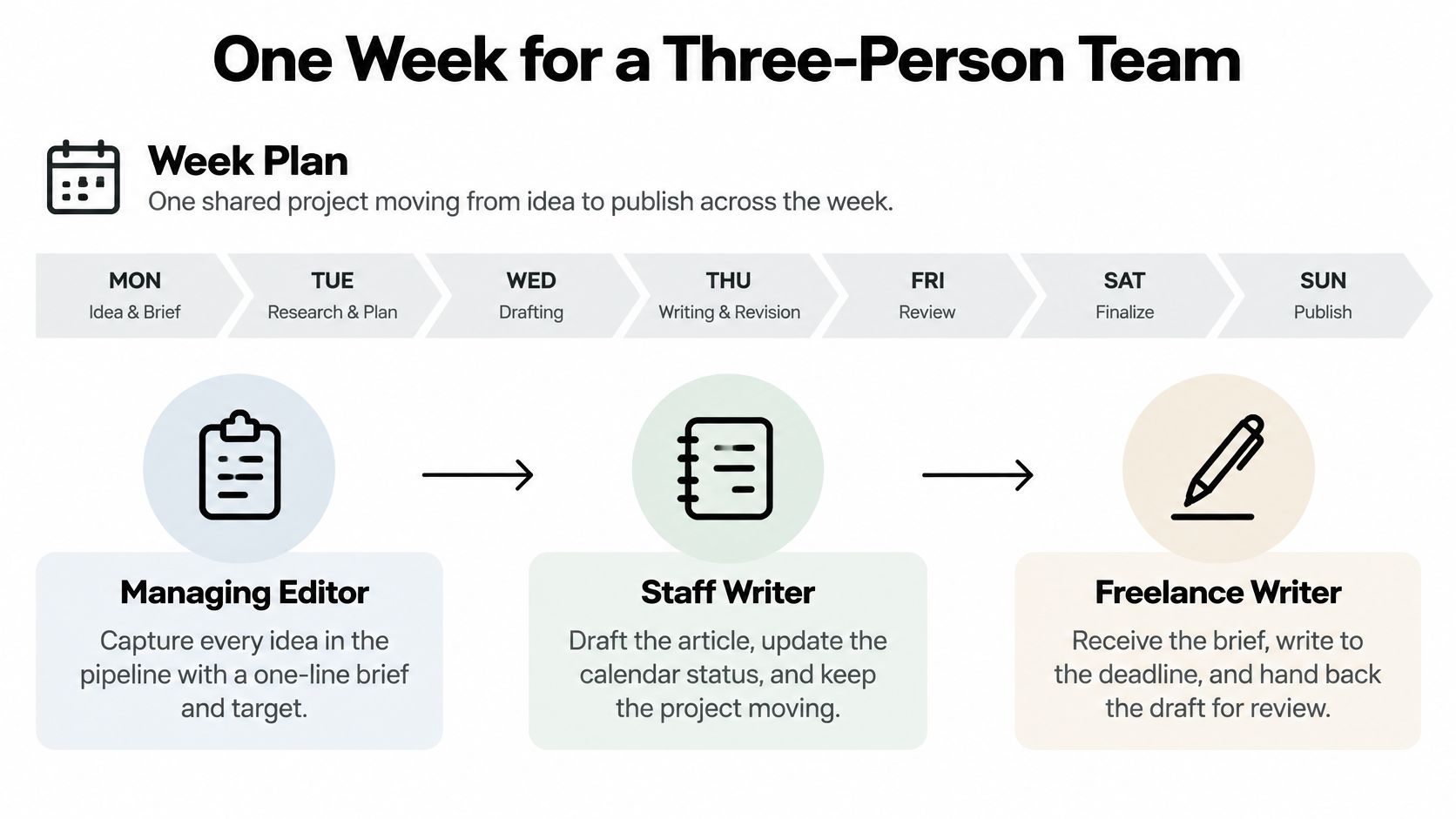
- Capture every idea with a one-line brief and a target audience, before anyone argues about a date.
- Each Monday, the editor assigns an owner and a publish date to the top ideas and drags them onto the calendar.
- Set a reminder two days before each draft is due and one day before each review. Those nudges are what keep the date visible when Slack gets loud.
- Writers move drafts into review, and comments stay inside the item.
- On publish day, mark the item published and attach its performance data.
- At month end, decide for each topic whether to repeat, refresh, or retire it.
Step 6 is the part most calendars skip. Before publication, every item should state its audience, channel, success metric, and review date, plus a decision rule for updating or retiring the topic. A fuller calendar can make a team less effective if it locks them into low-value commitments. Research on content teams, in the AirOps state of content teams report, indicates that promotion and performance tracking are still a significant difficulty for 33% of respondents, while research and ideation is the largest time bottleneck for 65%. Scheduling more dates does not fix either problem.
A spine you can copy
An idea lands on Monday. On Tuesday the editor assigns the staff writer and a Friday publish date. Thursday the draft moves to review, with the freelance writer's notes inside the item. A reminder fired two days before the draft was due, so Friday is a publish, not a scramble.
The check is simple. Can every item show an owner, a stage, and a date inside one view? If you have to open three tools to answer that, the week is not under control.
This short walkthrough shows the same loop in motion, from capture through a published item.
Criteria for Judging a Content Calendar App
Judge the data model before the feature list. A useful app stores each item as a calendar resource, not a date-only row. The iCalendar standard, RFC 5545, defines a service-independent format for events, to-dos, journals, and free/busy information, and it explicitly supports workflow and document-management applications. That means a stable identifier, start and end timestamps, time-zone context, status, ownership, and recurrence rules such as RRULE, with reminders driven by the rule rather than copied rows.
A deadline entered in London should not shift when the same item is opened in New York. If it does, the calendar is a database with a date column, not a calendar.
| Criterion | What to check | Red flag |
|---|---|---|
| Shared calendar view | Drag-and-drop dates across all projects | Static list that cannot be rescheduled |
| Pipeline stages | Custom stages from idea to published | Single done or not done checkbox |
| Ownership and reminders | Owner on each item and deadline alerts | Owners named only in comments |
| Time zones and recurrence | Stored time zone and recurring reminders as rules | Dates shift when viewed from another location |
| Collaboration | Writer assignment and comments inside each item | Feedback sent by email and pasted back |
| Export and integration | Standard calendar format or documented API | Data locked in the app with no export |
| Performance link | Published items connected to their results | Planning and results kept in separate tools |
Score a tool only on the rows that match your team. A solo editor may not need SSO. A team publishing an internal newsletter will care more about whether they can measure internal email effectiveness beside the items that were supposed to drive it. A long feature page is not a higher score.
Sync and Edit Conflicts to Check Before You Buy
Two people edit the same item at once. The editor moves Friday's publish date to Monday while a contributor changes the status to in review. A weak calendar either reloads the whole plan or keeps whichever save arrived last. One of those changes disappears, and nobody gets a warning.
A sound design loads every item once, stores a sync token, and then fetches only what changed. Google's Calendar API sync guide specifies one initial full sync, a persisted sync token, and later requests for resources changed since that token, with pagination and the original query preserved. That cuts the window in which a moved deadline stays stale, and it keeps reminders, ownership, and cross-project views responsive as the plan grows. Each item also needs a stable identifier and a version, or ETag-like value, so a clash is flagged instead of overwritten. If a token goes invalid, the app should resync fully rather than pretend the old token still works.
The symptom to watch is concrete. You moved a deadline, and a teammate's view still shows yesterday's date. The sync is stale.
Three questions for any vendor
- Changed items only. Does the app update only what changed after the first full load, or does it poll the whole calendar every time?
- Failed sync. What happens when a token is invalid or a page fails halfway? Is there a full resync, or a quiet gap?
- Visible conflicts. Does every item carry a version so two simultaneous edits are shown for review?
If the answers are vague, the failure will surface as a missed deadline, not as an error message. The same habits that make content collaboration tools usable, named owners and comments in one place, fall apart when the underlying record can be overwritten without a trace.
What Plans and Seats Cost for Real Teams
Price follows editors, not viewers. Count the people who assign, edit, and approve before you compare tiers.
| Plan | Price | Projects | Seats | Cost for four editors |
|---|---|---|---|---|
| Starter | Free | Up to 3 | 1 editor seat | Not possible beyond one editor |
| Pro | $12 per editor per month | Unlimited | Billed per editor | $48 per month |
| Team | $29 per editor per month | Unlimited | Unlimited seats, billed per editor | $116 per month |
Starter is free and includes an editorial calendar, up to three projects, one editor seat, and community support. Pro is $12 per editor per month and adds unlimited projects, content insights, team collaboration, and priority support. Four editors on Pro are $48 a month. Team is $29 per editor per month, so the same four are $116 a month. Team adds unlimited seats, custom workflows, onboarding support, and SSO and advanced security, and it is sold through sales contact rather than a self-serve sign-up button.
Where the limit actually binds
A four-editor desk cannot stay on Starter, because the seat cap is one editor, not because of the project cap. A single editor with four client series hits the three-project ceiling first and needs Pro for unlimited projects, even though one seat would otherwise fit Starter. People who only read the calendar are not what the bill scales with. Pay for Team when SSO, custom workflows, or onboarding support is a real requirement, not because the name sounds larger. How seats are assigned is covered in our note on seat management. Prices change, so confirm them on the current pricing page before you budget.
Keeping AI-Assisted Content Accountable
Most calendar guides treat AI as a faster way to fill dates. They skip the operational question. Which stages require a person to sign off?
Recent newsroom research covered by Digiday's look at AI in the newsroom shows workflow automation is already used by 93% of surveyed publishers, while 65% remain at the routine-task adoption stage and only 1% report AI fully scaled across operations. Speed is common. A trusted, fully scaled process is not. The useful calendar is the one that makes human checkpoints visible, even if it generates fewer ideas.
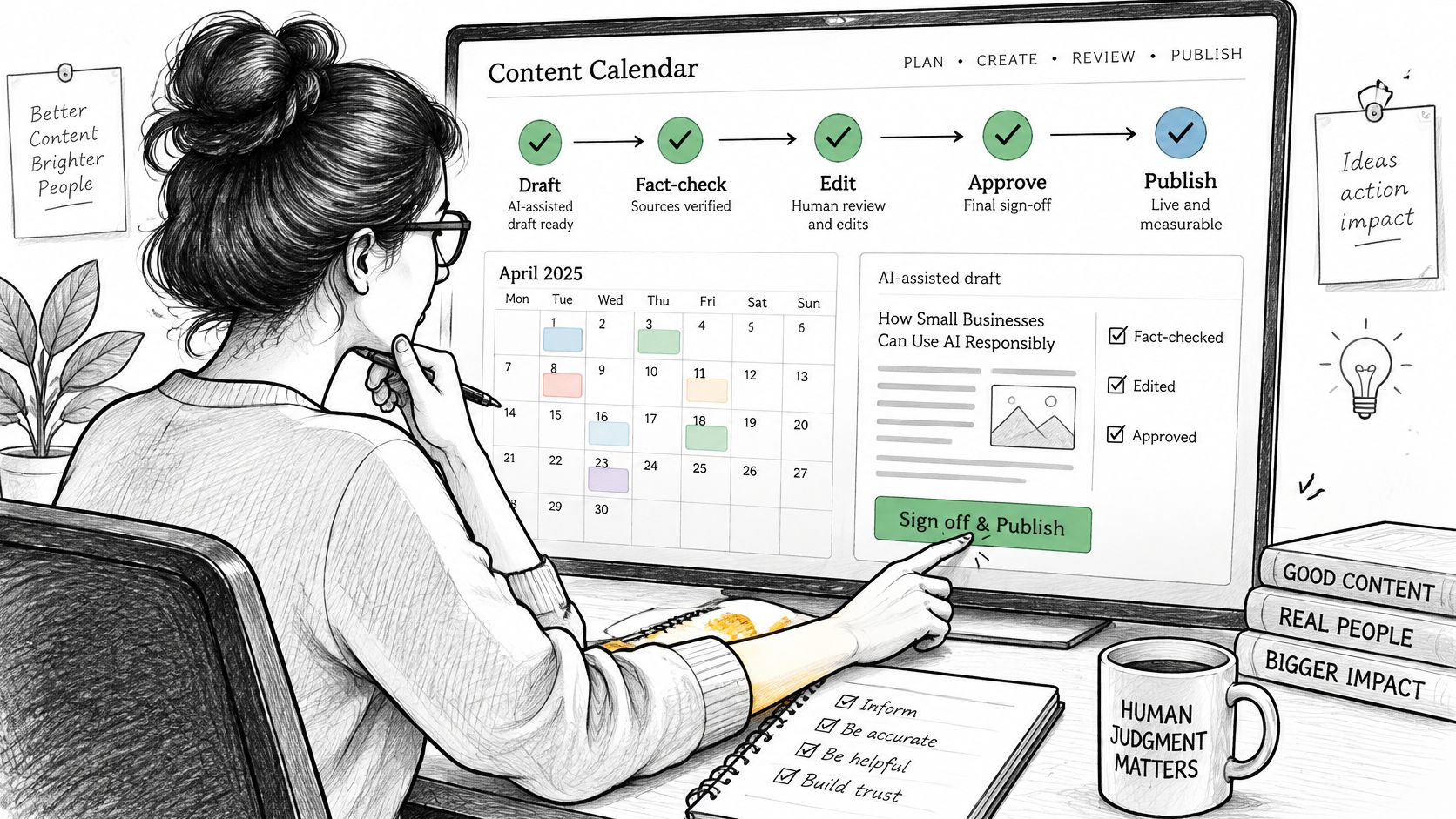
Model accountability as fields on the item, not as a ban on assistance.
- AI-use disclosure. A field that says whether a draft was machine-assisted, and for which parts.
- Verification status. Fact-checking and source checks recorded on the item, not in a side document.
- Named owner of the final version. The person who signs off, separate from whoever prompted the draft.
- Revision history. A record of when a person changed a machine draft, so a legal or brand miss is traceable.
A split between assistance and sign-off
Keep machine help on the idea and draft stages. Require a human stage before published, with enough time on the calendar to do the reading. Approvals take real time, so that stage has to be visible enough to plan around. If a draft misses brand, legal, or subject-matter requirements, it stops in review. It does not ship because the date arrived. Teams running heavy seasonal volume can look at how others approach scaling seasonal creative production with Sprello, then still keep sign-off as a dated stage rather than a hope.
A calendar that hides the checkpoint will publish the draft the model finished, not the draft an editor would stand behind.
Choose Your Calendar Before the Next Planning Cycle
Before switching tools, decide what the calendar must make visible. Start with the team's editor seats and project needs, then choose a few priorities that affect daily work. For example, a team may need clear ownership, visible deadlines, or insights into which published topics perform. A long list of “must-haves” can make it harder to compare tools.
Test the calendar using one live project. Capture real ideas, assign owners, set publish dates, and follow each item through the pipeline from draft to review and published. Check whether reminders keep deadlines visible and whether the calendar makes the plan easy to scan. The goal is a control layer for accountability and learning, not just a list of dates.
TheContentMap offers an editorial calendar, an idea pipeline, team assignments, publish reminders, and content insights. Its Starter plan is free and includes up to 3 projects and 1 editor seat. Try the workflow on a real project rather than judging it from a demo. Visit TheContentMap and check whether each item's owner, stage, and publish date are clear, and whether published results can inform the next plan.
Related Articles
10 Best Content Ideation Tools for Editors in 2026
The brainstorm ends with a page of promising topics. Everyone has a favorite, someone offers to find...
SoftwareWhat Is Cross Team Collaboration and How It Works
Cross-team collaboration is the coordinated work of people from different functions, such as editori...
SoftwareContent Marketing Plan: Step-by-Step for Editorial Teams
You opened the spreadsheet again. The dates are filled, the titles look plausible, and the month sti...
Comments (0)
No comments yet. Be the first to share your thoughts.