Content Workflow Management That Keeps Teams on Track
Learn content workflow management from concept to tooling. Build reliable editorial processes, fix bottlenecks, and ship on time.
Your draft is in Google Docs. The due date lives in a spreadsheet. Feedback is buried in Slack. One stakeholder says it's approved, another says legal still needs to look, and the writer has already started revising the wrong version.
That's a normal content team problem. It isn't usually a talent problem. It's a flow problem.
Most editorial breakdowns happen in the handoff. A topic moves from planner to writer, from writer to editor, from editor to approver, and somewhere in that relay, ownership gets fuzzy. People assume someone else is holding the baton. Deadlines slip not because nobody cares, but because nobody can see where the work is stuck.
This gets sharper when teams add AI into the mix. Drafting gets faster, but review often gets messier. A 2026 content operations benchmark found that 68% of long-form first drafts now pass through a generative AI tool, up from 22% in 2023, and teams that paired that adoption with agentic approval workflows completed work in 1.8 days on average versus 4.7 days for teams without those workflows, according to Digital Applied's 2026 workflow benchmark. The lesson isn't “automate everything.” It's that speed comes from governed movement, not just faster drafting.
Table of Contents
- Introduction Why Content Workflows Break Down
- What Content Workflow Management Really Means
- Key Aspects of a Reliable Editorial Workflow
- Comparing Workflow Tooling Options for Editorial Teams
- How to Design a Workflow Your Team Will Actually Follow
- Common Challenges and How to Fix Bottlenecks
- Real World Examples and What to Do Next
Introduction Why Content Workflows Break Down
A lot of teams think they have a workflow because they have a calendar.
They don't. They have dates.
A calendar tells you when something should go live. It usually doesn't tell you who owns the brief, where the draft sits, which version is current, who can approve it, or what happens when review stalls for three days. That missing layer is why simple publishing plans often turn into a daily scavenger hunt.
Where the scramble actually starts
The breakdown rarely begins at publication. It starts much earlier.
A strategist drops ideas into Google Docs. A manager tracks deadlines in Excel or Airtable. Writers send links by email. Editors leave comments in the document. Stakeholders reply in chat. Design approvals happen in another tool. By the time the piece is ready, the team has built a workflow out of memory and goodwill.
That kind of setup can function for a while, especially on a small team. Then volume grows, contributors multiply, and nobody can answer a basic question quickly: What is waiting on whom right now?
Content workflow management is less about “staying organized” and more about making every handoff visible, owned, and easy to audit.
Why hybrid AI makes this more urgent
AI hasn't removed the need for editorial control. It's increased the need for it.
Recent research shows that 92% of content teams still require human review before publication, and 81% say human fact-checking remains the most common post-generation task, according to WriteBros research on human review in AI content workflows. That means the design question isn't whether AI drafts. It's where people step in, what they check, and how approval moves after that check happens.
For a managing editor, that changes the job. You're not just assigning topics. You're building a track that content can move through without disappearing between people.
What a stable workflow changes
When teams move from fragmented coordination to managed flow, the daily work gets calmer in very practical ways:
- Ideas stop getting lost because they enter one visible pipeline.
- Writers stop guessing because each stage has an owner and a clear next step.
- Editors stop chasing approvals because routing is defined in advance.
- Stakeholders stop reviewing the wrong file because comments and versions stay attached to the asset.
That's the difference between content that feels busy and content that moves.
What Content Workflow Management Really Means
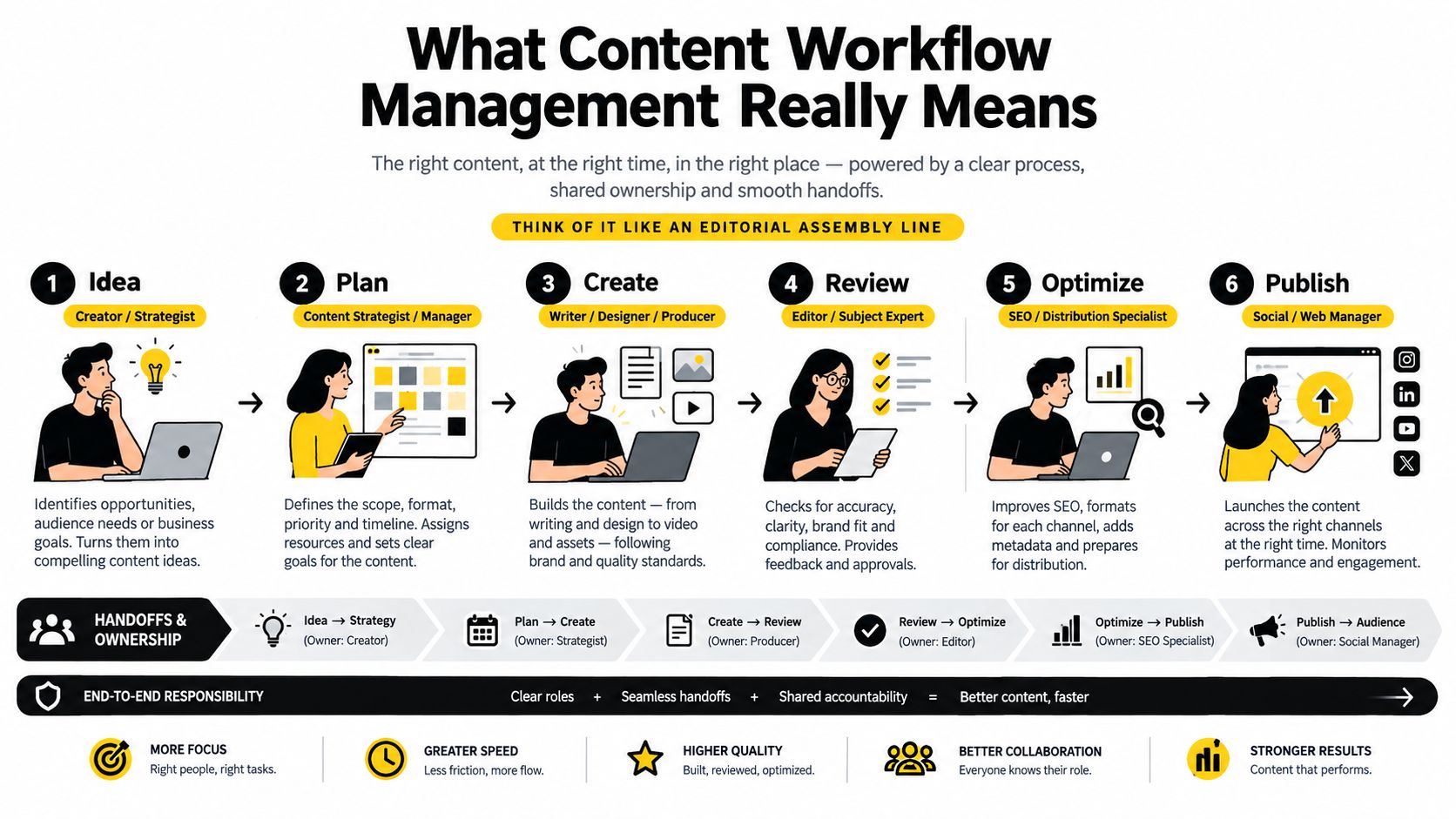
Content workflow management is easiest to understand if you stop thinking about it as scheduling and start thinking about it as a relay.
One person carries the work for a stretch, then passes it to the next person. If the baton handoff is messy, the whole race slows down. It doesn't matter how fast the writer drafted if the editor didn't know the draft was ready. It doesn't matter how strong the edit was if nobody knows who can approve the final piece.
The difference between a list and a workflow
A task list says, “Write article.”
A workflow says, “This article is in review, the editor owns this stage, and legal is next only if the topic meets certain criteria.”
That extra detail matters because it adds three things a simple list usually lacks:
- State. The work has a current stage.
- Ownership. One person is accountable for moving it forward.
- Visibility. Everyone can see the same status without asking around.
A study on editorial process interfaces found that visual workflow models improve process visibility by making state changes and responsibility transitions explicit, according to research published by Digital Scholarship in the Humanities. In plain terms, when people can see the handoff, they make fewer assumptions.
Plain definition: Content workflow management is the system a team uses to move content from idea to publication through visible stages, with clear owners, review rules, and shared context.
The stages should be few and stable
New editors often make one of two mistakes. They either create too many stages, or they use stages that describe effort instead of state.
“Working on it” is vague. “In editorial review” is clearer.
A small set of stable stages such as:
- Idea
- Draft
- Review
- Approve
- Publish
Some teams add a planning or post-publish analysis stage. That's fine if each stage marks a real handoff. The test is simple: can someone look at the status and know who owns the piece right now?
Why this matters more than a perfect calendar
A publishing calendar is useful, but it's a surface view. Workflow is the engine underneath it.
If a team only manages dates, missed deadlines feel mysterious. If the team manages state changes and ownership, delays become traceable. You can see whether the problem sits in briefing, drafting, stakeholder review, or final sign-off.
That's why strong content workflow management feels less like “project management” and more like air traffic control. Work can move at different speeds, but everyone needs a visible lane, a known controller, and permission to proceed to the next step.
Key Aspects of a Reliable Editorial Workflow
A reliable workflow isn't one big thing. It's several smaller parts working together. If one part is weak, the rest of the process feels heavier than it should.
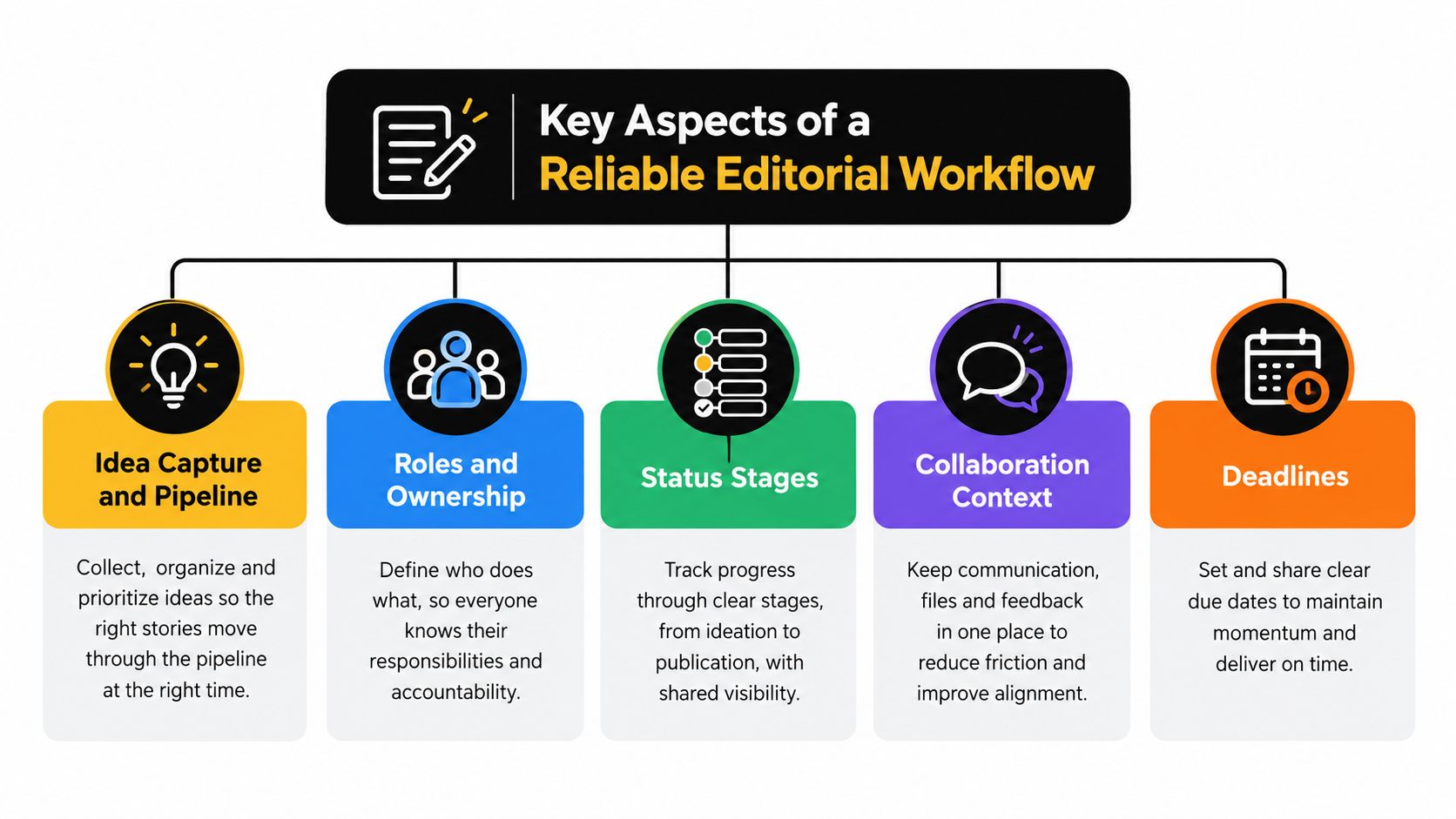
Idea capture and pipeline
Ideas need a home before they need a deadline.
When teams skip this, good topics stay in notebooks, chat threads, or browser tabs. Then planning meetings turn into memory tests. A pipeline solves that by giving every idea a place to land before anyone commits to publishing it.
A healthy pipeline should answer simple questions fast. Is this idea raw, assigned, drafted, paused, or ready to schedule? If the answer lives only in somebody's head, the team is already improvising.
Roles and ownership
Ownership isn't the same as participation.
Several people can contribute to a piece, but one person should own each stage. The writer owns the draft. The editor owns editorial review. The approver owns the sign-off. Without that clarity, work enters a polite waiting room where everyone assumes someone else will move it.
Many teams benefit from reviewing examples of a more formal content publishing workflow. The useful lesson isn't complexity. It's that every handoff needs a named person, not a vague group.
Status stages that mean something
Statuses should describe what happened to the content, not how people feel about it.
Good stages are durable. “Needs SME review” may be a temporary route for some pieces, but “Review” is a stable stage that can support many content types. The tighter your stage definitions, the easier it is to spot where cycle time accumulates.
Collaboration context in one place
Editors lose hours when comments, drafts, links, and approvals live in different channels.
The fastest way to create confusion is to discuss a draft in Slack, revise it in Google Docs, approve it in email, and track status in a spreadsheet. You can survive that setup for a handful of pieces. You can't scale it calmly.
Keep the working context attached to the item whenever possible:
- Brief details should stay with the assignment.
- Comments should stay with the current version.
- Approval notes should be visible to the people in the next stage.
- Version history should be easy to inspect when someone asks, “Which draft was approved?”
If editors have to reconstruct the story of a piece from four tools, the workflow is doing too much work on people's behalf.
Deadline governance
Deadlines only help if they trigger action.
A due date without reminders, escalation rules, or stage-level expectations is just a wish. The useful question isn't “When is this article due?” It's “How long can it remain in this stage before someone is alerted?”
A reliable workflow usually includes a few simple guardrails:
- Stage expectations so review doesn't sit indefinitely.
- Reminder logic for upcoming or overdue handoffs.
- Escalation rules for blocked approvals.
- Publish-date protection so late upstream work becomes visible early.
What to audit first
If your workflow feels unstable, check these areas in this order:
| Workflow area | What to look for |
|---|---|
| Idea capture | Are topics stored in one visible place? |
| Ownership | Does each stage have one accountable person? |
| Status design | Can everyone define each stage the same way? |
| Context | Are comments and files attached to the content item? |
| Deadlines | Do reminders and follow-ups happen automatically or manually? |
That short audit often reveals why a team feels “busy” but still misses handoffs.
Comparing Workflow Tooling Options for Editorial Teams
Tool choice matters, but not because software magically fixes process. The right tool makes the process easier to observe and harder to ignore.
Most editorial teams move through three tooling phases. They start with spreadsheets and docs. Then they outgrow that and adopt a general project tool like Asana, Trello, Monday.com, or ClickUp. Later, some teams realize they still need a system shaped around editorial movement rather than generic task tracking.
What each tooling approach is good at
Spreadsheets and docs are familiar. They're easy to start with, and almost everyone already knows how to use them. The cost is hidden in the handoffs. Status updates are manual, comments drift into side channels, and nobody gets a clean picture of the entire queue without extra work.
General project tools improve structure. You can assign owners, set dates, and build boards. For many teams, that's a meaningful upgrade. But editorial work still gets squeezed into a generic frame. A blog post, newsletter, landing page, and thought leadership draft often need different review patterns, and project tools don't always preserve that context elegantly.
Editorial platforms are built around the fact that content moves through recurring states. They usually make calendars, idea pipelines, assignments, reminders, and published-content learning easier to keep in one system.
Choosing Your Content Workflow Tooling Approach
| Capability | Spreadsheets and Docs | General Project Tool | Editorial Platform |
|---|---|---|---|
| Workflow visibility | Limited and manual | Good for task boards | Strong for content states and pipelines |
| Ownership clarity | Easy to blur | Usually clear | Usually clear and tied to editorial stages |
| Reminder support | Often manual | Built in | Built in with editorial context |
| Calendar planning | Basic | Varies by tool | Usually central |
| Idea pipeline | Often improvised | Possible with setup | Typically native |
| Learning from published work | Separate from planning | Often separate | More likely connected |
When it's time to move up a level
You probably need more than spreadsheets when editors are asking the same questions every day. Where's the latest draft? Who's approving this? Why is this still in review? Which pieces slipped this month?
You probably need more than a general project board when content planning, scheduling, workflow, and post-publish insight still live in separate systems. That usually means your team is managing the tool rather than managing the work.
If you're evaluating automation inside that stack, this AI agent SEO guide is a useful companion read because it shows how automated workflows fit into content operations without removing human checkpoints.
Teams also benefit from comparing editorial systems against broader categories of marketing workflow management software. The key is to choose for the handoff, not just the task list. If a tool helps you see who owns the current stage, what's blocked, and what's due next, it's serving the workflow. If it mainly stores tasks, it may still leave editors chasing movement manually.
How to Design a Workflow Your Team Will Actually Follow
The best workflow is usually smaller than people expect.
Teams often fail by designing for every exception up front. They create too many statuses, too many reviewers, and too many branching rules. Then nobody remembers how the system is supposed to work, so they return to chat and side messages.
A workflow people will follow is lean, visible, and strict about handoffs.
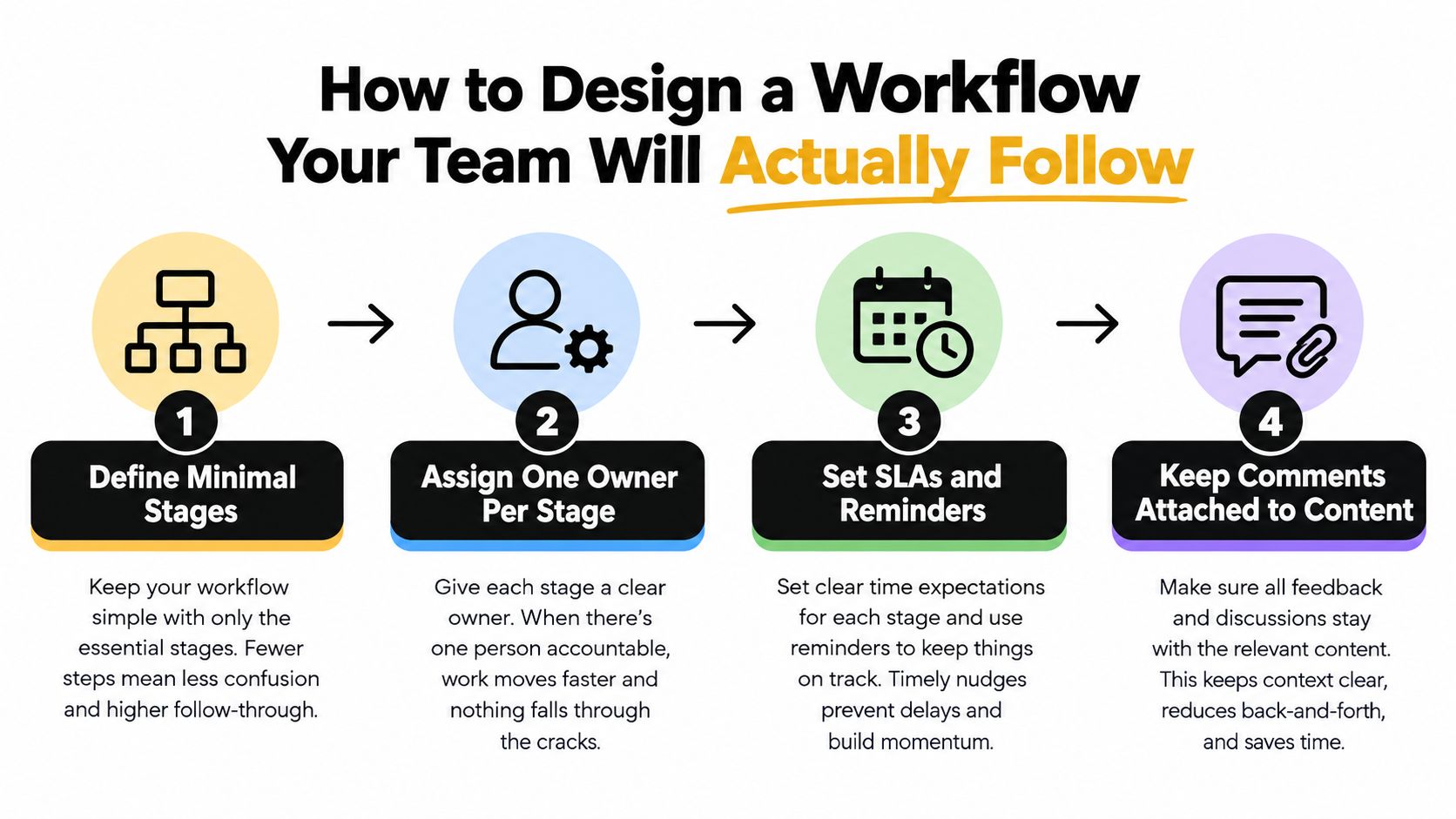
Start with the minimum number of stages
If your team publishes articles, newsletters, and landing pages, resist the urge to invent a separate process for every format on day one. Begin with a short sequence that nearly all work can pass through.
A practical starter model looks like this:
- Draft
- Review
- Approve
- Ready to publish
You can keep ideas and scheduled pieces in adjacent planning views, but the live production workflow should stay tight. Every added stage creates another place where work can sit.
Assign one owner per stage
This rule clears up more confusion than any dashboard.
If a draft is in review, the editor owns it. That doesn't mean only the editor can touch it. It means the editor is responsible for moving it forward or sending it back with clear notes. If a piece is awaiting approval, the approver owns the next action.
That simple rule reduces the most common sentence in chaotic teams: “I thought someone else had it.”
Practical rule: One item, one stage, one owner. Collaboration can be broad. Accountability should be narrow.
Set response windows and reminders
A workflow needs timing rules, not just end dates.
The strongest benchmark to watch is approval speed, because review latency often dominates time to publish. Industry analysis reported that structured or automated approval routing completed in about 1.8 days compared with 4.7 days for manual routing, a 2.6x improvement, according to The AI CMO analysis of content approval workflows. That's why stage-level expectations matter so much.
Use simple timing rules such as:
- Editorial review window for the first pass
- Approval response window for stakeholders
- Reminder before due time so reviewers act before a piece becomes late
- Escalation path when a stage sits untouched
Here's a practical walk-through of how teams think about building those rules into day-to-day operations:
Keep comments attached to the content
Detached feedback is workflow poison.
If revision requests arrive in Slack, email, and meetings, the writer has to merge competing interpretations before revising a sentence. Keep all feedback attached to the asset or to the workflow item that represents it. That way, the next owner sees the same history the previous owner saw.
Decide where humans must stay in the loop
This matters even more in AI-assisted drafting.
The drafting step can be accelerated. Final judgment usually cannot be outsourced. A practical boundary is to let AI help with outlining, first-draft generation, summarizing source material, or turning interview notes into a rough structure. Keep human review for factual accuracy, brand fit, legal sensitivity, and final publication approval.
That isn't resistance to automation. It's good editorial governance.
Common Challenges and How to Fix Bottlenecks
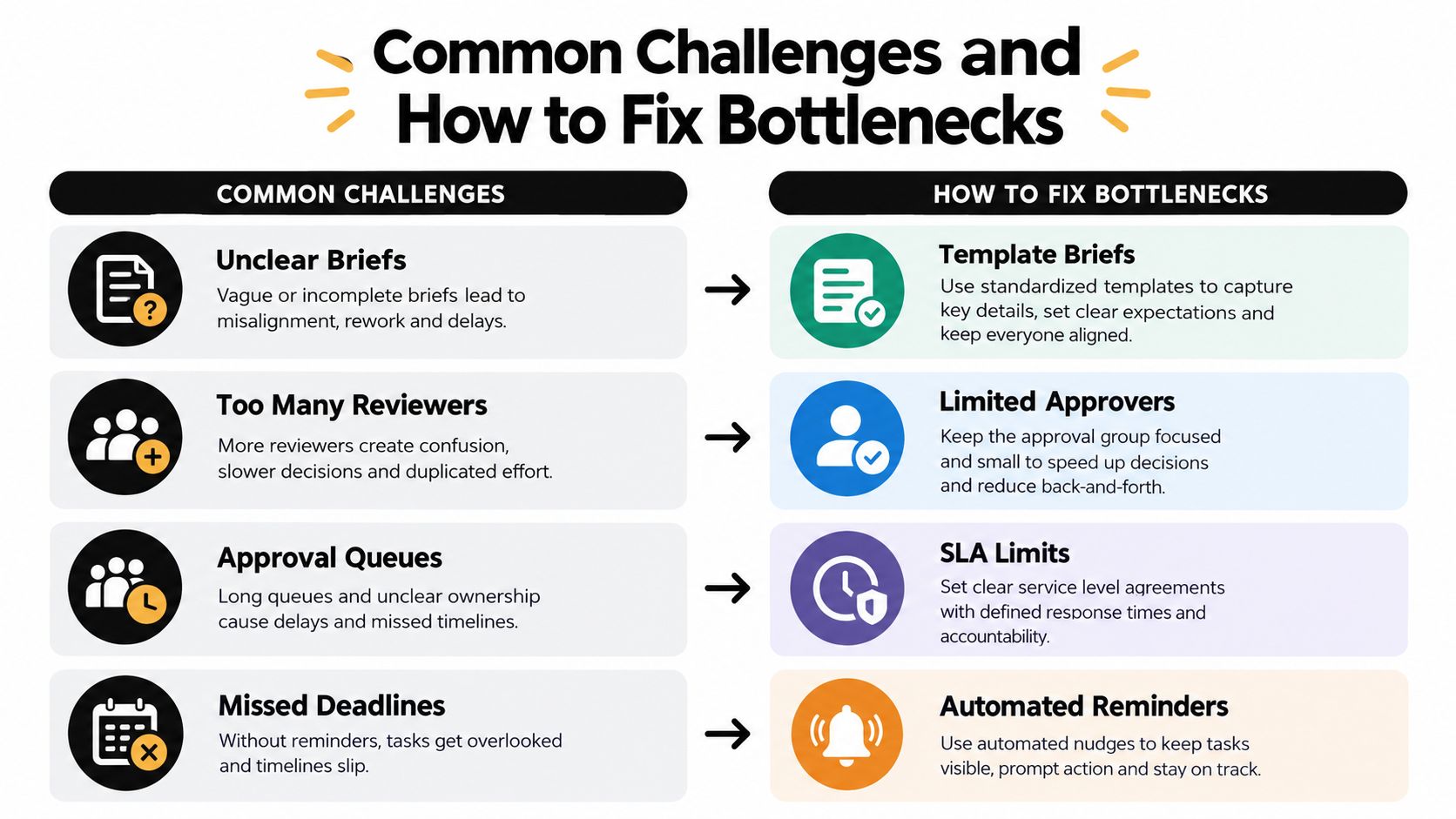
Most workflow pain shows up in the same few places. The symptoms look different, but the root causes are usually familiar: unclear direction, too many opinions, slow approvals, or invisible slippage.
Unclear briefs
When a piece comes back from review with large structural changes, the problem often started before writing.
A weak brief leaves the writer guessing about audience, angle, format, evidence, and approval needs. The editor then spends review time correcting direction rather than improving execution.
Fix it with a brief template that includes purpose, audience, key points, references, format, and approver notes. If rework keeps repeating, inspect the brief before blaming the draft.
Too many reviewers
More reviewers don't automatically create better content. They often create slower content.
When several stakeholders review the same draft without a defined role, feedback becomes overlapping or contradictory. The writer starts reconciling politics instead of improving clarity. A smaller review group with clear responsibilities usually works better than an open invitation.
Use a capped approver list. Decide who edits for quality, who checks for subject accuracy, and who has final sign-off. Those are different jobs.
Approval queues
Many teams lose the most time here.
Independent workflow research cited in a 2026 content operations survey found that 43% of organizations reported having fully mature, efficient workflows, while 48% of teams with advanced workflows reported significant ROI gains. The same overview notes that a separate 2023 industry review found only 21% of respondents described their workflows as very efficient, according to Canto's state of digital content overview. Mature workflow practice is still not the default, and approval governance is a big reason.
Watch how long content waits between “ready for approval” and “approved.” If that stage stays full, don't just push writers to move faster. Reduce reviewer count, add reminders, and define what qualifies a piece to enter approval in the first place.
Missed deadlines
Missed publish dates are often a downstream symptom.
If briefs are vague, reviewers are many, and approvals are slow, the deadline was at risk long before publication week. That's why editors should measure where time accumulates, not just whether the final date slipped.
A simple troubleshooting grid helps:
| Bottleneck | What it usually means | Practical fix |
|---|---|---|
| Repeated heavy rewrites | The brief was too loose | Tighten the brief template |
| Conflicting comments | Reviewer roles are unclear | Limit and define approvers |
| Long idle time in approval | No response window or reminder | Add SLA-style deadlines and nudges |
| Last-minute publish panic | Delay happened upstream | Review stage timing, not just launch day |
When review rounds keep multiplying, don't assume the team is being thorough. Often, the process is asking the content to solve for unclear decisions.
Real World Examples and What to Do Next
A managing editor working with freelancers needs a different setup than a campaign team or a publisher. But the core workflow principles stay the same.
A freelancer network needs clean briefs, visible due dates, and one place for revisions. A marketing team juggling campaigns needs ownership across writers, brand reviewers, and channel leads. A publisher handling multiple formats needs a repeatable status system so articles, newsletters, and feature packages don't disappear into custom side processes.
The common thread is simple. Good workflow management turns editorial work into observable movement. You can tell what's planned, what's blocked, what's approved, and what shipped. And you can learn from what shipped.
That final part often gets overlooked. Planning shouldn't end at publication. Teams should use published output and performance patterns to inform what enters the pipeline next. If certain topics or formats consistently earn stronger editorial confidence or audience response, that should shape future planning. Workflow isn't just about moving content out. It's also about feeding lessons back in.
If you want a practical model for that end-to-end flow, this guide to an editorial workflow from idea to published without the chaos is a helpful next read.
A good next step this week is to keep it modest:
- Map your current stages using the labels your team already uses.
- Assign one owner to each active stage.
- Cap reviewers so approval doesn't sprawl.
- Attach feedback to the asset instead of letting it scatter.
- Review one month of delays and ask where the handoff failed.
That's enough to make the workflow visible. Once you can see it, you can improve it.
TheContentMap gives editorial teams one place to capture ideas, schedule publishing, assign owners, track workflow stages, and learn from what's already been published. If you want a calmer way to manage handoffs, deadlines, and approval flow without stitching together spreadsheets and chat, visit TheContentMap.
Related Articles
Content Marketing Workflow for Editorial Teams
83% of marketing leaders wanted to streamline workflows and reduce the number of technology solution...
SoftwareTagging Ideas for Editorial Teams: A Practical Guide
You're in a planning meeting, looking for ideas about pricing. One editor used pricing, another...
SoftwareContent Calendar Planning: A Step-by-Step Guide for 2026
Your calendar looks full, but next week's article is still waiting for product approval. A write...
Comments (0)
No comments yet. Be the first to share your thoughts.