Change Control Process for Content Teams
Learn a reliable change control process for content operations, including core steps, roles, templates, and best practices editors use
The calendar looked fine at 9 a.m. By lunch, one untracked date move had become an ownership dispute, two writers were working from different versions of the plan, and the launch had turned into a chain of apologetic messages no one wanted to send. That's usually how editorial chaos starts, not with a dramatic failure, but with one small change that never got tied back to the plan.
A change control process exists to stop that slide. In large programs, formal change control grew out of the need to prevent scope, cost, and requirement drift, and the same logic applies to content work when deadlines, owners, or distribution plans shift [historical overview]. In a content team, the point isn't paperwork. It's making sure the calendar still means what everyone thinks it means.
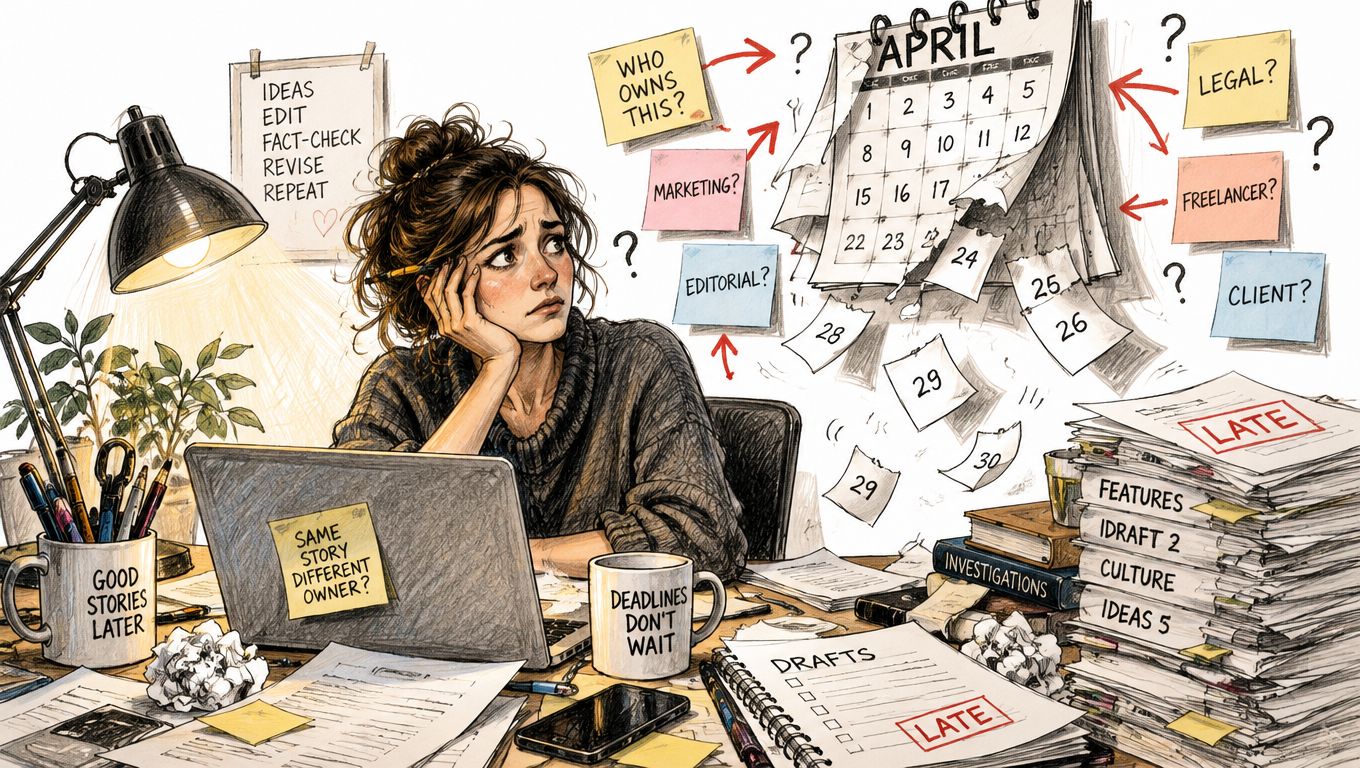
Table of Contents
- The Tuesday the Calendar Stopped Working
- What a Change Control Process Actually Does
- The Core Stages of an Editorial Change
- Roles and Ownership in Editorial Changes
- Risk-Based Lanes for Routine and High-Impact Changes
- A Practical Change Request Template and Verification Checklist
- Measuring Whether Change Control Improves Outcomes
- Common Misconceptions and Best Practices Editors Can Adopt This Week
The Tuesday the Calendar Stopped Working
The first sign was harmless. Someone moved a publish date in a spreadsheet so a launch could “just breathe” for a day. Nobody wrote down who changed it, why it changed, or whether the designer and social lead had seen it. By afternoon, the writer was polishing copy for the old date, the editor was chasing approvals for the new one, and the campaign owner was asking why the teaser email had gone out against the wrong asset set.
That's the kind of mess a change control process is built to prevent. The problem wasn't the date move itself. The problem was that the calendar stopped being a trusted baseline and became a pile of silent edits.
If you've ever had a team argue over which version was current, you already know why this matters. An editorial plan only works when people can see what changed, who approved it, and what the active version is now. A disciplined workflow inside a tool such as TheContentMap editorial calendar guide gives that work a home, so changes don't disappear into chat threads or half-updated sheets.
Practical rule: if a change can affect another person's deadline, you need a record, not a casual update.
The rest of this topic is simple in principle, even if teams make it complicated in practice. Treat every meaningful change as something that needs to be requested, reviewed, recorded, and verified. That's how you keep the calendar from lying to you.
What a Change Control Process Actually Does
A change control process is the way a team moves dates, owners, workflow states, or campaign scope without losing the thread. It isn't the same thing as an approval queue. It's the system that keeps a content plan tied to a known version, so you can always tell what was active when something moved, stalled, or published.
Why ad-hoc edits break trust
A spreadsheet edit by itself tells you almost nothing. It may show the new date, but not the reason, the approver, or the downstream effect on the rest of the launch. That's why ad-hoc edits feel fast in the moment and expensive later. They create uncertainty for everyone who depends on the plan.
A controlled process starts with the opposite assumption. The change gets linked to a baseline, which is the agreed reference point for the schedule, ownership, and workflow state. Once that baseline exists, an approved modification becomes traceable instead of mysterious.
The same idea shows up in quality and governance standards. ISO 10007 treats change control as part of a larger configuration-management system, and that system includes planning, identification, control, status accounting, and audit [ISO 10007]. For editorial work, that means the plan, the workflow, and the ownership model are all part of the record, not just the calendar entry you happen to see today.
How this connects to goals
When a content team thinks about aligning change with OKRs, the central question is whether a change supports the target or undermines it. A date move, a new owner, or a scope expansion can all be valid. What matters is that the decision is visible and tied to the active baseline.
A good change process protects the team from accidental drift, not intentional adjustment.
That's why this discipline works best when the workflow is clear enough for editors and stakeholders to follow without translation. The goal is simple, the current version of the plan should always be recoverable.
The Core Stages of an Editorial Change
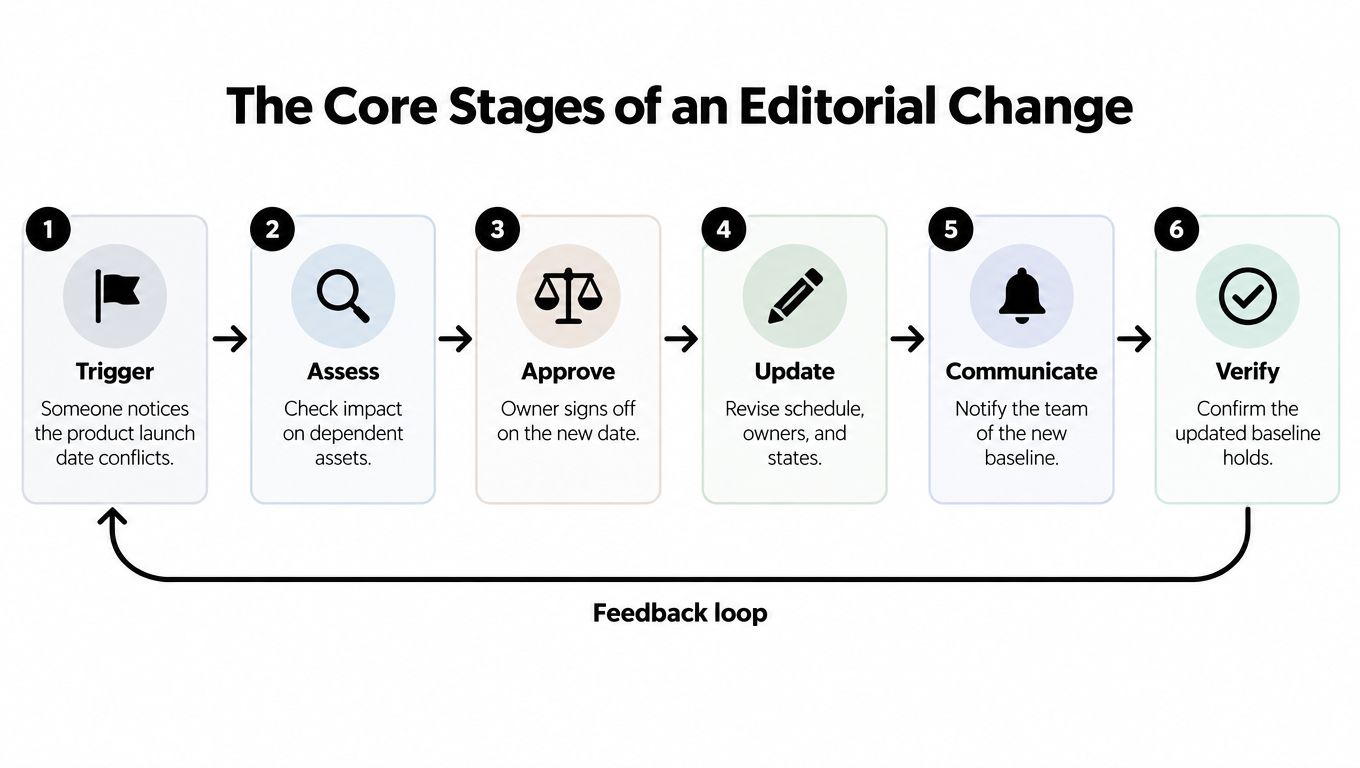
One writer flags a conflict. The product launch can't keep its current date because a required asset won't be ready. The request moves into review, and the managing editor checks what else depends on that date, including social scheduling, design handoff, and stakeholder sign-off. Then the owner approves the change, the calendar gets updated, the team gets notified, and someone checks that the new baseline holds.
From request to verification
The first artifact is the request itself. It should say what's changing and why. Then comes the impact review, where the team looks at dependencies and trade-offs before anyone commits. After that, approval gives the change authority, implementation updates the plan, communication tells the team which version is now current, and verification confirms the new plan didn't break something else.
This logic appears in project-management guidance as a move from request initiation through assessment, analysis, implementation, and closure [Asana on change control]. In editorial work, the story is the same, but the objects are dates, owners, states, and distribution channels instead of code releases.
What each stage produces
A request should produce a clear record. Assessment should produce a practical view of impact. Approval should produce a decision, not a vague consensus. Implementation should update the live schedule and workflow state. Communication should prevent people from working off stale information. Verification should confirm the change didn't create a new conflict.
Use that sequence any time the change affects more than one person or more than one asset. A launch delay, an ownership swap, or a new channel expansion all need the same backbone. The form may differ, but the discipline doesn't.
If the team can't tell whether a change is proposed, approved, or live, the process isn't working yet.
For teams that want a structured editorial workflow, content workflow management is the natural companion to this stage model. The process only helps when the software can show the current state as clearly as the people can discuss it.
Roles and Ownership in Editorial Changes
A change usually gets blamed on “the team,” which is another way of saying nobody owned the handoff. In practice, seven roles tend to touch an editorial change, even if a small team folds several of them into one person. The point isn't to create more bureaucracy. It's to make sure each stage has an owner so the change doesn't drift between chairs.
| Editorial Change Role | Primary Responsibility | Artifact Produced |
|---|---|---|
| Requester | Flags the issue and explains what needs to change | Change request |
| Managing editor | Triage, prioritizes, and routes the request | Initial review note |
| Impact reviewer | Checks dependency, brand, legal, or SEO risk | Impact assessment |
| Approver | Grants or rejects the change | Decision record |
| Implementer | Updates the calendar, owner, or workflow state | Revised baseline |
| Communicator | Tells the team which version is current | Team notice |
| Verifier | Confirms the new state matches the approved change | Verification note |
The role teams forget most often
The missing role is usually the verifier. Teams assign someone to update the calendar, but nobody is explicitly responsible for checking that the updated baseline matches the approval. That's where stale assumptions survive. A change can look complete in the tool and still be wrong in practice.
A managing editor often becomes the traffic cop for the whole flow, but the best teams still name the owner for each handoff. Request, review, approval, implementation, and verification each need a clear answer to one question, who owns this now?
Clear ownership turns a change from a conversation into a managed handoff.
This approval workflow guide is a useful companion when you're mapping who signs off on what. Approval and change control overlap, but they're not the same. Approval says yes or no. Change control makes sure the yes lands in the right place.
Risk-Based Lanes for Routine and High-Impact Changes
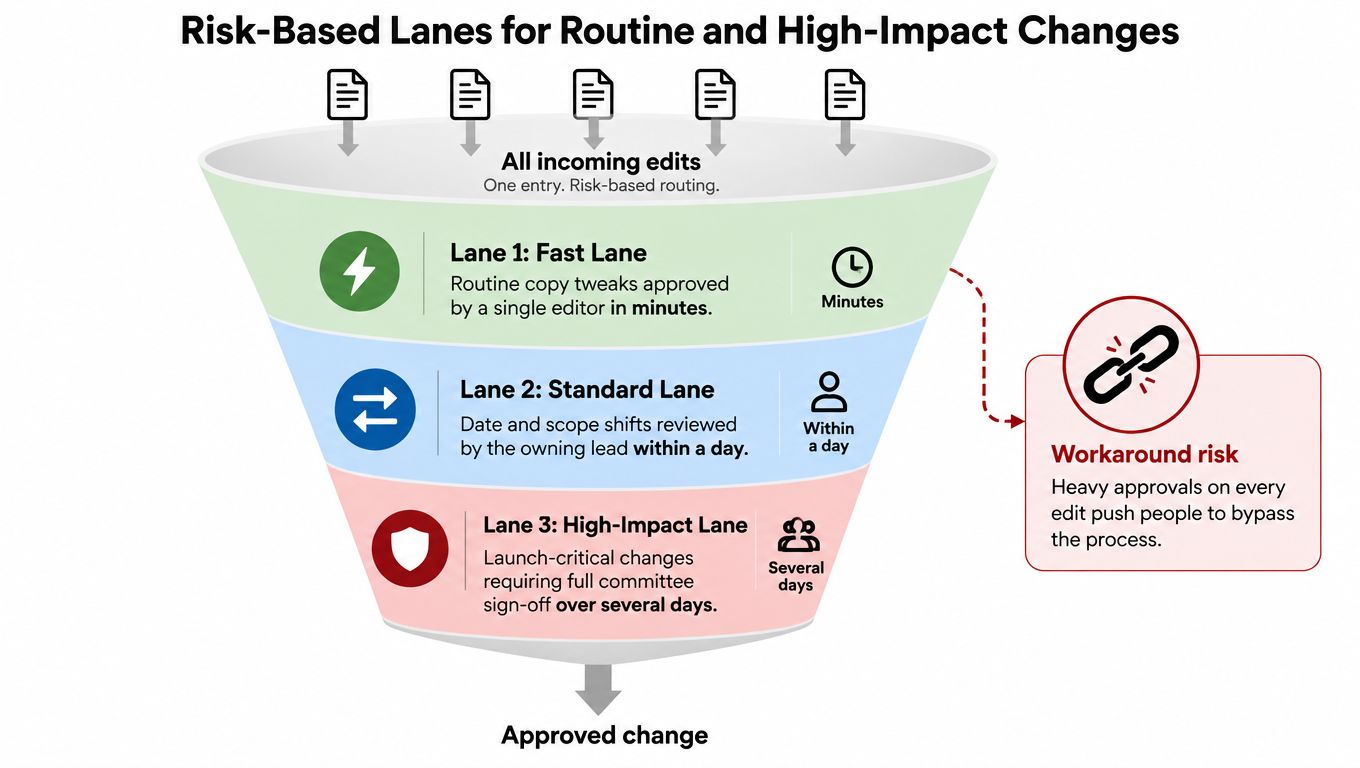
The fastest way to break a change control process is to force every edit through the same heavy gate. Editors then start bypassing the process for routine fixes, and the system loses credibility. Strong control is not about more approvals. It's about using the right lane for the risk.
Three lanes that match editorial reality
A Fast Lane works for routine copy fixes, label corrections, or other low-risk changes that don't affect shared dependencies. A Standard Lane fits date shifts, owner changes, or moderate scope changes that need a single approver and a quick impact check. A High-Impact Lane is for shared workflow states, permissions, integrations, or launch-critical changes that affect several teams and need broader review.
The criteria should be based on audience reach, legal exposure, SEO impact, and reversibility. A headline typo is easy to reverse. Changing a publishing integration or a shared state is not. That distinction matters more than whether the edit happened in a calendar field or a content brief.
Why lanes reduce workarounds
NIST-style change control guidance emphasizes identifying which changes need control, evaluating impact, recording the decision, implementing only approved changes, retaining records, and monitoring what happens next [NIST CM-3 guidance]. It also leaves room for risk-based handling instead of identical scrutiny for every update. That's the important editorial lesson.
If the process is too heavy, people start making “temporary” edits that never get logged. If the process is too loose, the team can't tell which version is current. Configurable permissions and delegated approvals in an editorial-planning platform can route these lanes automatically, which beats relying on memory every time the calendar shifts.
Heavy approvals on every change don't create control, they create escape routes.
For teams using TheContentMap or similar tools, the best setup is simple. Let low-risk edits move quickly. Route medium-risk changes to the owning lead. Escalate only the changes that can disrupt publication behavior or shared ownership.
A Practical Change Request Template and Verification Checklist
A useful template does two things at once. It forces the requester to think clearly, and it gives the approver enough context to decide without chasing missing facts. If you want to know how teams manage change requests in a practical way, this change request form guide is a helpful reference point for the structure, even if your editorial fields are different.
Template fields worth capturing
A strong change request should capture the requester, the reason for the change, the items affected, the dependencies, the implementation owner, the target release or publish window, the rollback approach, and the verification method. Those fields are enough to handle common editorial examples like rescheduling a launch, reassigning a writer mid-cycle, or expanding a campaign to a new channel.
Use plain language. “Move launch because the final asset is late” is better than a vague note that says “update timing.” The clearer the request, the less time the approver wastes trying to reconstruct the problem.
A short verification checklist
Before closing the change, confirm the updated date is live, the owner field is correct, the workflow status matches the approved state, the impacted stakeholders were notified, and the item no longer conflicts with adjacent commitments. If something in the system still reflects the old baseline, the change isn't finished.
A lightweight template can be enough for routine changes, while a higher-risk item may need extra notes, review evidence, or sign-off details. The key is consistency. Once the record exists, the team can see who approved it, who implemented it, and whether the outcome matched the request.
The payoff is traceability without extra admin. Editors spend less time reconstructing the history of a change because the history was captured when the change happened.
Measuring Whether Change Control Improves Outcomes
A change process that only proves compliance is half a system. The better question is whether it makes editorial work more reliable. That means tracking outcomes, not just approvals.
Metrics that show signal, not noise
Start with the percentage of changes implemented as planned. If requests are approved but keep slipping in execution, the process is missing something. Track rollback or correction frequency to see whether approved changes are causing downstream problems. Measure stakeholder wait time from request to approval to find bottlenecks that slow the team down.
On the editorial side, add on-time publication after a change and correction volume after publication. Those two signals tell you whether the change was well controlled or merely processed. You can also review how often a change creates a conflict with another commitment, because that's the kind of failure the calendar should catch early.
The point is not to flood the team with dashboards. It's to connect records to outcomes so you can tell the difference between a strategic adjustment and an avoidable failure. NIST guidance explicitly calls for monitoring and reviewing change activity, and that review only becomes useful when the team agrees on what success looks like [NIST SP 1301].
If you don't measure post-change outcomes, every approval looks equally successful.
When teams review these metrics together, the conversation gets sharper. A slow approval might be acceptable if it prevented a bad launch. A fast approval that caused rework is a process problem. That distinction turns change control into a learning loop.
Common Misconceptions and Best Practices Editors Can Adopt This Week
More approvals don't automatically mean stronger control. In editorial work, they often mean the opposite, slower decisions, more workarounds, and more untracked edits. The goal is reliable publication, not perfect paperwork.
What to do and what to avoid
- Do assign one owner per change: someone should own the request, the implementation, and the verification.
- Do set approval thresholds by risk class: use audience reach, reversibility, legal exposure, and SEO impact to route the work.
- Do keep a visible baseline: the team should know which date, owner, and workflow state is current.
- Don't send every edit through the same queue: routine corrections should not wait behind launch-critical items.
- Don't treat approval as completion: the change isn't done until the live plan matches the approved one.
- Don't let reminders live only in one person's head: use publish reminders and shared workflow signals so deadlines stay visible.
A recurring 30-minute review slot is enough for many teams to catch drift before it spreads. Put the change log, the active calendar, and the verification notes in that meeting. Small habits keep the process light, which is exactly what prevents workarounds.
The best change control process is the one editors can follow on a busy Tuesday. It should protect the plan, reduce confusion, and keep people publishing without stepping on each other.
If your team is still managing changes in scattered docs, shared sheets, and memory, TheContentMap gives you a single editorial workspace where calendars, owners, workflow states, and reminders stay connected. Visit TheContentMap to see how a structured editorial plan can keep changes traceable without turning routine edits into a bottleneck.
Related Articles
Marketing Campaign Workflow Teams Can Run in 2026
A campaign rarely fails because nobody had an idea. It fails because the idea sat in review, the lan...
SoftwareContent Marketing Workflow for Editorial Teams
83% of marketing leaders wanted to streamline workflows and reduce the number of technology solution...
SoftwareTagging Ideas for Editorial Teams: A Practical Guide
You're in a planning meeting, looking for ideas about pricing. One editor used pricing, another...
Comments (0)
No comments yet. Be the first to share your thoughts.