24 Hour Schedule Template: Build a Full-Day Plan
Learn how to create an effective 24 hour schedule with this practical template. Includes step-by-step instructions, real examples, and tips for productivity.
A 24-hour schedule works when every shift has an owner, a status, and a next action. A paper calendar that only shows times will miss stalled articles, while a closed-loop workflow keeps the piece moving from idea to publish.
You know the scene. The calendar looks full, the deadline is on the board, and still one story is waiting on a source check, another is stuck in review, and a third is “almost ready” for two days straight. The problem usually isn't the clock. It's that the schedule tracks publication slots, but not the work needed to reach them.
Table of Contents
- Why Most Schedules Fail Before They Begin
- The Five Control Points of a Reliable Schedule
- Calendar View versus Pipeline View
- Tools That Support the Workflow
- Monitoring Completion and Adapting
Why Most Schedules Fail Before They Begin
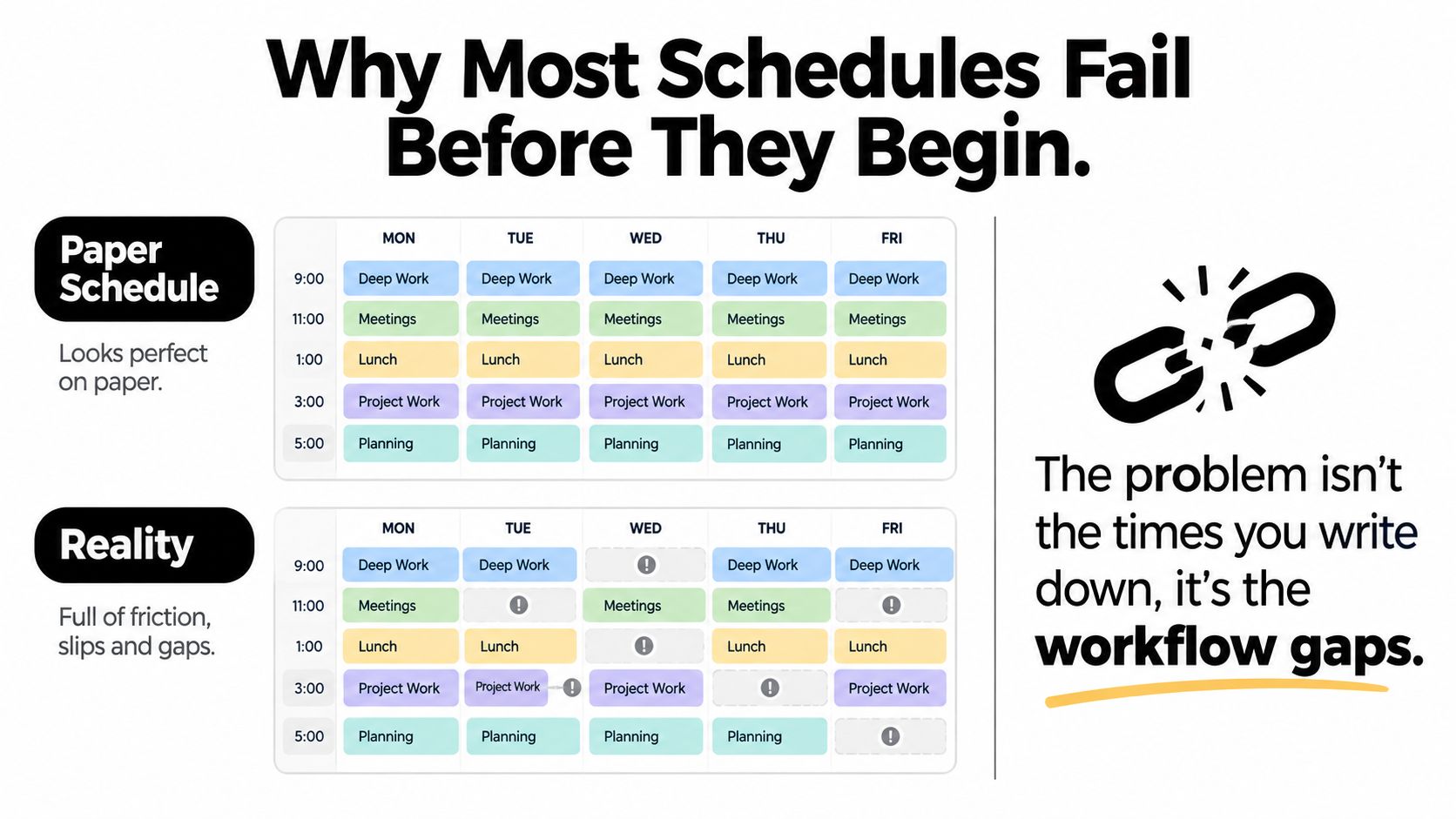
A lot of editorial calendars fail for the same reason a polished production board fails. They describe intentions, not movement. The date is there, the slot is there, and everyone assumes the article will move through drafting, review, and approval without friction. In a newsroom, that assumption gets punished fast.
Interruption is the warning sign. Observational research on professional schedulers found that 25.2% of tasks started were interrupted before completion (Springer). If a calendar records only publication time, but not ownership, dependencies, and what happens when a task slips, it will always look more reliable than it really is.
Common schedule breakdowns
| Failure Mode | Symptom | Root Cause |
|---|---|---|
| Unowned draft | Nobody knows who should finish it | Assignment was never made explicit |
| Stalled review | Article sits for days after draft delivery | Approval window wasn't reserved |
| Missed handoff | The next editor assumes someone else has it | Status wasn't updated at the transition |
| Phantom readiness | “Ready” item doesn't actually publish | Verification step was missing |
| Deadline drift | Slot gets pushed again and again | No recovery action was defined |
Practical rule: if a piece can't be named, owned, and advanced in one glance, it is still a hope, not a schedule.
A closed-loop workflow fixes that gap. The schedule begins with intake, moves through drafting and review, and ends only when the piece is confirmed live and performance data returns to planning. A list of times cannot do that. A workflow can.
The Five Control Points of a Reliable Schedule
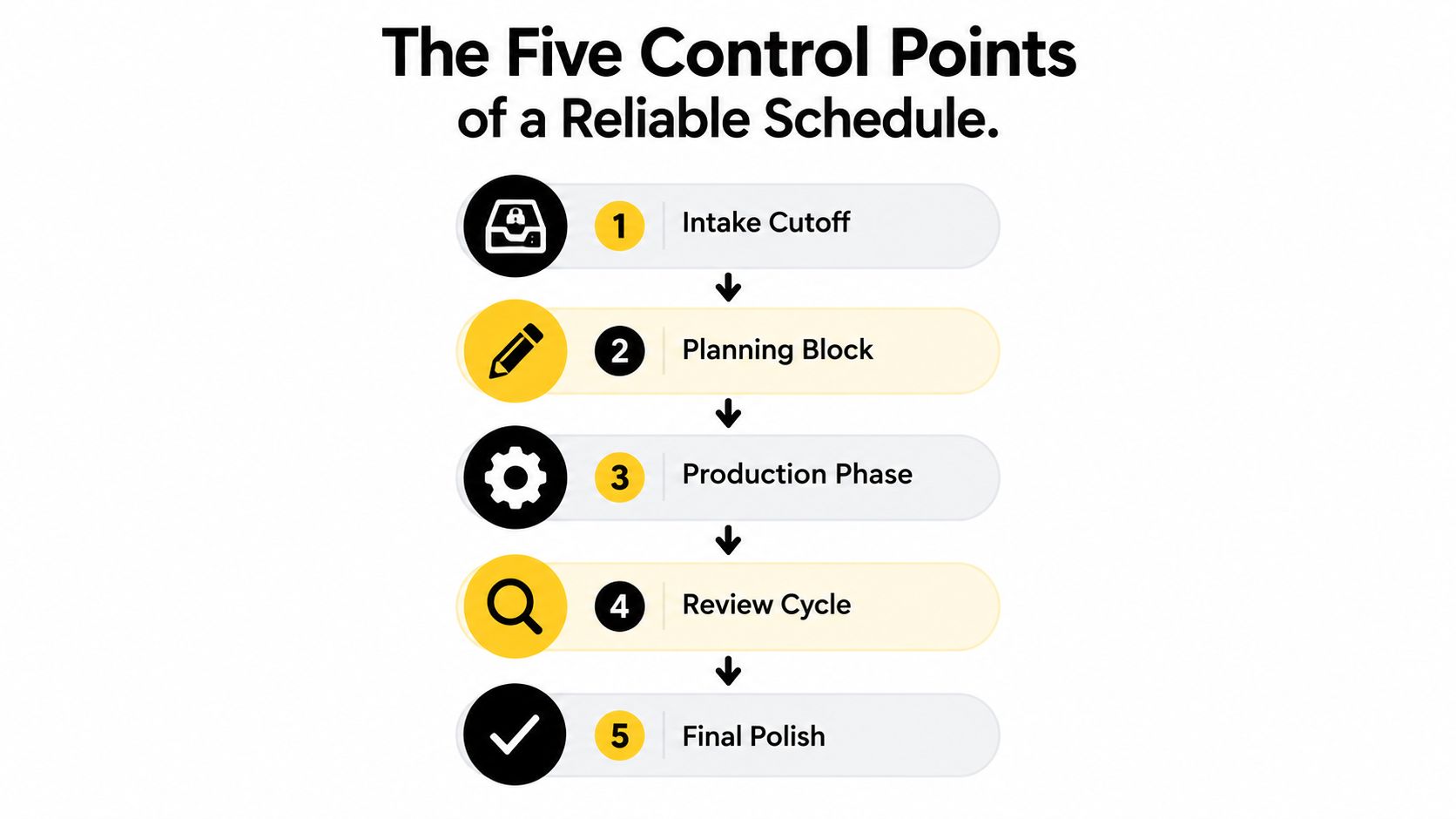
A solid editorial day is easier to manage when it has clear control points. Each one creates a decision boundary, and that boundary prevents random requests from wrecking production rhythm.
Intake cutoff and planning block
The first control point is intake cutoff. New pitches, late requests, and surprise assignments need a stop point, otherwise the team keeps reopening decisions that should already be closed. In practice, that means one person decides what enters the day and what waits for the next cycle.
The second point is the planning block. The editor ranks work here by deadline, effort, and business value. If every item is treated as equally urgent, the day turns into triage. If the plan is explicit, the team knows what wins when time runs short.
Production, review, and verification
The third point is production time. Writers need uninterrupted drafting blocks if the schedule is supposed to hold. Meetings, approval comments, and Slack pings belong outside that window unless the item is truly blocked.
The fourth point is the review window. Editors should know exactly when feedback happens, because review that drifts all day creates a hidden queue. A clean handoff includes the source checks, the open questions, and the next owner.
The fifth point is publication verification. A story isn't scheduled successfully because it “should be ready.” It's scheduled successfully when someone confirms the piece is live, formatted correctly, and attached to the right slot. That last step closes the loop.
Don't let one stage borrow time from the next without writing down what got delayed and who owns the cleanup.
A useful operating rule is simple. Every item should have one owner, one current status, one next action, and one reason if it misses the planned slot. Once those four fields exist, the schedule starts acting like a system instead of a wish list.
Calendar View versus Pipeline View
A calendar view is good at one thing, showing when something should go live. That makes it useful for deadlines, launch coordination, and audience timing. It becomes weak the moment you need to know why a story isn't moving.
A pipeline view solves that blind spot. Instead of hiding work inside a date cell, it shows articles as cards moving through stages like idea, assigned, drafting, review, approved, and published. That's the view I trust when a newsroom is under pressure, because stalled work is visible before the deadline collapses.
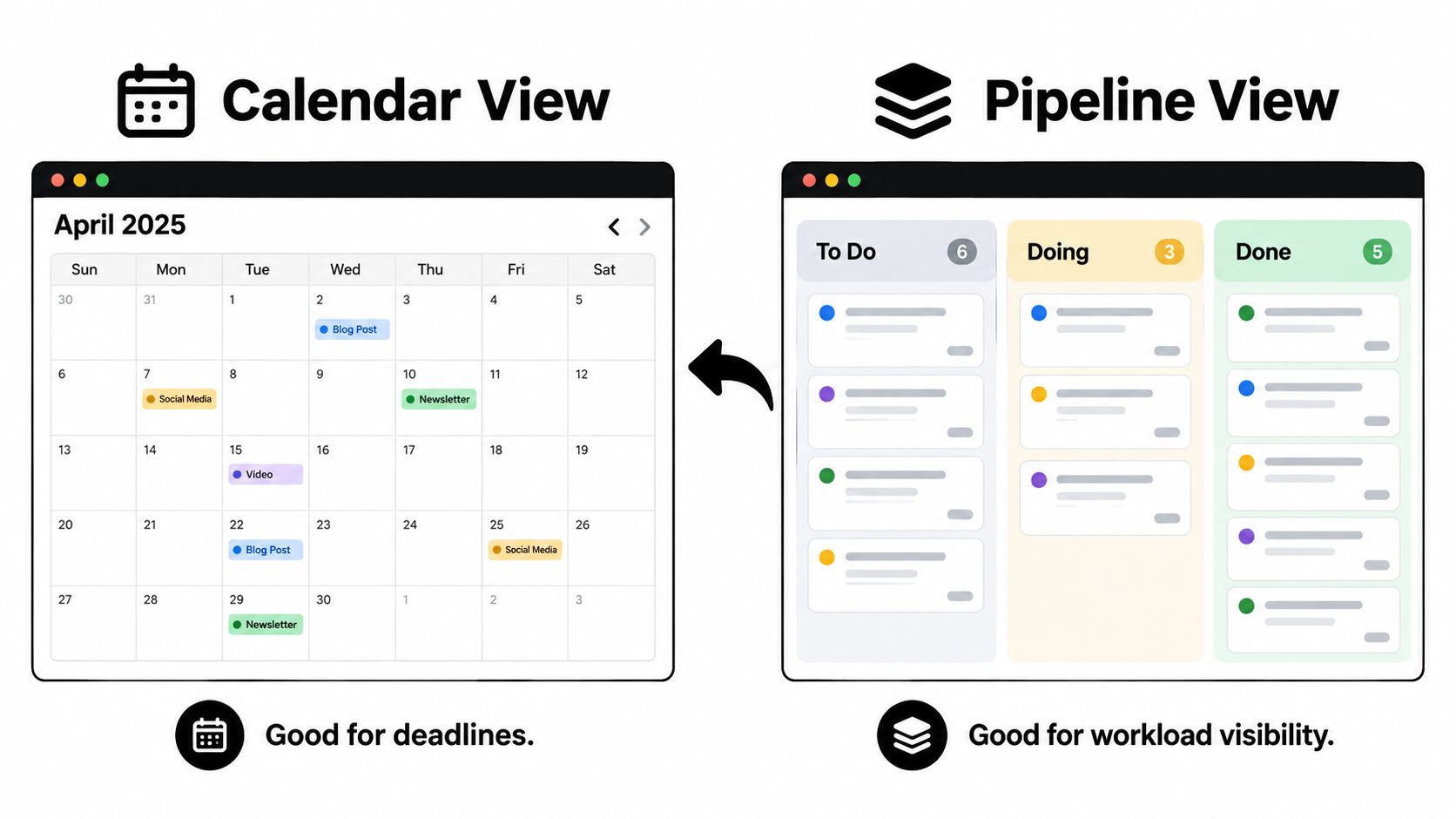
The two views work best together. A calendar tells the team what the audience should see and when. The pipeline tells editors what is moving, what is blocked, and what needs attention right now.
That's why a strong editorial setup keeps the calendar as the deadline surface and the pipeline as the production surface. If you want a deeper reference on how the calendar side works, see what an editorial calendar is.
For teams building around shared coverage and mixed responsibilities, it also helps to think beyond pure scheduling and plan the people layer too. Resources like hire sdrs can be useful when you're comparing how teams allocate ownership across roles and workloads, especially when deadlines depend on reliable handoffs.
If you're comparing operating models, the question isn't which view is better. It's which view answers the question you're asking. For day-to-day production, the pipeline wins. For weekly commitment setting, the calendar still matters.
Tools That Support the Workflow
A schedule only works if people can update it fast enough to keep reality visible. Spreadsheets are fine when the editorial load is light, but they get clumsy once ownership, comments, reminders, and stage tracking all matter at the same time. The more moving parts you have, the more a static sheet starts lying by omission.
What the tool has to do well
The first requirement is assignment visibility. Everyone should see who owns the item right now, not who touched it last week. The second is comment threading, because review feedback gets lost when it lives in scattered messages and email replies.
The third is deadline reminders. If a deadline only exists in somebody's memory, it doesn't exist reliably. The fourth is performance insight, because planning improves when editors can see which topics, formats, and channels made it out on time and into the world.
TheContentMap is built around that editorial reality, with calendar planning, workflow visibility, collaboration, and insights aimed at content teams rather than generic project work. If you want a broader list of adjacent tools to compare against, OGTool's content marketing picks can help you benchmark what's common in the category.
| Feature | Importance | Common Implementation |
|---|---|---|
| Drag-and-drop scheduling | High | Move items between dates or stages |
| Status tracking | High | To do, drafting, review, published |
| Ownership assignment | High | Single accountable editor or writer |
| Comment threading | Medium | Notes attached to the article card |
| Automated reminders | High | Deadline alerts before the slot arrives |
| Performance insights | Medium | Views of published content by topic |
| Topic and tag libraries | Medium | Group work by campaign or channel |
| Access controls | Medium | Permissions by role or team |
For a closer look at operational workflows, see content scheduling apps. That's where the difference shows up, not in how pretty the calendar looks, but in how quickly the team can recover when a draft slips.
Monitoring Completion and Adapting
A schedule gets trustworthy only when you measure whether it finishes what it starts. That sounds obvious, but many teams keep planning from the same calendar even after the same bottlenecks keep repeating. The fix is to review completion by slot and stage, not just count how many items were “in the system.”
Track the right signals
At minimum, watch four things, on-time publication, items blocked in review, average age of overdue work, and interruption-related rescheduling. Those signals show where the delay lives. If writing is the bottleneck, the draft stage will back up. If approvals are the problem, review age will rise while drafts pile up.
The idea of a closed-loop system matters most here. Your schedule should collect performance data and feed it into the next planning cycle, so the next week reflects what happened. If you keep scheduling as if every hour were interchangeable, you'll keep repeating the same miss patterns.
The strongest editorial teams review the week in plain language. What got published on time. What got stuck. Which handoffs broke. Which items were overpromised. That kind of review isn't about blame, it's about identifying whether the fix is more writing time, a tighter approval window, or a different handoff rule.
TheContentMap's content workflow management perspective fits this discipline because workflow isn't separate from scheduling, it's what makes scheduling real. A calendar without feedback is just a record of intentions.
Manage the next cycle from the evidence of the last one, not from the optimism of the one before it.
That's also how you keep the team honest about recovery time. When interruptions keep forcing reschedules, the answer isn't always to push harder. Sometimes the schedule needs fewer live commitments, clearer cutoffs, or more buffer between review and publication.
If your 24-hour schedule is still running on dates alone, fix that now. Build a workflow where every item has an owner, a status, and a verification step, then test it against missed handoffs and review stalls. If you want a platform designed for that kind of editorial control, visit TheContentMap and see how it handles scheduling, workflow, and performance in one place.
Related Articles
Seat Management for Editorial Teams in 2026
Your editorial calendar is full, a legal approval is holding up publication, and finance wants to kn...
SoftwareMarketing Campaign Workflow Teams Can Run in 2026
A campaign rarely fails because nobody had an idea. It fails because the idea sat in review, the lan...
SoftwareContent Marketing Workflow for Editorial Teams
83% of marketing leaders wanted to streamline workflows and reduce the number of technology solution...
Comments (0)
No comments yet. Be the first to share your thoughts.