What Is an Editorial Calendar and How Teams Use It
Learn what is an editorial calendar, its core components, benefits, and real examples to help your team plan, assign, and publish content consistently.
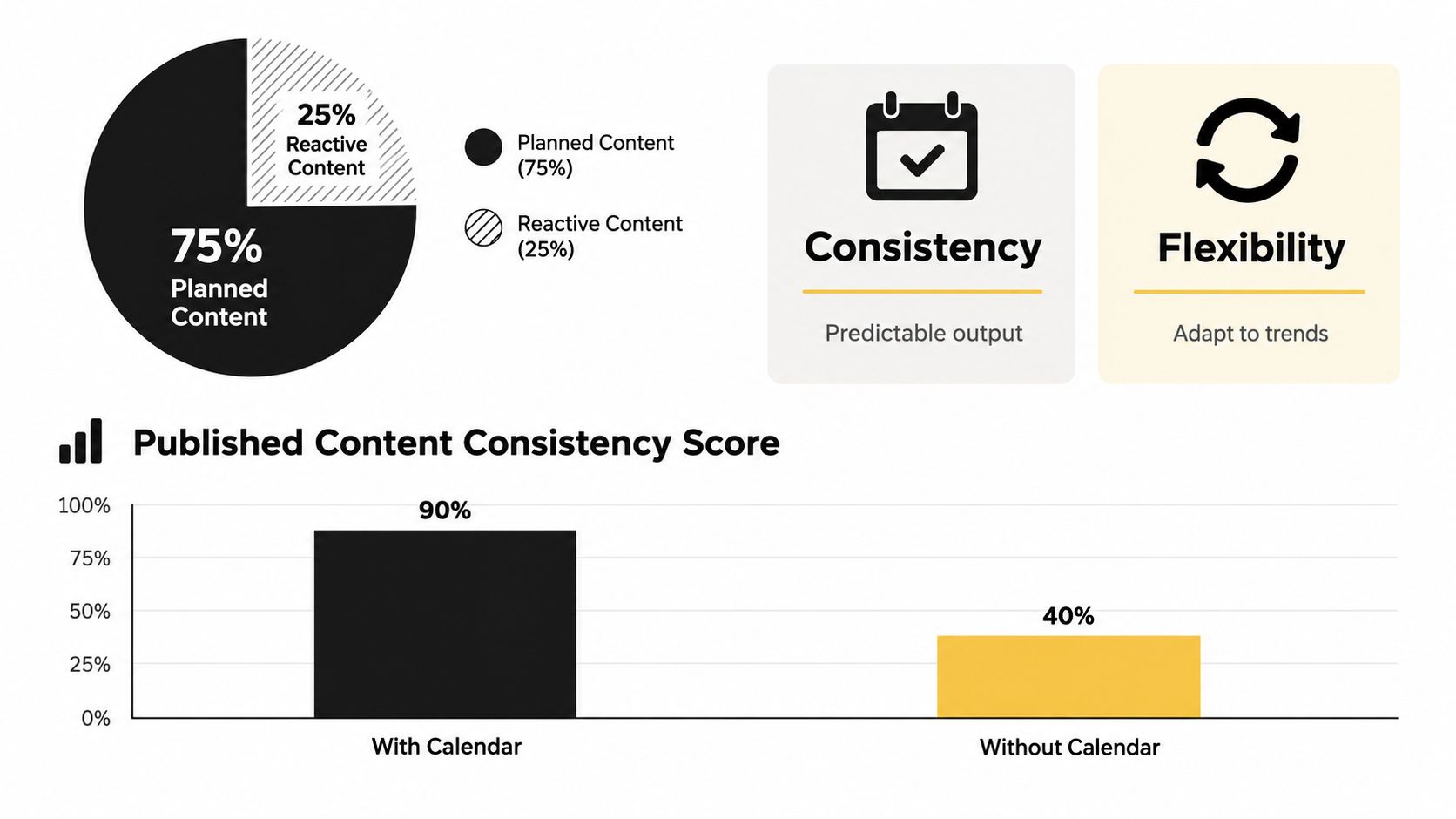
An editorial calendar is a planning system that organizes what content will be published, when, where, by whom, and at what workflow stage. Strong content operations keep approximately 75–80% of output preplanned and reserve 20–25% for timely or reactive work.
Your team may already have plenty of ideas. They may live in shared documents, chat messages, meeting notes, and a spreadsheet with dates that nobody updates. A writer thinks an article is waiting for review, the editor believes it's still being drafted, and the social manager discovers the launch date after the campaign has already started.
That confusion doesn't usually come from a lack of effort. It comes from treating publishing as a list of dates instead of a coordinated production system. A reliable calendar makes the work visible, assigns responsibility, and shows what must happen before content can move forward.
Table of Contents
- Introduction Why Content Teams Lose Track Without a System
- What an Editorial Calendar Really Is and How It Differs
- Core Components That Make an Editorial Calendar Work
- How Editorial Teams Move Content From Idea to Published
- Why Editorial Calendars Improve Consistency and Flexibility
- Real World Examples of Editorial Calendars in Action
- Putting Your Editorial Calendar Into Practice
Introduction Why Content Teams Lose Track Without a System
A small content team often starts with an informal process. Someone captures an idea in a document, another person adds a deadline to a spreadsheet, and an editor keeps approval notes in email. Each piece of information makes sense on its own. Together, they create a fragmented workflow.
The trouble becomes obvious when several content types overlap. A blog post needs a draft, an editor, a search review, images, and social promotion. A newsletter may depend on that blog post. A campaign page may need approval from someone outside the content team. If those relationships aren't visible, one delayed task can disrupt everything connected to it.
Core definition: An editorial calendar organizes content production and distribution over time, including the topic, channel, date, responsible person, and current workflow stage.
That definition is more useful than “a calendar for posts” because it explains the operational job. The calendar connects strategy with the people and actions required to publish. A neutral overview of the concept describes editorial calendars as planning documents that organize content production and distribution, including dates, channels, and responsible people, as documented in this overview of what is an editorial calendar.
The problem is usually the handoff
Suppose Maya writes a draft, but nobody knows whether Leo or Priya owns the review. The publish date appears in a spreadsheet, but the draft link is missing. The social post has an owner, yet the person creating it doesn't know which version of the article is final.
A date grid can't answer those questions. A working editorial calendar can. It gives every item a home, an owner, a stage, and a next action.
The aim isn't to create bureaucracy. It's to replace repeated status meetings and guesswork with a shared operating picture. By the end of this guide, you'll be able to define the calendar accurately, identify the fields it needs, trace content through its handoffs, and set capacity without filling every available slot.
What an Editorial Calendar Really Is and How It Differs
Editorial calendars began in traditional publishing. Newspapers and magazines used them to plan issues weeks or months in advance, coordinating authors, editors, deadlines, and recurring content around a fixed publication schedule. The concept isn't a modern marketing invention. It solves an old coordination problem that still appears in blogs, newsletters, podcasts, social channels, and campaign programs, as described in the history and definition of editorial calendars.
A useful modern definition has two parts:
- It plans content over time. The team can see upcoming topics, publication dates, channels, and themes.
- It coordinates production. The team can see who owns each task, what stage the work has reached, and what needs to happen next.
That second part separates an editorial calendar from a simple publishing schedule. A publishing schedule may say that an article goes live on a particular date. An editorial calendar also shows whether the article is an idea, an assigned brief, a draft, awaiting approval, scheduled, or already published.
Editorial calendar versus content calendar
The terms often overlap, so confusion is understandable. In practice, an editorial calendar usually operates at a higher level and across a longer planning horizon. It may map themes, campaigns, channels, and major publishing priorities across a broad period. A narrower content calendar often focuses on the practical short-term schedule, such as what a team will publish during the coming week or month.
Think of a train timetable compared with a daily departure board. The timetable shows the network, routes, recurring patterns, and connections. The departure board shows immediate movements and current status. Both are useful, but they answer different questions.
An editorial calendar might show that a team is building authority around a topic and supporting it with a blog article, newsletter feature, and social posts. A content calendar might show the exact posts being prepared for the next few publishing days. A consistent publishing schedule matters, but it works best when it reflects a broader editorial plan, as the practical explanation of a consistent publishing schedule makes clear.
The simplest test is this: if the document only tells you what publishes and when, it's probably a schedule. If it also helps you decide what to make, who makes it, how it moves through review, and where it will be distributed, you're looking at an editorial calendar.
Core Components That Make an Editorial Calendar Work
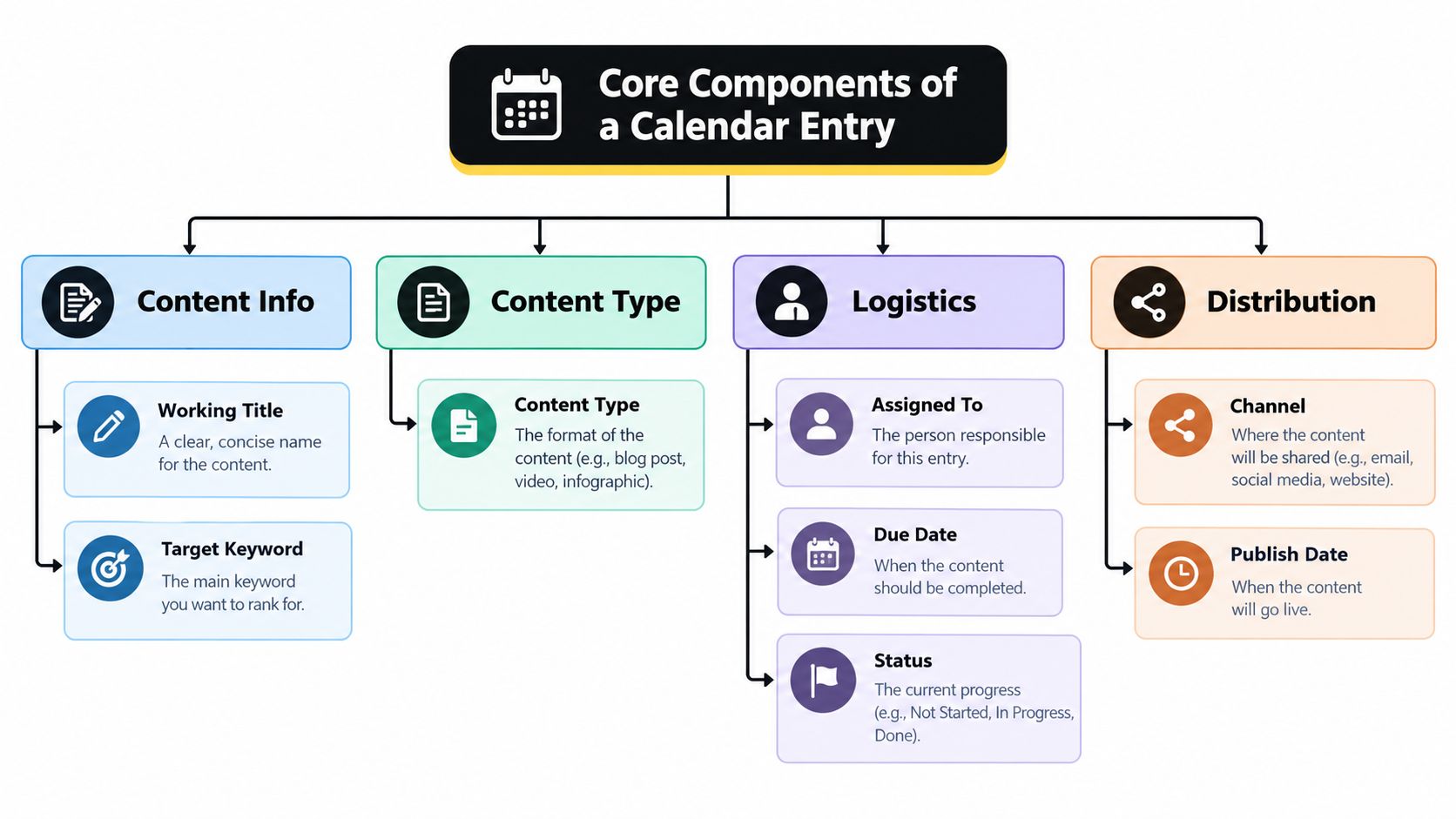
A usable entry should let a teammate understand the assignment without searching through several other systems. Guidance on editorial workflow fields recommends including the working title, target keyword, content type, channel, publish date, owner, editor or reviewer, status stage, and a link to the draft or published URL in each entry, as outlined in this editorial workflow guide.
The anatomy of one entry
Start with the content itself. The working title gives the team a shared reference, while the target keyword records the search intent or topic focus. The content type clarifies whether the item is a blog article, newsletter, video, social post, landing page, or another format.
Then add the logistics:
- Channel: Identify where the asset will appear, such as the company blog, email, LinkedIn, or another distribution channel.
- Publish date: Record when the finished item should go live, not merely when someone hopes to begin it.
- Owner: Name the person responsible for moving the item forward. “Marketing team” isn't an owner.
- Editor or reviewer: Identify who checks accuracy, clarity, brand fit, and any required search or legal considerations.
- Status stage: Use defined states such as draft, review, scheduled, and published.
- Draft or published URL: Give contributors one place to find the working document or final asset.
These fields create a controlled handoff chain. The writer knows what to produce, the reviewer knows when to act, and the publisher can confirm which version is approved. Status also gives managers a quick way to find stalled work without asking every contributor for an update.
Operational rule: Ownership tells you who is accountable. Status tells you what can happen next. Without both, a calendar is only a schedule with decoration.
Design the stages around real work
Avoid creating status labels that sound polished but don't guide action. “In progress” might cover research, drafting, editing, or design, which makes it difficult to identify a blocker. More useful stages mirror the team's actual handoffs and make dependencies visible.
A calendar should also connect related assets. If one article supports a newsletter and several social posts, those items need clear relationships, shared campaign tags, and separate owners where necessary. That structure lets the team coordinate a group of deliverables without pretending they're one task.
A spreadsheet can contain these fields, but the team must maintain them manually. A structured workflow tool can make status changes, reminders, assignments, and filtered views easier to manage. The format matters less than whether it reflects the work people do.
How Editorial Teams Move Content From Idea to Published
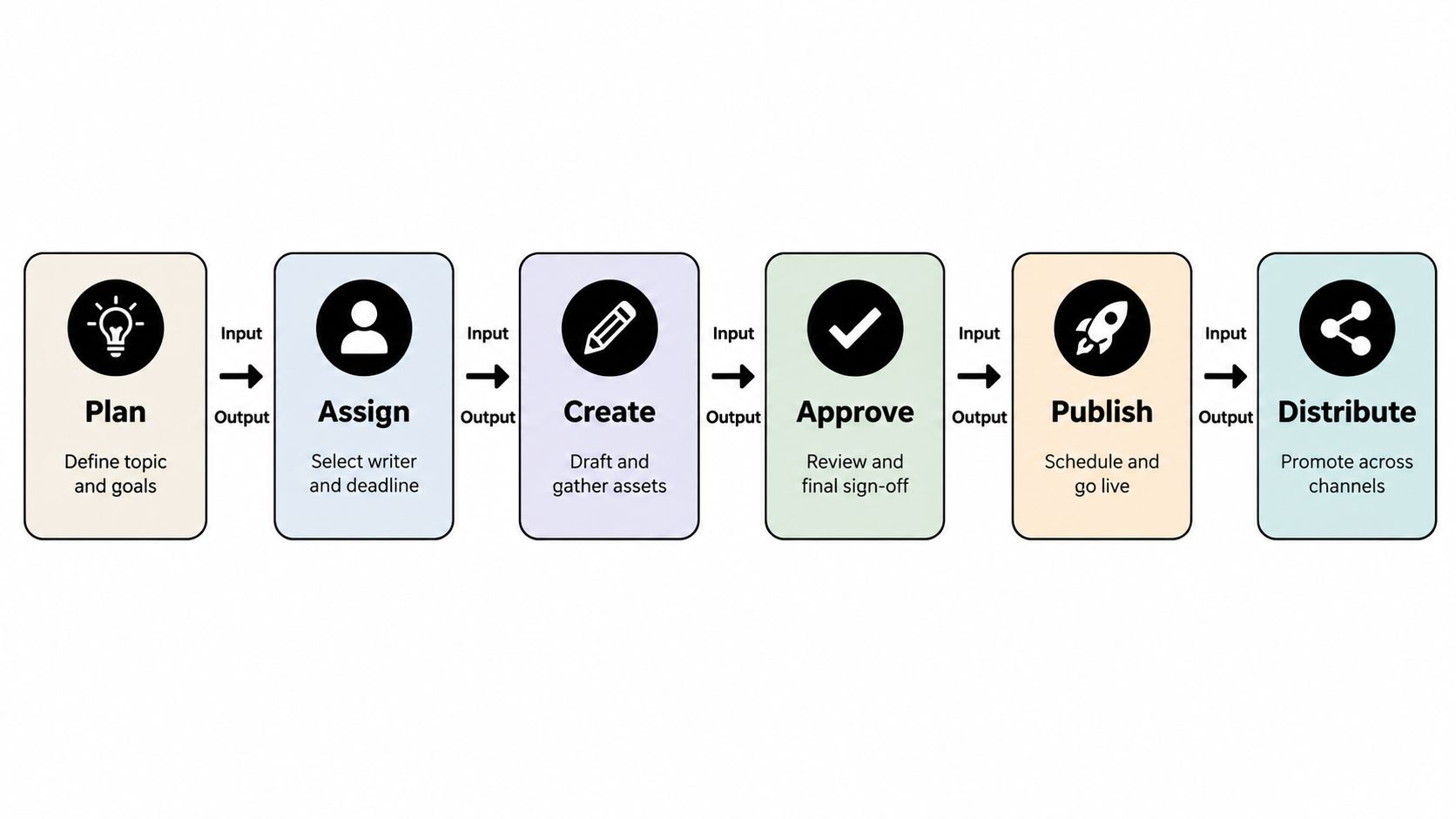
A calendar becomes useful when it shows movement, not just location. A practical workflow uses six distinct stages: plan, assign, create, approve, publish, and distribute. Each stage has an input and an output, so the team can see what must be complete before the next handoff, according to this six-stage editorial workflow.
Plan
Planning turns a loose idea into an intentional assignment. The team defines the topic, audience need, format, channel, and purpose. The output is a clear brief or calendar entry that another person can act on.
For example, “write something about search” isn't ready for production. A stronger plan identifies a specific reader problem, a working title, a target keyword, and the intended channel.
Assign
Assignment gives the work a person, a deadline, and any dependencies. The editor might assign the article to a writer, identify a designer for supporting assets, and name the reviewer who must approve the final draft.
This stage prevents a common failure: a team believes an idea is “on the calendar,” while nobody is responsible for making it.
Create
Creation produces the draft and supporting materials. The writer researches and drafts the article, the designer prepares an image if needed, and the team adds working links to the calendar entry. The output is a reviewable asset, not merely a task marked active.
Approve
Approval is a defined quality checkpoint. The reviewer checks the brief, accuracy, structure, search requirements, brand standards, and required assets. If changes are needed, the item returns to the creator with specific feedback rather than sitting in an ambiguous state.
Publish
Publication means the approved content is scheduled or released through the correct channel. The publisher verifies the final link, metadata, formatting, and timing before marking the item live.
Distribute
Distribution extends the work beyond the original publication event. The team prepares the newsletter mention, social adaptations, internal sharing, or other planned promotion, then records the final URLs and relevant observations.
The editorial workflow from idea to published without the chaos is easier to manage when each handoff has a visible owner and completion condition. If content stalls, the team can diagnose the stage instead of treating the whole project as mysteriously late.
Why Editorial Calendars Improve Consistency and Flexibility
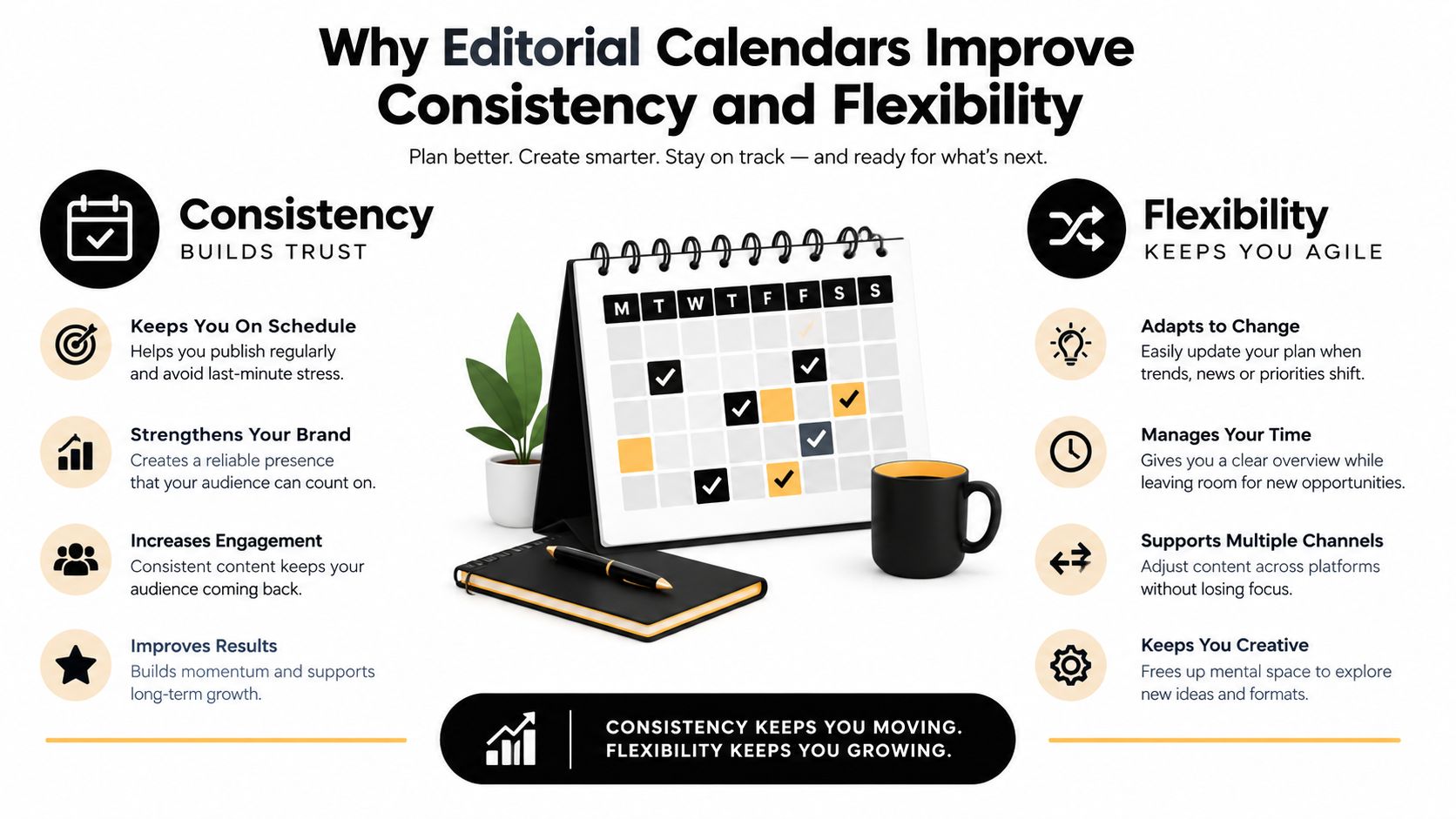
The calendar's most important job isn't making a team look organized. It allocates limited production capacity. Every planned item consumes writing time, editing attention, design support, approval time, and distribution effort. If the team fills every date before accounting for those resources, the calendar creates a promise nobody can keep.
A useful planning rule keeps approximately 75–80% of output preplanned and reserves 20–25% of capacity for reactive or timely content, according to this content calendar planning framework. The exact mix may vary by team, but the principle is stable: build a dependable base without eliminating room for news, customer questions, emerging trends, or performance-informed changes.
Use layered planning horizons
Long-range planning and short-range execution answer different questions. A practical framework uses:
- 90 days for strategy: Decide major themes, campaigns, priorities, and resource assumptions.
- 30 days for tactics: Turn those priorities into specific assignments, formats, channels, and dependencies.
- 7 days for execution: Confirm immediate tasks, reviews, assets, approvals, and publishing details.
The same framework recommends weekly planning as the operating rhythm, so the team regularly adjusts near-term work without abandoning the larger direction. A guide to setting a publishing cadence you can sustain is useful when the planned workload repeatedly exceeds available capacity.
This structure helps managers spot overcommitment early. If the next week contains more reviews than the editor can complete, the answer isn't to hope everyone works faster. The team can move a lower-priority item, simplify the format, reassign the review, or use the reserved reactive capacity differently.
A calendar also keeps channels synchronized. A campaign can show the core article, email announcement, social adaptations, sales enablement material, and approval dependencies in one view. That visibility supports consistency without forcing every channel to publish identical content or follow an inflexible pattern.
Real World Examples of Editorial Calendars in Action
A digital publisher might organize a monthly editorial theme across a blog, newsletter, and social channels. The blog entry contains the working title, keyword, writer, reviewer, and publication date. The newsletter entry links to the article but has its own owner and approval stage. Social entries adapt the idea for each channel, with deadlines that account for the article's final URL.
The calendar doesn't treat these assets as one oversized task. It shows their relationship while preserving separate ownership. If the article changes direction during review, the editor can identify which supporting assets need updates.
A marketing team uses the same principle for a campaign. One campaign record may connect a landing page, product announcement, customer email, sales presentation, and social posts. Each item has a channel, owner, status, and deadline, so the team can see whether the launch depends on an unfinished approval.
An agency faces another layer of complexity. The agency editor may manage the brief, the freelance writer may own the draft, a client stakeholder may approve claims, and a social specialist may distribute the final asset. A calendar prevents client approvals from disappearing inside email threads and gives the account lead a reliable view across projects.
| Team Type | Primary Goal | Calendar Emphasis |
|---|---|---|
| Digital publisher | Coordinate recurring editorial output | Topics, formats, channels, deadlines, and review stages |
| In-house marketing team | Align content with campaigns and business priorities | Campaign relationships, owners, approvals, and distribution |
| Content agency | Manage multiple clients and handoffs | Project separation, client review, status visibility, and due dates |
| Freelance writer and editor | Keep assignments and revisions clear | Briefs, draft links, feedback, ownership, and publication status |
The distinction between a true editorial calendar and a simple publishing schedule matters in each example. Current definitions commonly include topics, channels, owners, statuses, deadlines, and workflow stages, yet many explanations reduce the idea to a basic calendar view, as noted in this editorial calendar definition.
Spreadsheets begin to break down when several teams edit the same rows, dependencies live in comments, and status updates depend on memory. A simple sheet can still work for a small operation, but it should be judged by whether people can answer three questions quickly: what is happening, who owns it, and what is blocking publication?
Putting Your Editorial Calendar Into Practice
Start with the workflow your team already follows, then make it visible. Create fields for the working title, keyword or topic focus, content type, channel, publish date, owner, reviewer, status, and draft or published URL. Add campaign or topic tags only when they help people filter and make decisions.
Set capacity before filling dates. Reserve approximately 75–80% for planned work and 20–25% for reactive work, using the content planning guide for practical help with planning content for a month. Review the coming week regularly, while keeping the broader strategy and tactical plan in view.
Use a short operating checklist:
- Assign ownership: Every item has one accountable owner and a named reviewer.
- Define completion: Each status has a clear meaning and next handoff.
- Show dependencies: Related articles, emails, social posts, and approvals are connected.
- Review capacity: Remove or move work when the team can't support it.
- Capture learning: Add performance observations that can inform future planning.
Choose a format people will update. A spreadsheet may be enough for a small team with a simple workflow. A visual drag-and-drop calendar with workflow stages, reminders, comments, and ownership can reduce ad hoc coordination as the operation grows. The practical guidance on building an editorial calendar that actually gets used is a useful implementation reference.
Start with one channel or one recurring content program. Run the process, notice where work stalls, adjust the fields, and expand only when the team can maintain the system.
TheContentMap gives editors and content teams one place to capture ideas, schedule work, assign ownership, manage review stages, and connect planning with performance insights. Visit TheContentMap to replace scattered spreadsheets with a visual editorial workflow your team can use every week.
Related Articles
Marketing Campaign Workflow Teams Can Run in 2026
A campaign rarely fails because nobody had an idea. It fails because the idea sat in review, the lan...
SoftwareContent Marketing Workflow for Editorial Teams
83% of marketing leaders wanted to streamline workflows and reduce the number of technology solution...
SoftwareTagging Ideas for Editorial Teams: A Practical Guide
You're in a planning meeting, looking for ideas about pricing. One editor used pricing, another...
Comments (0)
No comments yet. Be the first to share your thoughts.