Writing Styles Guide: Complete Plan for Consistent Content
Learn how to create a writing styles guide that keeps your team consistent. Includes examples, sections, and practical steps for effective style documentation.
A writing style guide can unify a team's content, and research found that approximately 82% of surveyed participants agreed style guides unify a company's brand and writing. The most useful guides are living operating systems, with terminology, readability, AI, accessibility, SEO, and review rules that writers can apply every day.
Your team probably knows the problem. One writer calls the product a “platform,” another calls it a “solution,” and a third uses the official product name only once before switching to a synonym. Headlines follow different formats, tone changes from warm to corporate, and editors spend review time debating preferences instead of improving the message.
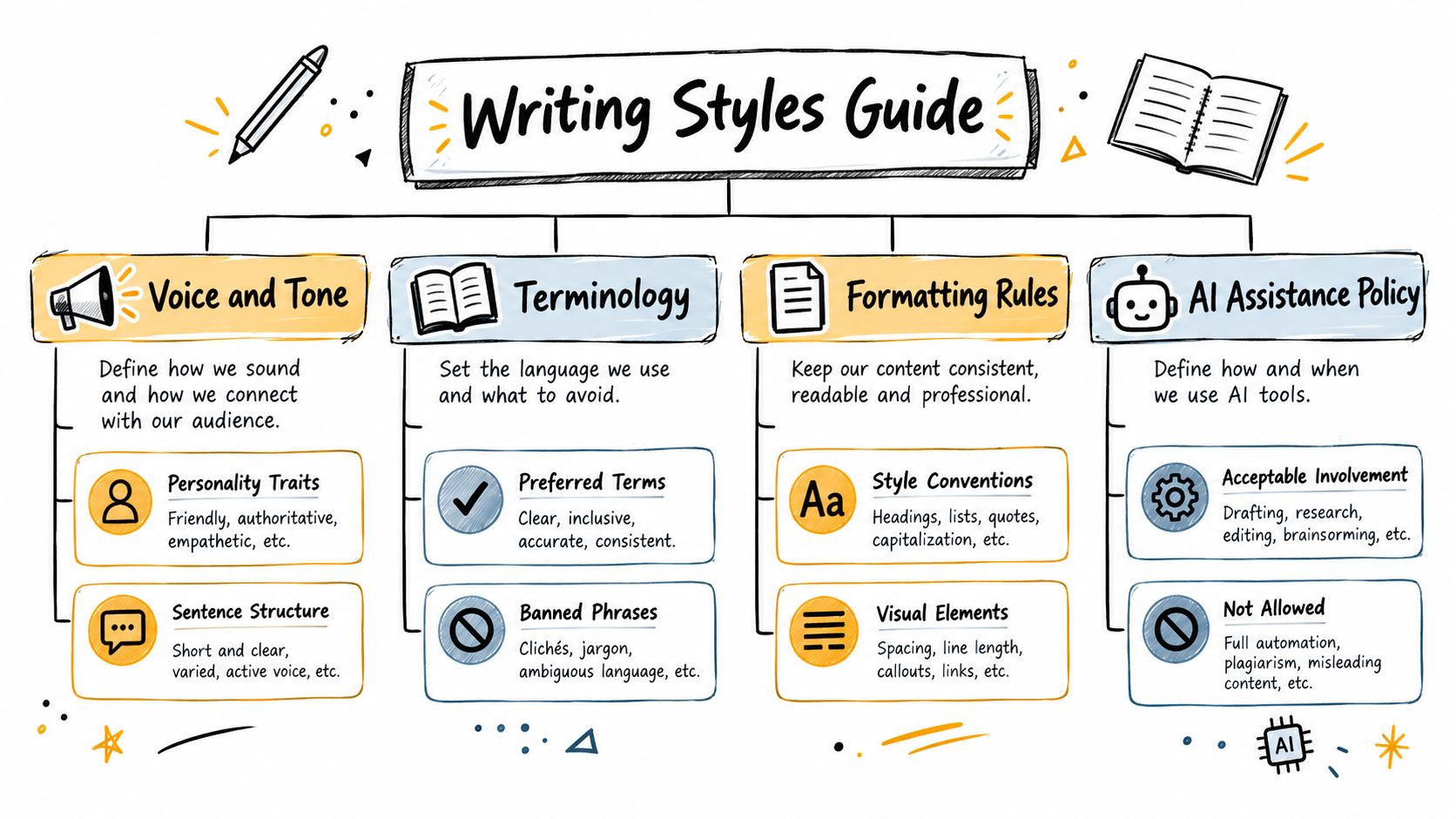
A writing style guide solves that problem by defining voice, grammar, terminology, formatting, accessibility, AI involvement, and SEO rules in one maintained standard. It isn't a dusty reference book that writers consult only after a disagreement. It's a coordination tool that helps people make consistent decisions before content reaches review.
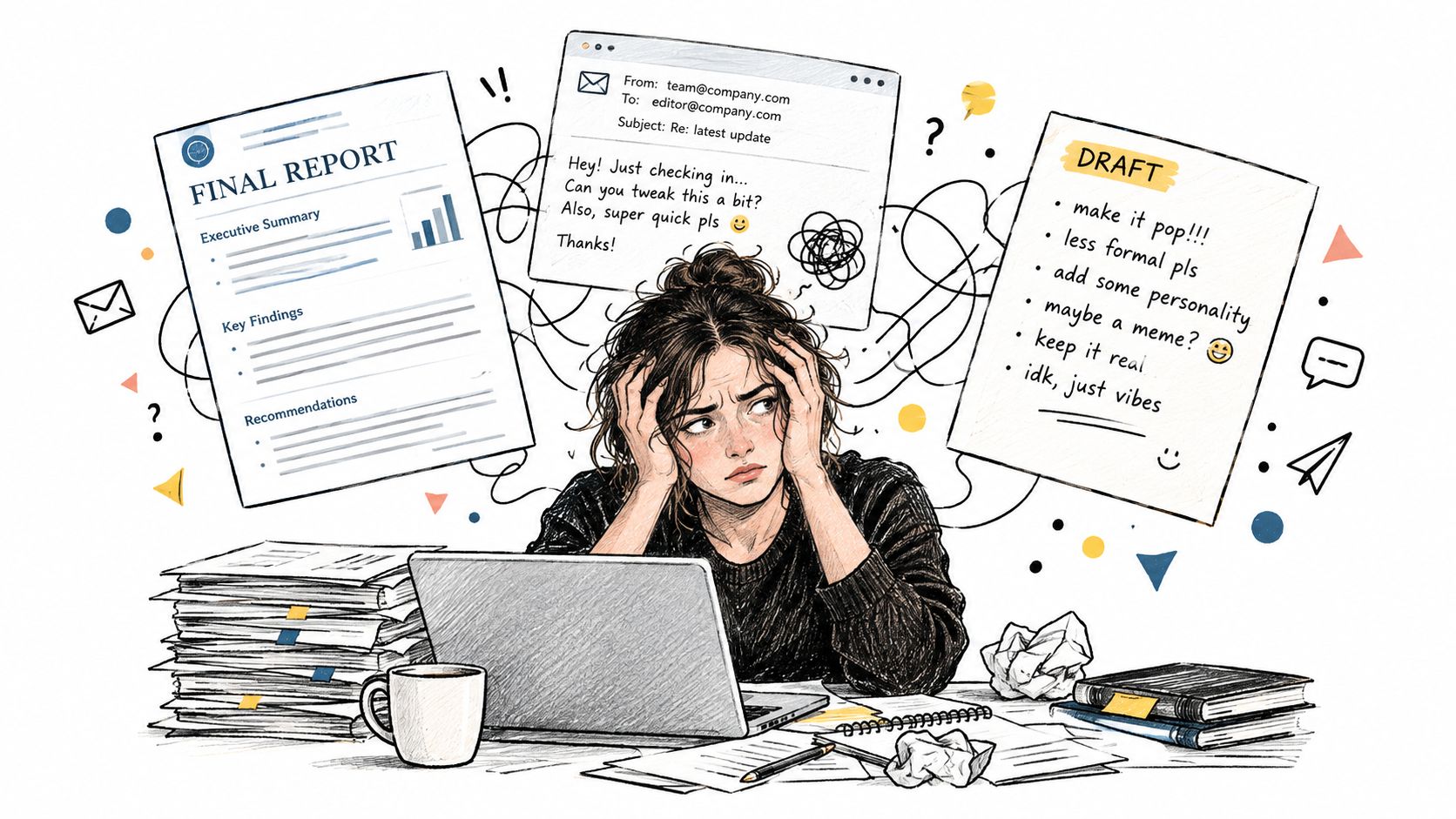
Table of Contents
- Why Teams Need a Writing Styles Guide
- The Evolution and Value of Modern Style Guides
- Building Core Sections of Your Style Guide
- Defining AI Assistance Rules in Your Style Guide
- Integrating Accessibility and Multilingual Standards
- Enforcing and Maintaining Your Style Guide
Why Teams Need a Writing Styles Guide
Suppose three writers are assigned articles for the same website. The first writes in a conversational tone and addresses the reader directly. The second uses formal, passive sentences. The third produces clear copy but changes the names of features throughout the article. Each draft may be acceptable on its own, yet the collection feels unreliable because readers encounter a different organization behind every page.
A writing style guide gives those writers a shared decision-making system. It can state that the brand uses direct language, short paragraphs, sentence case headings, a defined spelling convention, approved product names, and a particular approach to keyword placement. It can also explain when a rule has exceptions, who owns those exceptions, and where writers should ask for clarification.
That shared standard has practical value for any team whose content passes between people. A marketing department, agency, publisher, or distributed editorial group needs more than good individual writers. It needs predictable handoffs. The guide reduces the number of decisions each writer must make alone, which gives editors more time to assess accuracy, usefulness, structure, and audience fit.
Consistency is more than a visual preference
Inconsistent terminology creates semantic uncertainty. If “content calendar,” “editorial calendar,” and “publishing planner” all refer to the same object, a reader may wonder whether the terms describe different features. The same drift can make search filters, tags, analytics, and content reuse harder to manage. Microsoft's guidance on using technical terms carefully supports a one-term/one-concept approach, especially for technical communication.
A guide also protects the brand from personality shifts. Voice describes the stable character of the organization, while tone changes with the situation. A product page might sound confident and precise. A support article might sound calm and reassuring. Both can still use the same terminology and sentence conventions.
Practical rule: If a writer must ask the same style question twice, the answer probably belongs in the guide.
The guide becomes especially valuable when connected to content operations, because planning, production, review, and publication all depend on shared decisions. Treat the document as part of that workflow, not as a separate file hidden in a shared drive.
The Evolution and Value of Modern Style Guides
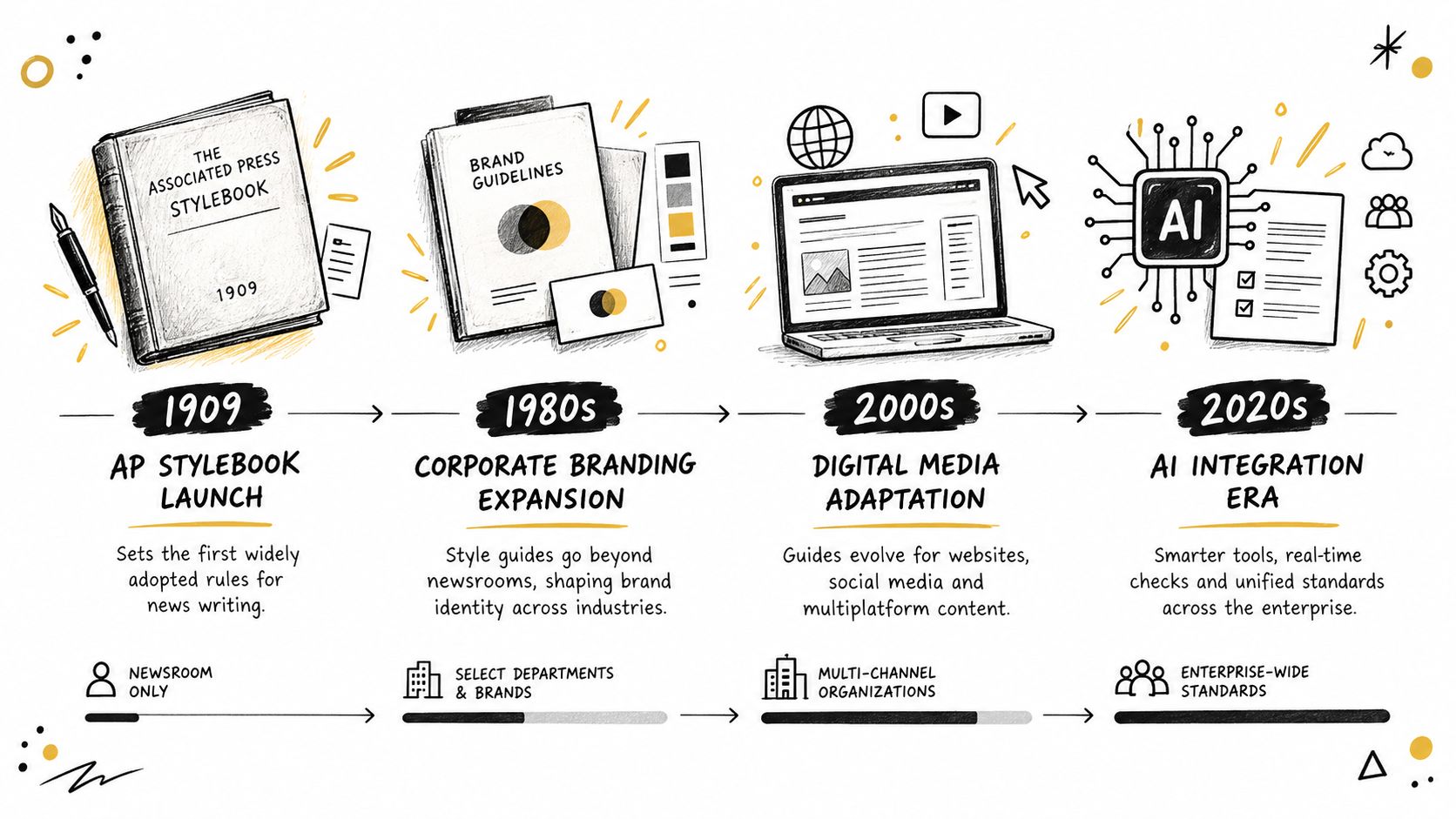
Style guides began as ways for organizations to make internal communication predictable. The Associated Press maintained internal style rules as early as the late 1870s and published its first organization-wide guide in 1909 under the title “The Associate Press Rules Regulations and General Orders.” Its first publicly available edition appeared in 1953, followed by the first modern edition in August 1977. The history is documented in the AP Stylebook overview.
The guide's reach expanded far beyond newsrooms. It was used across newspapers, broadcasting, magazines, marketing departments, and public-relations firms. More than 2 million copies were sold worldwide from 1977 through 2005, and cumulative sales reached approximately 2.5 million by 2011, according to the same historical reference. Those milestones show how an internal editorial practice became a shared professional standard.
Revision is part of the system
The AP Stylebook's revision schedule makes the operational lesson clear. The English edition was updated biennially from 1980 to 1984 and annually from 1985 through 2020. The 2020 edition was identified as the 55th edition, while the 2024–2026 edition was reported as the 57th edition in the historical record.
A guide needs that same willingness to change. Product names evolve, audiences ask new questions, platforms impose new formats, and language develops. A rule that once clarified communication can later create confusion or exclude readers if nobody reviews it.
Research summarized by Brigham Young University's Editing Research program reinforces the point. Approximately 82% of surveyed participants agreed that style guides effectively unify a company's brand and writing, while 91% of editors most frequently updated word-usage and terminology sections. Participants commonly recommended updates every 6 to 12 months. See the BYU summary of style guide research for the study context.
Terminology receives frequent attention because it sits where language meets operations. A changed feature name affects product pages, help content, campaign copy, metadata, internal search, and reporting. Before you compare top style guides, ask whether each option can support your organization's own vocabulary and review process. The strongest choice isn't the guide with the most grammar rules. It's the one your team can maintain and apply.
Building Core Sections of Your Style Guide
Start with the decisions that shape every draft. A useful guide doesn't need to answer every possible language question on its first release. It needs to make the recurring, high-impact decisions visible and easy to apply.
Define voice and tone with examples
Describe the organization as a set of observable writing behaviors. “Helpful” is too broad on its own. “Use direct sentences, explain unfamiliar terms on first use, and avoid exaggerated claims” gives a writer something to follow.
Then separate voice from tone. Voice might be clear, practical, and respectful. Tone can become encouraging in an onboarding email, precise in documentation, and empathetic in a complaint response. Include a short example of what fits and what doesn't:
- Preferred: “Choose a project, assign an owner, and set the review date.”
- Avoid: “Our new solution helps teams easily boost productivity.”
The second sentence isn't automatically ungrammatical. It makes a different promise and may not match the intended character.
Govern terminology deliberately
Create a controlled vocabulary rather than a loose list of favorite words. For each important term, record:
- Approved term: The exact label writers should use.
- Prohibited alternatives: Synonyms or former names that create confusion.
- Capitalization: The required treatment in headings and body copy.
- Definition: The meaning in your organization's context.
- Owner: The person responsible for future changes.
Apply the one-term/one-concept rule across products, websites, documentation, and marketing. If “review date” is the approved label, don't alternate with “approval deadline” unless the concepts genuinely differ. Attach these rules to topics and projects so writers encounter them where work happens, rather than discovering them during a final proofread.
Turn readability into production rules
“Write clearly” isn't a test. Set rules that editors can observe, while allowing exceptions for specialist audiences. Australian Education Research Organisation guidance favors a standard tone for most practitioner-facing material and connects readability with concise titles, plain language, and tools that flag passive language, excessive adverbs, and difficult sentences. University of Edinburgh web-writing guidance emphasizes one idea per paragraph, short sentences, summary-first organization, and scan-friendly structure.
For a public article, your checklist might ask whether the headline names the subject clearly, the opening gives the answer quickly, each paragraph has one focus, and specialist terms receive explanations. Technical documentation may permit more defined terminology, but it should still explain the reader's next action.
Add SEO and formatting rules
Specify how writers handle search intent, primary terms, headings, links, lists, images, and summaries. SEO guidance should support useful communication, not encourage awkward repetition. A good rule might require the main topic to appear naturally in the title, introduction, and relevant headings, while allowing the writer to use close variants when they improve clarity.
Store the rules beside assignments, briefs, and review checklists. A strong content brief template can capture the audience, intent, terminology, reading expectations, and required format before drafting begins.
A short instructional video can reinforce how writers should use a guide during planning and review:
Defining AI Assistance Rules in Your Style Guide
Many style guides treat AI as a question of productivity, originality, or disclosure. That framing is incomplete. The amount and purpose of machine involvement can change how readers interpret a message, particularly when the communication depends on trust.
A 2025 study of 1,100 professionals found that supervisors' messages were viewed as sincere by 83% of employees when AI use was low, but only 40–52% when AI assistance was high, as reported by the University of Florida's summary of the writing and AI study. Low-level assistance for grammar or editing was generally accepted. Heavy assistance harmed perceptions of trust and care, especially in praise, motivation, and personal feedback.
That doesn't mean teams should ban AI from every draft. It means “AI-assisted” is too broad a category for a useful policy.
Match machine involvement to message sensitivity
A customer announcement, manager's feedback, and sensitive apology shouldn't automatically receive the same editing standard. The first may permit research support, outlining, or language refinement. The second may require the manager to write the substance personally, using AI only for limited proofreading. The third may require a human author and a careful human review because the message's sincerity matters as much as its correctness.
A practical policy can classify drafts by context:
- Low sensitivity: AI may help with brainstorming, structure, grammar, or formatting.
- Moderate sensitivity: AI may suggest edits, but an accountable subject-matter expert must approve meaning and tone.
- High sensitivity: A human should write the core message, review every change, and decide whether disclosure is appropriate.
The right question isn't “Was AI used?” It's “What role did AI play, and could that role weaken the reader's trust?”
Record the permitted AI role, human-review requirement, audience sensitivity, and disclosure expectation in the workflow. This turns a general principle into a decision that editors and writers can apply consistently. It also gives reviewers a reason to challenge a draft beyond vague concerns that it “sounds artificial.”

Integrating Accessibility and Multilingual Standards
A short sentence isn't automatically accessible, and a strong readability score doesn't prove that a page works for every reader. English-focused measures can miss language declaration, translation quality, heading structure, idioms, screen-reader behavior, and cognitive load.
The 2025 Web Almanac reports that no standardized automated readability test covers all languages or cases. It also reports that only about 86% of websites used a valid language attribute, a figure largely unchanged from 2024, in its accessibility analysis. The language attribute helps screen readers select pronunciation rules and improves automatic translation, so it belongs in a writing and publishing standard, not only in a developer checklist.
Design for more than one reader profile
A multilingual accessibility policy should answer practical questions:
- Language declaration: How will the page language and changes within a page be marked?
- Translation safety: Which idioms, metaphors, jokes, and culture-bound references should writers avoid?
- Meaning preservation: Who checks that translated content preserves the intended action and level of certainty?
- Navigation: How will headings, lists, links, and summaries help readers scan with visual or assistive tools?
- Cognitive load: Which terms, sentence structures, and instructions need simplification or explanation?
Plain language remains essential, but it can't carry the whole responsibility. A page can use familiar words and still fail if its headings are unclear, its language is undeclared, or its translated instructions change the intended meaning.
WCAG 2.2 was approved as an ISO standard in 2025 and explicitly addresses cognitive, neurological, physical, speech, visual, and auditory disabilities, according to the Web Almanac discussion. A style guide should therefore connect editorial choices to accessibility checks at the draft stage. Ask writers to verify headings, language attributes, link meaning, idioms, and translation-sensitive phrases before publication.
Accessibility is not a final technical inspection. It begins when the writer chooses the words, structure, and audience assumptions.
Enforcing and Maintaining Your Style Guide
A guide becomes useful when writers encounter it during work. Start by converting major rules into fields, templates, and review prompts. A terminology rule can sit on a topic or project. An AI policy can appear on a sensitive communication brief. An accessibility check can become a required pre-publication item rather than a note that reviewers may remember later.
Build the guide into the workflow
Use the editorial workflow to make ownership visible:
- Plan: Record audience, purpose, channel, terminology, reading expectations, and sensitivity.
- Draft: Give the writer the relevant rules before writing begins.
- Review: Ask an editor to check meaning, structure, style, accessibility, and AI involvement.
- Approve: Assign a clear decision-maker for unresolved terminology or exception requests.
- Publish: Confirm formatting, links, language declarations, and required metadata.
- Learn: Track recurring corrections and content insights to identify rules that need clarification.
This approach works better than sending every contributor a long document and hoping they remember it. A content approval workflow can make each handoff explicit, so the guide supports action rather than adding another passive reference.
Assign owners and review dates
Every living guide needs an owner, but one person shouldn't make every decision in isolation. Editors can collect questions, subject-matter experts can validate terminology, accessibility specialists can review inclusive patterns, and brand or legal teams can approve sensitive exceptions.
Set a recurring review cycle of 6 to 12 months, the interval commonly recommended by participants in the BYU research summary. Use shorter reviews when a product, audience, channel, or AI policy changes quickly. Use the review meeting to inspect real drafts, not just the guide itself. If writers repeatedly misunderstand a rule, rewrite the rule or add an example.
A simple maintenance register can include:
| Review item | Evidence to inspect | Decision |
|---|---|---|
| Terminology | Repeated edits, new product names, search labels | Keep, revise, or retire a term |
| Readability | Difficult sentences and recurring rewrite requests | Clarify the rule or add an exception |
| Accessibility | Language declarations, headings, translations, assistive-technology feedback | Add a check or assign ownership |
| AI policy | Draft sensitivity and review notes | Change permitted involvement |
| SEO and formatting | Search intent, title patterns, page structure | Update the production standard |
Use signals from production
Content insights can show where the guide helps and where it creates friction. If editors repeatedly correct the same capitalization pattern, add the approved form to the terminology layer. If writers submit unclear briefs, require audience and intent fields earlier. If accessibility checks are always left until approval, move them into drafting and review.
Schedule maintenance beside the editorial calendar, assign the review task to a named owner, and use reminders to prevent the document from becoming outdated on its own. The best writing style guide is not the longest one. It's the one connected to planning, drafting, review, publication, and learning.
TheContentMap helps editorial teams centralize ideas, schedules, assignments, review steps, terminology context, and content insights in one planning environment. Visit TheContentMap to connect your writing style guide with the daily workflow that keeps standards current and content consistent.
Related Articles
10 Content Scheduling Apps for Editorial Teams
Your team's ideas live in a document, drafts sit in a shared drive, approvals happen in chat, an...
SoftwareHashtags in Twitter: A Complete Guide for Publishers in 2026
You're about to publish a thread about a new climate report. The copy is ready, the images are a...
Software10 B2B Marketing Examples Worth Studying in 2026
The best B2B marketing examples don't succeed because a single campaign idea happens to be cleve...
Comments (0)
No comments yet. Be the first to share your thoughts.