Content Creation Workflow for Editorial Teams
Build a repeatable content creation workflow from idea capture through review, approvals, publishing, and iteration for editorial teams.
The calendar says the article publishes tomorrow. The draft is sitting in separate comment threads, the subject-matter reviewer hasn't signed off, and the writer has already moved to another assignment. You can see the deadline in the spreadsheet, but you can't tell who needs to act next.
Table of Contents
- Why Editorial Teams Lose the Content Creation Workflow
- Design a Brief to Publication Pipeline
- Put Quality Gates Around AI Assisted Drafting
- Choose an Editorial Planning Tool That Fits
- Turn Published Results into the Next Plan
- Start Your Content Creation Workflow This Week
Why Editorial Teams Lose the Content Creation Workflow
A spreadsheet can show a healthy publishing schedule while the managing editor spends the afternoon chasing approvals. A stakeholder asks for a different angle in email. An editor corrects the introduction in the document. Someone else marks the calendar entry complete because the writing is finished.
Nobody has deliberately stopped the article. Nobody has explicitly accepted responsibility for moving it forward, either.
That's the distinction between an editorial calendar and a content creation workflow. The calendar records when something should appear. The workflow defines how an idea becomes an approved publication and how the team decides what to do after readers encounter it.
Faster writing doesn't resolve a stalled handoff
The production benchmarks make the temptation to focus on speed understandable. Average article creation time fell to just under 3.5 hours in 2025, from almost 4 hours in 2024, a saving of roughly 30 minutes, yet only 13.9% of surveyed content marketers reported strong blog results in 2026, according to the content marketing benchmarks collected by Oliver Munro.
Those figures shouldn't be read as evidence that faster writing causes weaker results. They highlight different questions: how quickly a team creates something, and whether publishing it achieves anything useful.
Research, outlining, editing, optimization, approval, publishing, and distribution still require attention from people with competing commitments. Saving drafting time doesn't help much if an article then waits in an unnamed review queue.
A finished draft isn't a finished assignment. Someone still has to decide whether it's ready for readers.
The work between the dates
This problem looks slightly different depending on who's managing the queue:
- Managing editors need to know whether a delayed article requires a decision, additional reporting, or a replacement slot.
- In-house content operations teams need stakeholder input without allowing every department to reopen the assignment.
- Digital publishers and agencies need to separate editorial readiness from client or commercial approval.
- Freelance writers need acceptance criteria and consolidated feedback, not conflicting instructions from several reviewers.
The operational mistake is treating these needs as personal coordination problems. A diligent editor can chase people for a while, but that doesn't create a dependable process.
A useful workflow covers idea capture, briefing, drafting, review, approval, publication, and iteration. It also makes exceptions visible, including a changed scope, missing evidence, or a reviewer who can't meet the deadline.
The objective isn't more volume. It's a repeatable learning system in which people know what they own, what qualifies as ready, and which published work deserves further investment.
Design a Brief to Publication Pipeline
A draft sits in a shared folder labeled "in review" for nine days. Nobody can tell whether it needs a copy edit, a subject-matter check, or a final signature, so nobody touches it. A status like "awaiting subject-matter approval" names the missing decision and the person who should make it. "In progress" names neither.
Workflow and approval problems affected 33% of respondents in a global survey of 1,186 B2B marketers, according to the Content Marketing Institute's B2B research. Approval capacity belongs in production planning. Teams that treat it as administrative cleanup inherit the delay after the deadline has already slipped.
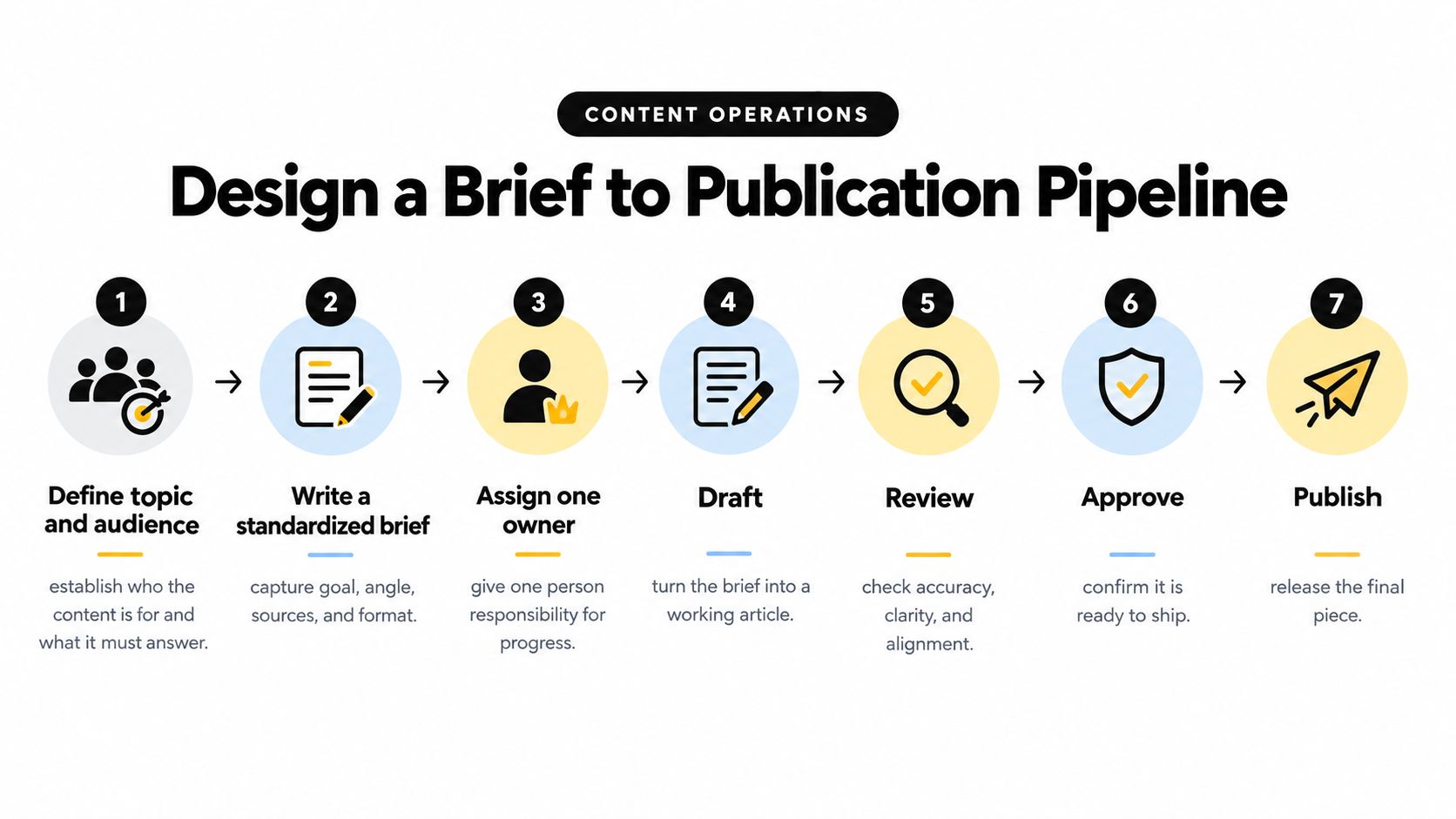
Treat the flow below as the operating model. Attach your team's readiness criteria to each transition.
Define what can move forward
A standardized brief specifies the audience, reader question, angle, business purpose, format, evidence requirements, internal links, and acceptance criteria. Use a content brief template that produces stronger first drafts rather than asking writers to interpret a topic title.
The statuses below make useful queue labels. The owner listed is accountable for the next decision, even when other people contribute to the work.
| Status | Decision owner | Definition of ready |
|---|---|---|
| Idea | Commissioning editor | Audience need and proposed angle are clear |
| Brief Approved | Managing editor | Scope, evidence, deliverable, and writer are agreed |
| Drafting | Writer | Complete draft meets the brief's acceptance criteria |
| Review | Assigned editor | Subject-matter, copy, factual, and SEO checks are resolved |
| Approved | Accountable approver | Final version has explicit sign-off |
| Scheduled | Publishing editor | Publication slot, metadata, assets, and distribution are prepared |
| Published | Content owner | Live page and distribution have been checked |
| Refresh Due | Assigned editor | Evidence supports updating, retiring, or retaining the piece |
Assign a maximum review window to every decision-bearing stage. Agree it with the reviewer before commissioning, record the expiry on the item, and name an escalation contact. Scheduling and publication checks run against the release deadline rather than an open-ended review period.
A missed window triggers escalation or rescheduling. It never counts as silent approval.
Control comments and scope
Keep review comments in the designated workspace. Require reviewers to mark blocking errors separately from preferences, so the editor can distinguish an unsupported claim from a stylistic suggestion.
Freeze the brief when drafting begins. A stakeholder can still request a change, but the editor documents the scope change and its effect on delivery before the writer proceeds.
For a video walkthrough of the pipeline, use the embedded resource below.
Track cycle time by stage, share of items returned for rework, on-time publication, and approval aging. Each measure answers a different question: where work waits, where requirements fail, and whether the schedule still holds.
The finished pipeline shows every handoff. If the next owner cannot tell why an item reached them, the handoff is incomplete.
Put Quality Gates Around AI Assisted Drafting
AI assistance changes how a draft is produced, not who accepts responsibility for it. A fluent paragraph still needs evidence, and a plausible quotation still needs an original recording, transcript, or approved written source.
A 2025 survey of 16,000 creators across the United States, United Kingdom, France, Germany, South Korea, Japan, India, and Australia found that 86% used generative AI. Unreliable output quality was a barrier for 34%, while uncertainty about model training affected 28%, according to the creator survey findings.
Adoption and trust are different issues. A workable editorial policy allows useful assistance while requiring evidence wherever an error could mislead readers or create a rights problem.
Match the check to the risk
Treat transcription, formatting, and brainstorming as lower-risk assistance, not risk-free work. A transcript can misidentify a speaker; a formatting change can alter a qualification. The editor should still check the result against its input.
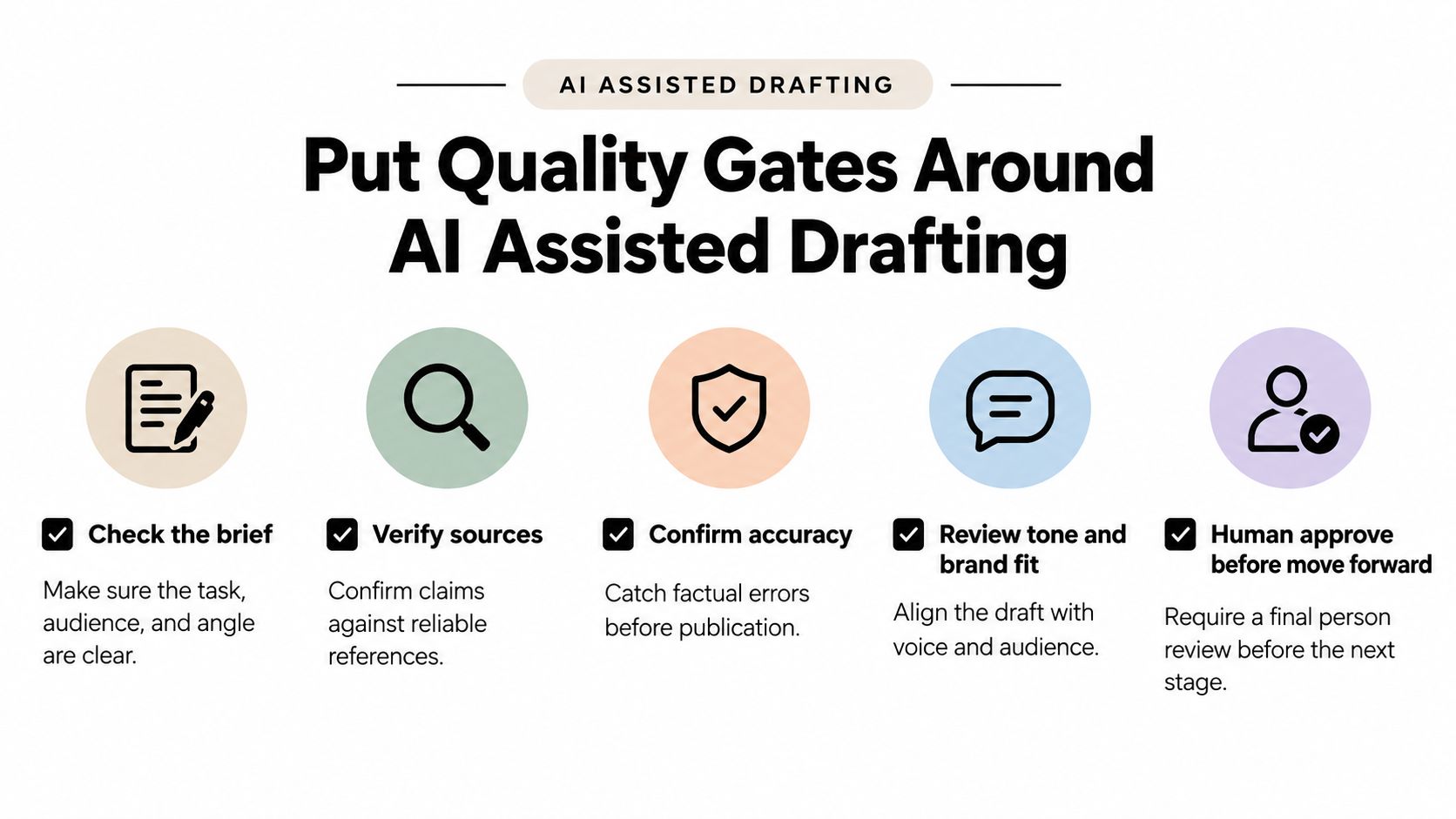
Use a review matrix to assign responsibility before the draft circulates.
| AI-assisted work | Named human reviewer | Required check |
|---|---|---|
| Brainstorming and formatting | Writer or copy editor | Relevance, meaning, and brief alignment |
| Transcription | Writer | Speaker attribution and wording against recording |
| Factual claims and quotations | Fact-checker or subject editor | Original evidence and accurate context |
| Imagery | Visual editor or rights owner | Provenance, permissions, and potential misrepresentation |
| Regulated subject matter | Qualified specialist | Applicable requirements and necessary qualifications |
For visual-content governance, AI Image Detector's QA process guide is an additional resource to consider when documenting checks. Keep responsibility with the named reviewer rather than treating any detection output as publication approval.
Use the checklist below as the mandatory gate between assisted drafting and release.
Keep a short, usable audit note
Distributed teams can miss errors when the writer assumes the editor verified a claim and the editor assumes the writer supplied checked research. Prevent that ambiguity with an explicit record.
- Writer records assistance: Note what AI helped produce and retain the relevant prompt or source material, subject to confidentiality rules.
- Source reviewer records verification: Attach supporting references and identify claims removed or corrected.
- Rights owner records clearance: Document image provenance, permissions, and unresolved restrictions.
- Final approver records release: Identify the approved version and any required disclosure.
The audit note can be brief: assistance used, inputs retained, material edits, checks completed, and final approver. It needs to make the chain of responsibility understandable without reconstructing a conversation.
Publication rule: An unresolved factual or rights question blocks release, even when the prose is polished.
Choose an Editorial Planning Tool That Fits
Choose the planning home by testing a live assignment, not by counting features. Can an editor find its status, owner, deadline, draft discussion, and eventual outcome without asking someone where the information lives?
A spreadsheet or document calendar stays workable when coordination is straightforward and someone maintains it carefully. A general-purpose project tool offers more configurable task management, but the team must translate editorial needs into its fields and conventions. That translation often holds for a quarter, then decays once the person who built the conventions changes roles.
An editorial planner earns its cost when upkeep becomes recurring maintenance. The buying question is whether the tool supports your operating model without requiring a separate system to explain it.
Editorial Planning Options at a Glance
| Need | Spreadsheet or docs | General project tool | TheContentMap |
|---|---|---|---|
| Visible idea status | Manual fields and filters | Configurable task statuses | Visual idea-to-publication pipeline |
| Clear responsibility | Owner column | Task assignees | Writer and editor assignments |
| Deadline reminders | Manual checks or added automation | Depends on configuration | Publish reminders |
| Draft discussion | Often split across documents | Task comments, with draft context linked | Comments for editorial collaboration |
| Channel and campaign organization | Custom columns | Tags or custom fields | Topics and tags |
| Learning from publication | Separate reporting process | Requires configured reporting or integrations | Insights into published topics and formats |
Treat the table as orientation rather than a verdict on every setup. A carefully maintained general tool can outperform a specialist planner nobody updates, and a planner that stops at the publish date leaves the learning loop in a separate spreadsheet anyway.
If you're still defining the calendar fields, AIDictation's content strategy calendar templates provide a resource for that planning exercise. For a broader evaluation, use these content planning tool considerations to keep the discussion tied to editorial requirements.
Check limits against the actual team
The editorial option in the table is a web app with drag-and-drop scheduling, an idea pipeline through drafting and review, assignments, comments, topics, tags, reminders, and publication insights. Evaluate those workflow features alongside the plan limits the vendor publishes. Confirm how many projects each tier allows, how pricing scales per editor, and which controls such as single sign-on sit behind higher plans, since packaging changes and the figures on the vendor's site are the ones that matter at budget time.
When a vendor lists customer names, treat them as a starting point for reference calls with teams your size rather than proof of results. A logo tells you the tool was purchased. It says nothing about whether the pipeline held up under deadline pressure.
Before choosing a plan, distinguish editors who manage production from contributors and stakeholders who only need visibility. Ask how those roles interact with licensing, permissions, and project boundaries, because seat definitions are where costs surprise teams after adoption.
Test rescheduling, reassignment, reviewer absence, and a returned draft during evaluation. A useful planning home surfaces those ordinary disruptions. A demo calendar where everything runs on time proves very little.
Turn Published Results into the Next Plan
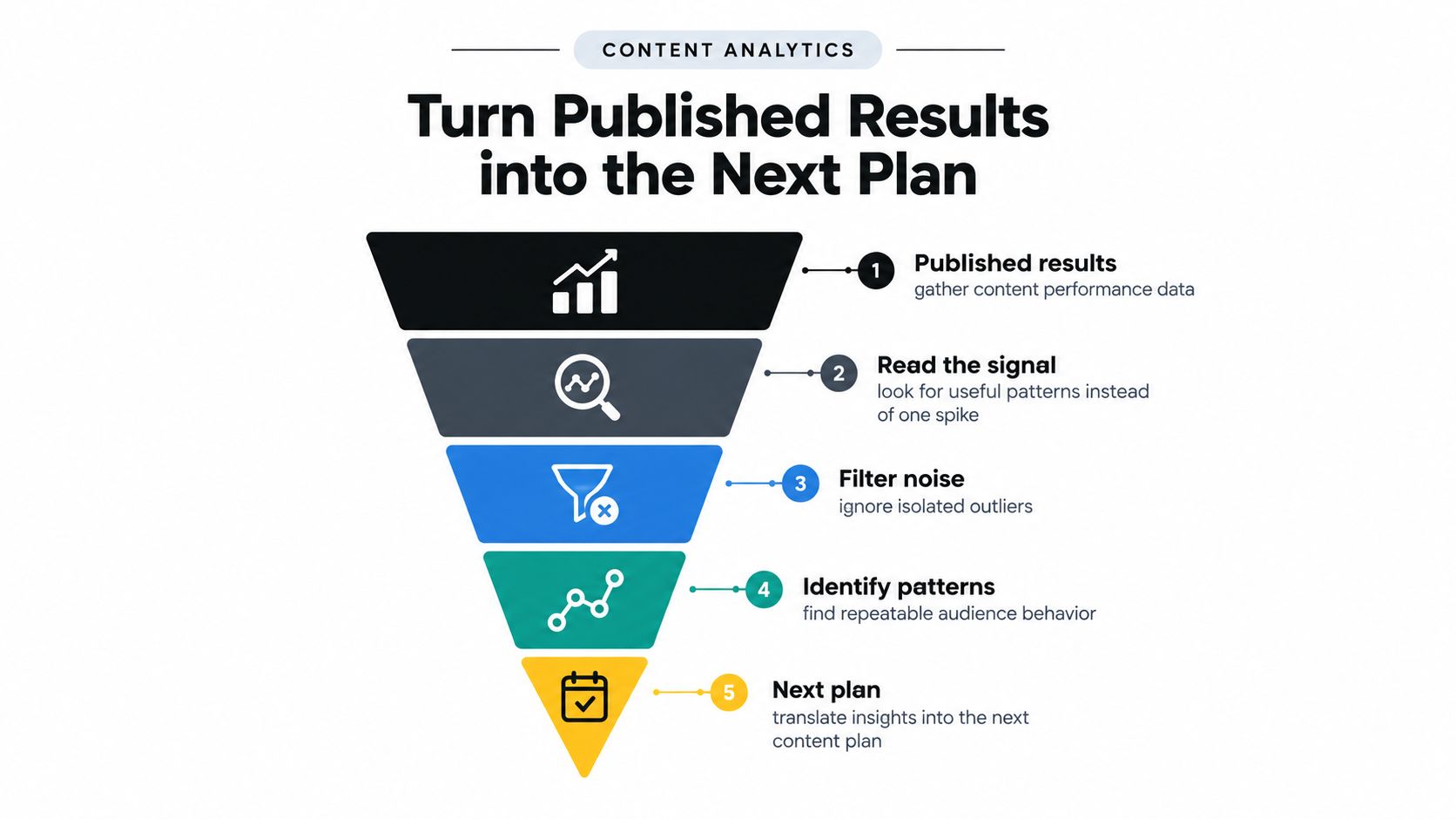
Publication ends one production cycle and starts the next planning decision. An editorial team that records results before agreeing on what they mean invites every reviewer to pick a different winner.
Give the same performance report to a strategist, an editor, and an account stakeholder and each will find a number that suits their argument. In a 2025 digital report, 40% of marketing teams identified measuring effectiveness or return on investment as their top challenge, while 25% reported using AI for audience segmentation and personalization, according to the digital report's measurement and adoption findings. A team that cannot agree on what worked will publish more instead of planning better.
Write the decision into the assignment
Attach a compact learning record to the content item while the approved brief is still open. By the time results arrive, the record should already say what evidence would justify investing further, changing the asset, or leaving it alone.
| Planning field | Illustrative entry |
|---|---|
| Audience | Editors comparing approval processes |
| Hypothesis | A practical review rubric will help readers evaluate their current process |
| Business outcome | Relevant subscriptions or product interest |
| Channel | Search-supported evergreen article |
| Owner | Assigned content strategist |
| Success metric | Qualified visits progressing to the intended action |
| Observation window | Agreed period suited to the channel |
| Decision rule | Expand, revise, or retain based on repeated evidence |
| Post-publication decision | Recorded action with supporting evidence |
Treat the table as a proposed planning record rather than a reported case study. Its value is commitment: the owner signs off on the interpretation standard before seeing the results, so the later review argues about evidence rather than definitions.
Separate early signals from outcomes
Leading signals, such as qualified reach, completion, or saves, tell you whether the asset earned attention. Lagging outcomes, such as leads, subscriptions, or revenue, tell you whether attention converted. Match the measure to the assignment using the content performance metrics that fit the asset, and resist holding every item to the same bar.
Search, social, email, and evergreen pieces also age on different clocks. Judge each against work with similar audience intent and distribution conditions, and record the important differences before drawing conclusions.
Schedule a recurring learning review with the owner in the chair. A monthly session works for slower channels; a campaign-close review works for launches. Either way, the owner answers four questions in writing:
- What changed: the topic, format, distribution, or presentation difference.
- What supports the interpretation: patterns across the full window rather than an isolated spike.
- What transfers: whether the lesson applies elsewhere or stays specific to this assignment.
- What happens next: a refresh, follow-up, distribution change, further test, or no change.
An inconclusive result is a legitimate answer. Shipping more assets under inconsistent definitions produces a larger pile of results the team interprets in incompatible ways.
Start Your Content Creation Workflow This Week
Start with the assignments already stuck between draft and decision. A governed brief-to-publication system earns its keep when it shows which pieces can ship, which need evidence, and which are waiting on a named approver.
Reported benchmarks put a manual article workflow from topic selection through publication at 8–12 hours, compared with 3 hours 48 minutes for writing alone, while only 43% of digital content teams have standardized, automated, consistently efficient workflows, according to the content workflow benchmark report. Those measures are different, and together they make the practical point clearly: drafting can get faster while approvals, verification, and scheduling still hold the queue.
Move the current queue before adding volume
Place every live item in one stage: Idea, Brief Approved, Drafting, Review, Approved, Scheduled, Published, or Refresh Due. Assign one owner and one due date, then write down the single decision blocking the next move. If an AI assisted draft is in review, mark the claims that still need a human source check and name the reviewer who can clear them.
Keep usable drafts moving. Close duplicate feedback threads, move actionable comments into the workspace, get an explicit commitment from anyone holding a decision, and attach reminders to the person responsible rather than the editor watching the calendar. Choose the planning home and put the current queue there; if the editorial option described earlier fits, use its free Starter allowance, create the needed projects, and move active assignments onto the calendar.
Standardize the pieces people keep rebuilding
Build one reusable set: brief template, research checklist, metadata fields, review rubric, channel specifications, and a short post-publication report. Start from materials the team already trusts, then cut fields that do not change a decision. A research-heavy article needs stronger evidence and review than a routine distribution update, so scale the gate to the risk.
Standardize recurring decisions. Leave room for editorial judgment about the work itself.
For the next cycle, record median end-to-end cycle time, touch time versus waiting time, revision rounds, and on-time publication. Treat the first pass as a baseline. Bring the queue to the next meeting, resolve the oldest blocked decision, and leave with a visible answer to what is ready, what is waiting, and who agreed to move it.
TheContentMap combines an editorial calendar, assignments, reminders, and publication insights to support this kind of governed workflow. The free starting option is a reasonable way to move an active queue into a shared workspace before adding new volume.
Related Articles
10 Best Content Planning Tools for Editorial Teams
Stop shopping for the tool with the most features. That popular advice pushes editorial teams toward...
SoftwareContent Plan Format That Actually Works for Editorial Teams
You open the shared spreadsheet before the editorial meeting. A draft is overdue, a reviewer hasn...
Software10 Team Collaboration and Productivity Software Picks
The popular advice says consolidate everything into the biggest platform you can afford. For editori...
Comments (0)
No comments yet. Be the first to share your thoughts.