Content Calendar Planning: A Step-by-Step Guide for 2026
Learn content calendar planning from goals and planning horizons to owners, approvals, AI-era review and monthly rituals, with a practical build sequence.
Your calendar looks full, but next week's article is still waiting for product approval. A writer has started a guide that overlaps an existing page, and nobody has booked time to check whether last month's content helped the business.
The fix isn't another publishing slot. Effective content calendar planning means scheduling the decisions, checks, and waiting time that determine whether useful content gets published.
Table of Contents
- Set Goals and Planning Horizons First
- Choosing Cadence and Content Mix
- Calendar Fields and the Validation Gate
- How to Build the Calendar in Seven Steps
- Owners, Approval Stages and Escalation Rules
- Scheduling AI-Assisted Content With Human Control
- Recurring Rituals and Measurement Reviews
- Run Your First Planning Cycle This Month
Set Goals and Planning Horizons First
Start with the business decision, not the empty calendar. Decide which audience you need to help, what action you want them to take, and how you'll judge progress.
For example, a logistics software team might aim to increase qualified demo requests from operations managers, using demo-form submissions and sales qualification feedback as evidence. That's more useful than a goal to publish more articles because the editor can reject topics that won't support the intended outcome.
Documentation helps, but it isn't proof of a sound strategy. In the Content Marketing Institute and MarketingProfs 2025 B2B benchmark, based on research reported in October 2024, only 29% of marketers whose organizations had a content strategy described it as extremely or very effective, according to the Content Marketing Institute benchmark page.
Separate direction from commitments
Use different planning horizons for different decisions. You can commit to a quarterly theme without pretending you already know every weekly task.
Planning horizons and what each one decides
| Horizon | What you decide | Output |
|---|---|---|
| Quarterly | Themes, content clusters, major assets, business priorities, team capacity | Quarter theme plan and capacity budget |
| Monthly | Approved topics or target URLs, briefs, owners, dependencies, publish dates | Approved monthly schedule |
| Weekly | Production tasks, reviews, QA, distribution, blockers | Weekly task list and blocker log |
Keep the quarterly plan broad enough to accommodate new customer questions. Make the monthly schedule selective, and make the weekly task list explicit enough that contributors know what to do next.
If those strategic choices are still unresolved, use a content strategy planning process before assigning publication dates. For LinkedIn distribution, RedactAI's guidance can help you choose pillars for your LinkedIn calendar so channel topics support the same business priorities.
Starting point: Write a goal sentence that names the business objective, target audience, and measure before approving topics.
Choosing Cadence and Content Mix
Your sustainable cadence is limited by the scarcest production stage. A team with available writers but an overloaded editor doesn't have spare publishing capacity.
Build the production budget from actual availability. Remove holidays, meetings, existing commitments, review work, and contingency time before estimating how much content the team can finish.
Use time records from completed work rather than treating every article as equivalent. An update that needs new screenshots and product verification can take longer than a fresh opinion piece.
Budget by work type
Give each format its own estimate and place in the mix:
- New cluster pages: Fill an established audience or topic gap rather than expanding the site indiscriminately.
- Comparison and how-to guides: Address a concrete buying question or task, with room for expert input.
- Existing-page updates: Protect useful pages whose examples, claims, or recommendations need attention.
- Distribution assets: Adapt published work for newsletters, LinkedIn, or sales conversations.
Don't distribute effort evenly just because the categories look tidy. A mature library may need more maintenance; a new product category may need foundational explanations before comparisons make sense.
Record the intended mix in the quarterly plan, then check monthly commitments against it. Otherwise, urgent requests can consume the capacity you meant to reserve for strategically important work.
Leave some production time uncommitted. A buffer is usable capacity for late corrections and urgent changes, not an invitation to add another article.
For the operating details, use this guide to setting a publishing cadence you can sustain. Increase output only when the entire workflow can absorb it without accumulating unfinished reviews.
Calendar Fields and the Validation Gate
Each calendar row should represent a content job, not merely a publication date. The row needs enough information for someone outside the planning meeting to understand the assignment.
Calendar row fields and the question each answers
| Field | Question it answers | Example entry |
|---|---|---|
| Audience | Who is this for? | Operations managers at mid-size logistics firms |
| Search intent | What does the reader want to do? | Compare editorial planning tools |
| Page type | What format is it? | Comparison guide |
| Unique angle | What do we add that others do not? | Annotated workflow template |
| Owner | Who is accountable for delivery? | Senior writer |
| Approval status | Where is it in review? | Editor review |
| Dependencies | What must finish first? | Product data sheet due before draft |
| Internal links | Which existing pages connect? | Relevant cluster pages |
| Target URL | Is this a new page or an update? | Existing URL to refresh |
| Publication state | Is it drafted, scheduled or live? | Scheduled after final QA |
| Distribution plan | Where is it promoted? | Newsletter and LinkedIn post |
| Review trigger | When is it revisited? | Product change or sustained traffic decline |
| Results | What did it achieve? | Qualified engagement and sales feedback logged |
Require evidence before commitment
The Dmarketer Tayeeb content calendar planning system places strategic fit, search intent, page type, duplication risk, source availability, original contribution, target URL, and internal-link opportunities before the committed schedule. That's a useful operating rule: an interesting idea isn't automatically a schedulable assignment.
Require the editor to confirm audience fit and demand or business evidence. Then check whether the proposed format matches the reader's task and whether the team can support its claims.
Say someone requests a new how-to guide about editorial handoffs. The site already has a cluster page serving that intent, but its examples are outdated.
The right assignment is an update to the existing URL, not a competing slug. Make that decision before briefing the writer.
A provisional idea can stay incomplete. A scheduled assignment needs a resolved intent, destination URL, and reason to exist.
Keep validation evidence in the item's brief or linked record. Don't rely on a status label alone, and don't assume a workflow tool will enforce checks your team hasn't defined.
How to Build the Calendar in Seven Steps
Build the working calendar in this sequence. Keep unapproved candidates separate from committed work so stakeholders can distinguish possibilities from promises.
Use this flow as a setup checklist.
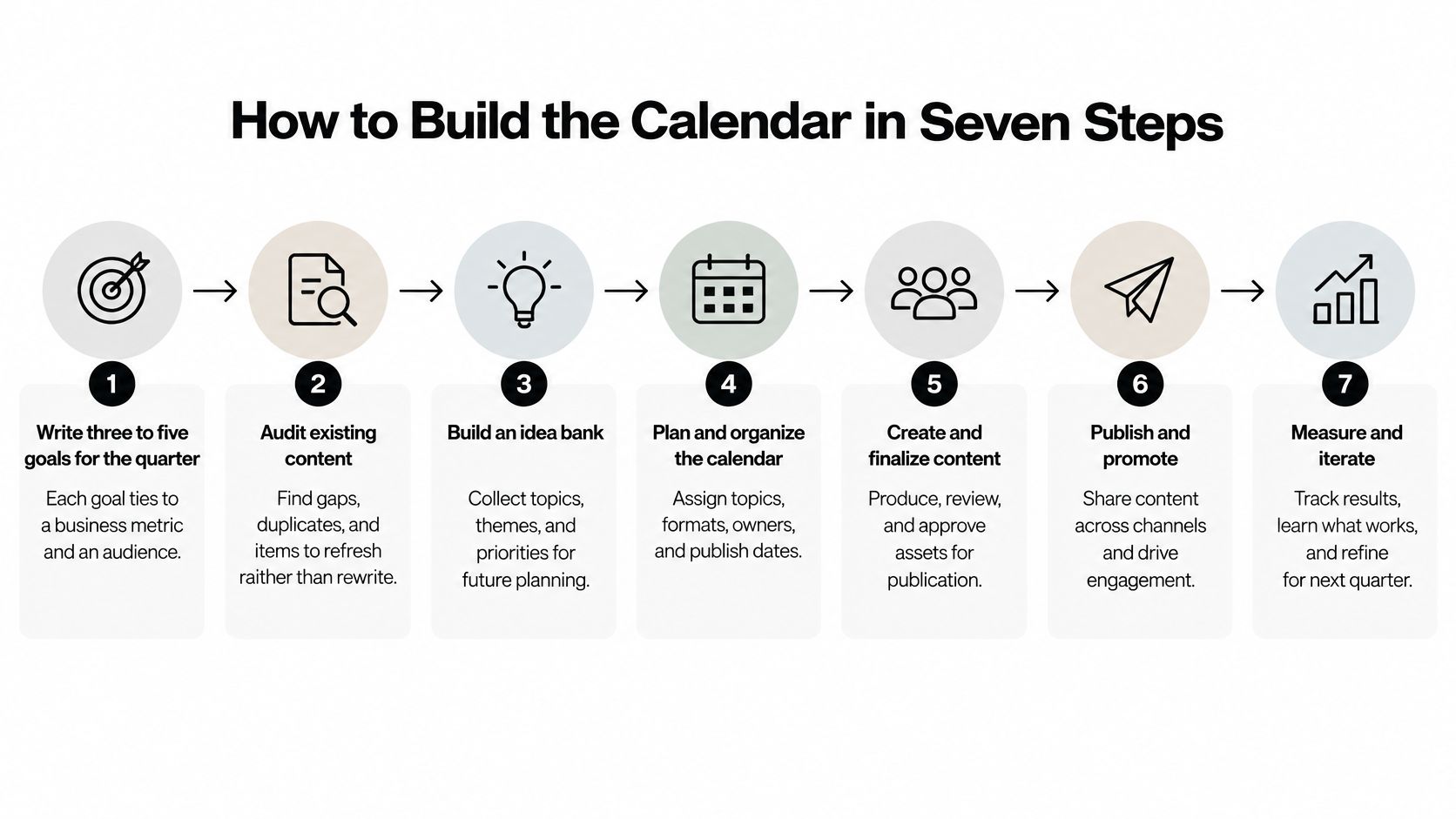
Establish the planning inputs
Write the quarterly goals. Tie each goal to an audience and a business measure, then name the person responsible for interpreting progress. The common mistake is choosing a production target without deciding what the output should accomplish.
Audit existing content. Review relevant URLs for gaps, duplication, outdated information, and opportunities to consolidate. Skipping this step sends writers back into subjects the library already covers while neglected pages continue to deteriorate.
Build the idea pipeline. Capture topic proposals with their rationale, supporting evidence, and likely destination, then move candidates through validation. Don't let a large backlog become an implied commitment, and archive ideas that no longer fit the strategy.
Assign delivery and review responsibility. Give every approved item an accountable owner and named reviewers with distinct responsibilities. Assigning a department rather than a person leaves the editor chasing whoever happens to respond.
Turn approved work into a schedule
Place approved items on the monthly calendar. Work backward from publication to brief approval, drafting, asset creation, and distribution preparation, while preserving contingency capacity. The usual failure is filling every available slot, leaving no room for a delayed dependency or substantial correction.
Book approval windows and reminders. Confirm reviewer availability before treating the publication date as firm, and record what happens when a response is late. An invitation to review isn't a commitment until the reviewer understands the scope and deadline.
Publish and create the follow-up task. Record the live URL, verify the page after publication, and book a measurement check suited to the content's purpose. Don't close the assignment while distribution, tracking checks, or the learning decision are still unowned.
Bruce and Eddy's editorial calendar templates and workflows offer another useful way to compare planning layouts. Choose a template for how your team works, not for how polished the monthly grid looks.
Keep detailed briefs in linked documents rather than expanding the calendar into an unreadable database. The shared view should make ownership, status, deadlines, and blockers easy to inspect.
Run monthly scheduling alongside weekly production checks and a post-publication review queue. That rhythm keeps planned work moving without requiring the managing editor to reconstruct progress from messages.
Owners, Approval Stages and Escalation Rules
A reported manual workflow benchmark summarized by BlogSync's content approval process guide measured an approximately 4.7-day median cycle, with approximately 3.7 days attributed to status-chasing, stakeholder waiting, and rerouting. That's a workflow-specific benchmark, not a deadline to impose on every team, but it shows why writing speed alone is an incomplete measure.
Treat approval as scheduled work with an accountable person, an agreed response window, and a fallback. The windows below are operating rules to negotiate with reviewers, not universal benchmarks.
Approval stages with owners, windows and escalation triggers
| Stage | Accountable person | Typical window | Escalation trigger |
|---|---|---|---|
| Brief approval | Managing editor | Before drafting begins | No decision by the agreed deadline prompts a reminder |
| Draft submission | Writer | Before dependent reviews start | Forecast delay goes to the editor immediately |
| Subject-matter review | Named expert | Reserved review slot | Missed response deadline goes to the editor |
| Editorial review | Editor | Agreed editorial window | Repeated unresolved revisions trigger a planning check |
| Fact and link check | Editor or researcher | Before final QA | Unverified claims hold publication |
| Final QA | Content operations | Before scheduling is locked | Failed QA returns the item for correction |
| Scheduled publication | Publisher | Agreed publish time | Missing live confirmation alerts the managing editor |
| Post-publication measurement | Content analyst | Booked measurement review | Missing review moves the item to the monthly agenda |
Separate consultation from approval
Name an accountable final approver for each item. Subject-matter experts can correct technical claims without gaining an open-ended veto over voice, structure, and publication timing.
Define what each review is allowed to change. A brief review should settle audience and scope; editorial review should resolve structure and language; final QA should verify the approved page rather than reopen the premise.
Cap review rounds through an agreed rule. If contributors still disagree after the normal revision process, the managing editor should resolve the conflict or reconsider the assignment instead of circulating another draft.
Escalation rule: A late approval requires a decision, not another silent date change.
Record blocked time separately from active work. Tracking only the writer's due date hides stakeholder latency and encourages managers to solve the wrong problem by asking writers to draft faster.
Scheduling AI-Assisted Content With Human Control
An AI-assisted draft can reach the review queue in hours; checking its evidence and securing approval may take days. Schedule that work in the calendar. Otherwise, added output can create a review backlog and push publish dates past the intended window.
Keep evidence checks and editorial decisions visible alongside creative planning.

Many organizations are still preparing to optimize content for AI-powered discovery tools. That preparation should include factual reliability and useful answers, not just formatting changes.
Make human sign-off a release condition
Use clear statuses for idea, evidence gathering, human review, AI-search optimization, publication, and revalidation. An AI-assisted draft passes human review only after an accountable editor checks its factual claims and records the supporting sources.
- Evidence collection: Schedule source gathering before drafting claims that depend on product documentation or expert knowledge.
- Editorial contribution: Require useful analysis, examples, or original evidence rather than a paraphrase of existing pages.
- Answer adaptation: Address conversational questions clearly while retaining necessary qualifications.
- Revalidation: Book checks when product details or underlying evidence may change.
A product comparison, for example, needs recurring checks of pricing and feature claims against current source documents. Remove unsupported claims. If the central comparison cannot be verified, hold the item rather than publish around the gaps.
Build time for these checks and approvals into the calendar, with a named owner and a release condition for each gate. Use the video below as a discussion prompt when defining the team's planning process.
Recurring Rituals and Measurement Reviews
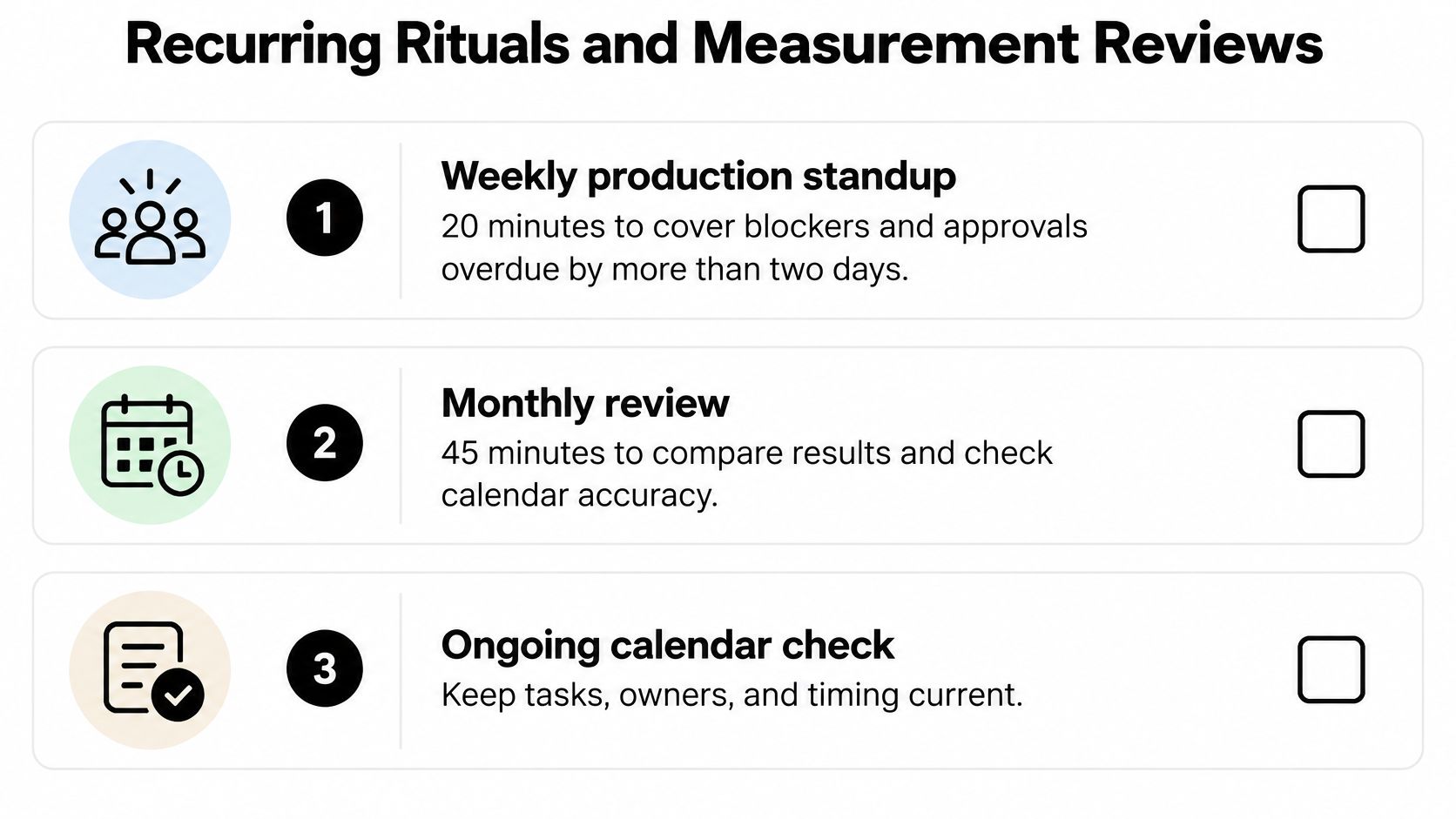
Keep the calendar current through recurring decisions, not occasional cleanup sessions. Each meeting should end with updated owners, dates, or dispositions recorded in the working system.
- Weekly production standup: Resolve blockers, check overdue approvals, and confirm the next handoffs.
- Monthly schedule review: Compare planned with published output, examine stalled items, and adjust commitments.
- Quarterly portfolio review: Decide which clusters deserve expansion, improvement, consolidation, retirement, or repurposing.
Keep the recurring checklist visible to everyone responsible for maintaining the schedule.
Decide what evidence will change the plan
In the Content Marketing Institute's 2025 B2B research, 56% of marketers struggle to attribute ROI to content, and 44% cannot tie performance to business goals. Don't turn an imperfect attribution model into a promise of precise asset-level ROI.
Give each item a hypothesis, a primary leading signal, a secondary business indicator, an update window, and a decision rule. Qualified engagement can inform an early improvement decision; sales outcomes need a longer assessment window and broader context.
Use this guide to measuring content performance with meaningful metrics to distinguish evidence of audience usefulness from evidence of business contribution.
For a page with engaged readers but weak progression to a relevant next step, inspect the offer and call to action. If neither audience usefulness nor strategic value emerges after the agreed review windows, consider merging or retiring it.
Evaluate clusters and programs alongside individual pages. Include sales feedback, median cycle time, stage wait time, on-time publication, review rounds, and returns for missing requirements so the next plan reflects both audience results and operational constraints.
Run Your First Planning Cycle This Month
Start with an active quarterly theme rather than migrating the entire content library. Build the next monthly schedule from work the team can validate, resource, and review.
Use a short launch checklist:
- Confirm the goal owners: Make someone responsible for judging progress, not just delivering assets.
- Validate a manageable batch: Resolve each candidate's purpose and destination before committing it.
- Reserve review capacity: Get approvers to accept their windows and preserve contingency time.
- Book the learning review: Compare commitments with publication and decide what should change.
A shared spreadsheet can support this process while the workflow is small. For teams that need connected scheduling and assignments, TheContentMap is another option: its drag-and-drop editorial calendar, idea pipeline, owner assignments, and publish reminders keep the working schedule together rather than scattered across files.
Don't choose software to avoid making editorial decisions. First establish who can approve work, what qualifies for scheduling, and how the team will handle a missed dependency.
Begin with a narrowly scoped project and expand only when the process works reliably. The immediate aim isn't a packed calendar; it's a schedule your team can trust.
TheContentMap offers a shared editorial calendar, idea pipeline, assignments, and performance insights for managing content from proposal through publication. Visit TheContentMap to organize your next planning cycle and keep delivery work connected to the decisions that follow publication.
Related Articles
Content Collaboration Tools for Editors: 10 Compared
Your shared spreadsheet says the article is ready. The draft still contains unresolved comments, the...
SoftwareBrand Awareness Measurement: Surveys, Metrics and Results
Aided recognition can look impressive while spontaneous recall barely moves. In research analyzing b...
SoftwareProject Management Checklist for Editorial Teams: 10 Steps
The feature is due Friday. The writer never saw the approved angle, the legal reviewer is out, and t...
Comments (0)
No comments yet. Be the first to share your thoughts.